
Quick buying check: price, speed, and real use
Do not choose a VPN only because the discount looks big. First decide whether you need it for travel Wi-Fi, streaming, privacy, downloads, many devices, or a backup connection.
On the English homepage, the first screen should help you choose by job, not by a generic ranking.
Always check the final checkout page. Price can change by region, tax, currency, and billing term.
VPN decision guide
Quick buyer check
Start here: choose a VPN by use case, not by ranking alone
Most VPN buyers are not looking for a perfect brand; they are trying to solve one job. Travel Wi-Fi, streaming, public networks, torrenting, China access, and device setup all require slightly different priorities. Use the table below as the fast route before opening individual reviews.
| Priority | Pick | Best for |
|---|---|---|
| Yearly value | StrongVPN | Better first comparison when price matters |
| Premium app and streaming | ExpressVPN | Best fit when support and app polish matter |
| Test before paying long term | FlowVPN | Useful for checking your local network first |
Pick by use case first: travel Wi-Fi, streaming, Android, or China backup
Do not start with the biggest discount. First decide what you actually need: safe public Wi-Fi while travelling, stable streaming, a simple Android app, or a backup route when a normal connection fails.
| Use case | First VPN to compare | Why it matters |
|---|---|---|
| Travel / hotel Wi-Fi | ExpressVPN or StrongVPN | Look for fast recovery, trusted apps, and public Wi-Fi protection. |
| Try before paying | FlowVPN | Useful if you want a short test path before choosing a long plan. |
| Streaming and sports | ExpressVPN / Surfshark | Prioritize speed consistency, device support, and region switching. |
| Everyday value | StrongVPN | A simple one-year plan is easier to judge than a confusing two-year deal. |
Prices and checkout offers can change by country. Use this page to decide the plan logic before leaving Wallzhihu.
Where the big VPN sites are winning
Four VPN buying moments to check before you leave this page
The strongest VPN comparison pages now separate travel, Android, streaming/sports and price risk. Use the quick grid below before clicking a deal.
| Buying moment | Why it matters | First VPN to compare |
|---|---|---|
| Travel / public Wi-Fi | Use this when you rely on hotel, airport, cafe or stadium networks. | ExpressVPN for premium travel, StrongVPN for simple yearly value. |
| Android phone | Avoid random Play Store VPN apps. Check refund, kill switch, speed and battery impact. | Surfshark for many devices, ExpressVPN for simple setup. |
| World Cup / streaming | Live sports needs stable speed and quick region switching, not only a cheap price. | ExpressVPN first, Surfshark if many screens matter. |
| Price and trial | The lowest monthly headline can hide long plans or renewal risk. | StrongVPN for one-year clarity, FlowVPN if you want to test first. |
Wallzhihu's edge is simple: decision first, speed snapshot second, checkout link last.
Wallzhihu VPN Knowledge Hub
Use this hub as a practical map: learn the basics, compare real-world VPN use cases, check privacy risks, then choose a service that fits your device, streaming needs, travel plans, or backup connection.
Strong for travel, streaming, and users who prefer a familiar international brand.
ExpressVPNStart here
Privacy and risk
Devices and streaming
Best VPN for China
Check what still works in China: connection recovery, one-year price value, free trial testing, and backup routes.
VPN buying notes – updated August 14, 2026
This month, compare VPNs by the jobs people actually buy them for: streaming, travel Wi-Fi, privacy, account security, speed, device limits, and price clarity.
Practical reading: StrongVPN is usually the clearest one-year value; ExpressVPN is the premium app and recovery option; Surfshark fits a longer plan and many devices; FlowVPN is the short-trial option for checking your own connection.
August 14, 2026 connection notes
- If a node slows down, switch protocol, city, or backup entry before judging the entire VPN unusable.
- Use official download and payment paths whenever possible; avoid unknown installers and shared accounts.
- Keep one primary VPN and one backup option if you rely on AI tools, search, streaming, or international payments.
Price decision: match the VPN to the plan length
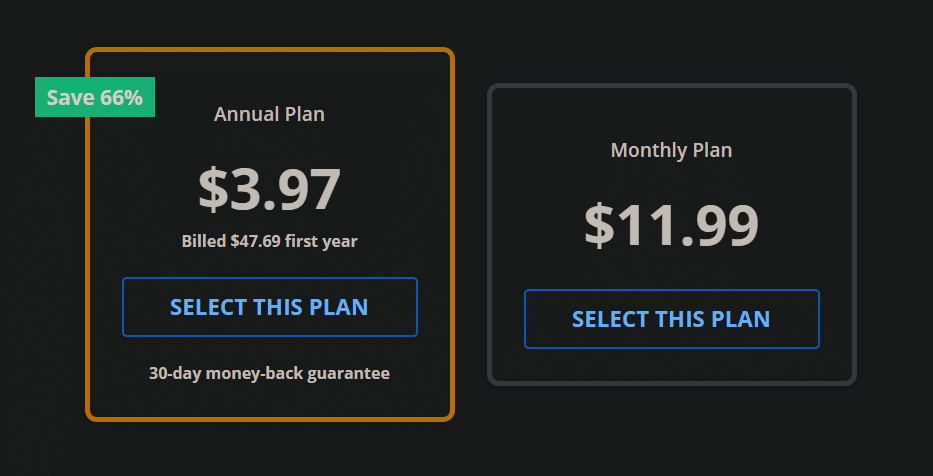
If you only want a one-year plan, StrongVPN is usually the clearest value: about USD $3.97/mo, billed about USD $47.69 for the first year. ExpressVPN is the premium app and recovery choice; Surfshark fits a two-year commitment and many devices; FlowVPN offers a short trial for connection checks, subject to the checkout terms.
- StrongVPN: best one-year value, about USD $3.97/mo; first-year total about USD $47.69.
- ExpressVPN: about USD $6.67/mo; premium price, strongest brand and streaming/travel fit.
- Surfshark: about USD $2.30/mo, but the value usually depends on a two-year plan.
- FlowVPN: about USD $1.88/mo; use the short trial to test your connection and confirm the terms at checkout.
Final checkout price can change with tax, exchange rate, billing term, and current promotion.
VPN price vs subscription months
Use this chart with the price note above: one-year value points to StrongVPN, premium apps and recovery to ExpressVPN, long-term multi-device value to Surfshark, and trial-first testing to FlowVPN.
- One-year plan: StrongVPN is the clearest value path.
- Two-year plan: Surfshark usually becomes attractive only when you commit longer.
- Premium path: ExpressVPN costs more, but is strongest for brand, travel, and streaming polish.
- Test first: FlowVPN offers a short trial; confirm the current terms at checkout.
What to check before buying a VPN this month
Do not compare VPNs only by the headline discount. The better order is: can it handle your main use case, is the speed consistent, does the plan length make sense, and is the refund or trial path clear.
For most readers, that means checking price, speed, streaming fit, travel Wi-Fi protection, number of devices, and whether there is a simple backup option.
- Speed snapshot shown below
- USD plus local-currency price note
- One-year vs two-year plan logic
- Trial, refund, and device-limit check
Choose by the total charged today, contract length, device fit, and how easily the connection recovers when a server fails.
StrongVPN: our first value pick for a straightforward annual plan 
ExpressVPN: the premium choice for polished apps and recovery 
Surfshark: strongest value when a long plan and many devices fit 
FlowVPN: a short trial path for checking your own connection

VPN speed snapshot – updated August 14, 2026
Monthly VPN comparison
| VPN | Trial/refund | Payment | Devices | Best for |
|---|---|---|---|---|
| StrongVPN | 30-day refund | Card / PayPal | 5 | StrongVPN: our first value pick for a straightforward annual plan |
| ExpressVPN | 30-day refund | Card / PayPal | 8 | ExpressVPN: the premium choice for polished apps and recovery |
| Surfshark | 30-day refund | Card / PayPal | Unlimited | Surfshark: strongest value when a long plan and many devices fit |
| FlowVPN | Short trial | Card (confirm at checkout) | Unlimited | FlowVPN: a short trial path for checking your own connection |
Results vary by location and route. If a line slows down, change protocol or node before switching services.
Current Landscape & What This Guide Is About
Using a VPN has become essential this year—not just for privacy, but for streaming, gaming, security, and accessing the internet without restrictions. Whether you’re working remotely, trying to watch shows from another country, banking online while traveling, or simply protecting your personal data on public Wi-Fi, a reliable VPN can make a huge difference in your digital life.
Over the past few years, VPN technology has improved dramatically. Speeds are faster, apps are easier to use, and more providers now support WireGuard, SmartDNS, and advanced security features.
But with this growth, we’ve also seen a wave of low-quality VPNs that throttle your speeds, leak your IP, or simply don’t unblock anything.
That’s exactly why we put together this 2026 VPN Buyer’s Guide — a fully tested roundup that includes:
- Real-world speed tests
- Free trials or money-back guarantees
- Streaming & gaming performance
- Latest deals and discounts
- Security and privacy evaluations
After running dozens of tests across multiple regions, we selected five VPN services that consistently deliver great performance, strong unblocking capabilities, and excellent value for the price.
| VPN Service | Free Trial / Money-Back | Streaming & Gaming | Device Support | Refund Policy | Approx. Price |
|---|---|---|---|---|---|
| StrongVPN | 1-day free trial | Great for U.S. streaming & gaming | 5 simultaneous devices | 30-day guarantee | $4.50/mo |
| ExpressVPN | 30-day money-back | The most consistent for Netflix, Hulu, BBC iPlayer | 5 devices | 30-day guarantee | $6.67/mo |
| Surfshark | 30-day money-back | Best price-to-performance ratio | Unlimited devices | 30-day guarantee | $2.30/mo |
| FlowVPN | Short trial (confirm terms at checkout) | Good long-distance speeds | Unlimited devices | 30-day guarantee | $1.88/mo |
2026 World Cup VPN Watch Guide: Streaming, Travel Wi-Fi, and Backup Access
The 2026 World Cup is not just another streaming event. It is a 48-team tournament hosted across the United States, Canada, and Mexico, with fans traveling between cities, logging in from hotels, airports, stadium areas, and public Wi-Fi networks. That makes VPN choice more practical than usual: you want speed for live matches, security for travel logins, and a backup path before a knockout match starts.

ExpressVPN has announced a FIFA World Cup 2026™ Official Supporter campaign and a ticket giveaway for subscribers. Use the official activity page for rules, eligibility, and timing.
StrongVPN remains the safer long-term pick if you want a simple yearly plan, stable apps, and a primary connection for work, streaming, and travel.
Install and test before match day. Live sports are unforgiving: a backup VPN matters more than an extra feature you never use.
| World Cup scenario | What to prepare | Recommended path |
|---|---|---|
| Watching from home | Fast nearby server, streaming account, backup protocol | ExpressVPN for premium streaming speed; StrongVPN as a steady long-term option |
| Traveling during matches | Phone + laptop apps, hotel Wi-Fi protection, ticket/email account security | Set up both a primary VPN and a backup before leaving |
| Knockout rounds and finals | No last-minute downloads; confirm login, payment, and device limits | Use the fastest tested route and keep a second provider ready |
This is also why the regular VPN comparison below still matters. A sports campaign can create urgency, but the real decision is whether the VPN works on your devices, keeps speed stable during prime time, and gives you a clean recovery path if one route slows down.
Disclosure: Wallzhihu is not FIFA, ExpressVPN, or StrongVPN. FIFA World Cup 2026™ marks belong to their respective owners. Giveaway rules and eligibility should be checked on the official ExpressVPN activity page.
Which VPN Should You Choose? A Practical Use-Case Guide
Most VPN rankings give every reader the same answer. That is not how people actually buy a VPN. Someone traveling through China, someone trying to watch live sports, someone testing a free trial, and someone avoiding cracked VPN apps all need a different decision path. Use this map before you jump into the full recommendations.
| What you need | What matters most | Best next step |
|---|---|---|
| China access or restrictive networks | Setup before arrival, backup provider, multiple protocols, official download links | Use StrongVPN as the primary yearly option |
| Streaming, travel, and live sports | Device polish, speed consistency, live-chat support, hotel/airport Wi-Fi safety | Check ExpressVPN for premium use |
| Many devices or family sharing | Unlimited devices, long-term pricing, simple apps | Compare Surfshark through the official deal path |
| Testing before committing | Short trial path, easy payment, fast cancellation, low friction | Try FlowVPN first |
Free VPN vs free trial: the safer way to test
For difficult networks, a “free VPN” is often not the same thing as a safe test. Free services may be overloaded, slow, limited by location, or unclear about privacy. A legitimate trial or money-back window is usually safer because you can test speed, login, streaming, and support without installing unknown software.
Travel setup checklist before you need the VPN
- Install the VPN on phone and laptop before you travel.
- Save official download pages and backup login methods.
- Test at least two protocols and two server locations.
- Confirm your streaming, email, bank, and ticket accounts still work while the VPN is on.
- Keep one backup provider if access matters for work, payments, AI tools, or live sports.
World Cup and live sports: why timing changes the decision
Live sports are less forgiving than normal browsing. If a VPN route fails five minutes before kickoff, a cheaper long-term plan may not help unless you already tested it. For the 2026 World Cup window, ExpressVPN has a dedicated campaign and ticket-giveaway angle, while StrongVPN remains a practical primary VPN for everyday use and travel backup.
China VPN Questions We Would Answer Differently
A lot of VPN advice on the English web is written for normal streaming, not for people who actually need access from China or while traveling through restrictive networks. The questions below are the ones where a simple “top VPN list” is not enough.
Is there a truly free VPN for China?
Free VPNs are tempting, but China is one of the hardest environments for a free service to survive. The usual problems are overloaded servers, blocked protocols, weak support, privacy trade-offs, or apps that disappear when you need them most. A better approach is to use a legitimate trial, a short paid test, or a money-back window.
FlowVPN is useful if you want a short trial path before paying for a long plan.
StrongVPN is the cleaner long-term choice if you want one stable subscription for daily use.
ExpressVPN is expensive, but it is often the smoother option for streaming and travel devices.
What about Twitter/X in China?
If your goal is Twitter/X access, the biggest mistake is waiting until you arrive to install everything. Prepare the VPN app, login credentials, backup email, payment method, and at least two protocols before the trip. If one server becomes slow, switch route first; do not immediately assume the whole provider is dead.
WgetCloud, Nexitally, Blessing VPN, OverWall: VPN or proxy?
Names like WgetCloud, Nexitally, Blessing VPN, and OverWall often appear in community discussions because they can feel faster or more flexible than mainstream VPN apps. The trade-off is that setup, payment, device support, account recovery, and long-term reliability may be less predictable. If you use an airport/proxy-style service, still keep a mainstream VPN as your recovery path.
Avoid cracked VPN apps and “premium unlocked” installers
Cracked Surfshark, “premium unlocked” VPN apps, and random APK installers are not shortcuts. They can leak traffic, steal accounts, inject ads, or simply stop working when you need them. If cost is the issue, use official discounts, short trials, or a monthly plan instead of trusting a modified installer.
| Need | Safer answer |
|---|---|
| Long-term primary VPN | Use StrongVPN as the steady yearly option. |
| Premium travel/streaming | Check ExpressVPN if speed and device polish matter more than price. |
| Many devices | Consider Surfshark through the official deal path, not cracked installers. |
| Lowest-friction test | Try FlowVPN before committing to a long plan. |
Why We Review VPNs (And How Our Testing Works)
Most VPN review sites are packed with pop-ups, fake “top 10” lists, and paid placements that have nothing to do with real testing. That’s not what we do here.
Our goal is simple: give you transparent, data-driven recommendations you can trust.
We don’t collect your email to spam you with offers, and we don’t promote VPNs we haven’t personally tested. Every provider featured on this site has gone through hands-on evaluation, including:
- Speed tests across multiple regions
- Streaming and gaming performance
- Security audits and leak checks
- Long-term stability testing
- Real-world use on mobile and desktop
If a VPN fails to deliver—whether it’s slow, unreliable, or doesn’t unblock content—we remove it from our recommendations immediately. If it performs well, we keep it on our list and continue to monitor updates and new features throughout the year.
At the end of the day, our mission is to help you browse freely, securely, and without unnecessary restrictions—so you can access the content you love with confidence and peace of mind.
Special Deals and Trial Details for 2026
Take advantage of these exclusive links to get the best prices currently available:
Best VPN Recommendations for 2026 – Real Tests & Key Features
After testing dozens of VPN services across speed, stability, security, and overall user experience, we selected the providers that deliver the best balance of performance and reliability. Our rankings are based on real-world speed tests, long-term use, and hands-on evaluations.
A good VPN should offer the following essential features:
- ✔ Strong encryption: AES-256 encryption to keep your data secure and protected from hacking, tracking, or identity theft.
- ✔ Multi-device connections Use one subscription across multiple devices—phones, laptops, tablets, and even smart TVs.
- ✔ Strict no-logs policy: Your browsing history, DNS queries, and IP address should never be recorded or stored.
- ✔ Worldwide server coverage: A global network ensures fast nearby connections and access to international content.
- ✔ Ad-blocking & malware protection: Built-in tools to block intrusive ads, trackers, and malicious sites.
- ✔ Unlimited bandwidth: Stream, browse, or download without any data caps or speed limits.
- ✔ Cross-platform support: Apps for Windows, macOS, iOS, Android, Linux, and more.
- ✔ P2P-friendly servers: Safe, encrypted connections ideal for secure file sharing.
- ✔ High speed & low latency: Smooth streaming, gaming, and everyday browsing with minimal lag.
- ✔ 24/7 customer support: Fast, helpful assistance through live chat or email whenever you need it.
Unlike many websites that list any VPN just to earn commissions, we only recommend providers with a proven track record, real security audits, and long-standing user trust. This ensures your subscription is backed by a reputable and reliable service.
Recommended VPN for 2026: StrongVPN
When it comes to trustworthy, secure, and easy-to-use VPN services, StrongVPN stands out as one of the best overall options.
- 🔐 Top-tier Security: StrongVPN uses AES-256 encryption and follows a strict no-logs policy, ensuring your online activity stays private.
- 🚀 Fast & Stable Worldwide Connections: Its global server network delivers consistent speeds, making it great for streaming, gaming, and everyday browsing.
- 🖥️ Beginner-Friendly Yet Powerful: Simple for new users, but still offers advanced configuration options for tech-savvy users.
- 🕒 24/7 Professional Support: Reliable live-chat support anytime you need help.
⭐ Conclusion
StrongVPN combines speed, security, and simplicity better than most VPNs on the market.
If you want a reliable service to protect your privacy and improve your internet experience in 2026, StrongVPN is an excellent choice.
VPN Speed and Reliability Test – August 1, 2026
This is a practical VPN comparison for China users, combining regional speed, Asia routes, connection success rate, and streaming reliability.
1. VPN price and subscription comparison
2. Global route speed comparison
Global speed table
| Region | StrongVPN | ExpressVPN | Surfshark | FlowVPN | NordVPN |
|---|---|---|---|---|---|
| North America | 65.8 | 64.2 | 65.0 | 62.5 | 66.5 |
| Europe | 77.0 | 83.5 | 73.2 | 74.2 | 78.3 |
| Oceania | 62.4 | 58.7 | 58.4 | 57.4 | 60.1 |
| Asia | 77.7 | 77.9 | 73.8 | 68.9 | 73.3 |
| Central Asia | 49.8 | 48.3 | 47.3 | 50.2 | 49.0 |
| South America | 57.3 | 56.6 | 51.3 | 51.4 | 53.2 |
| Africa | 47.3 | 49.4 | 48.7 | 42.8 | 49.3 |
| Mbps | Mbps | Mbps | Mbps | Mbps | Mbps |
3. Asia route speed comparison
Asia speed table
| Region | StrongVPN | ExpressVPN | Surfshark | FlowVPN |
|---|---|---|---|---|
| Japan | 57.5 | 61.8 | 54.5 | 56.6 |
| Singapore | 54.3 | 52.7 | 50.6 | 47.1 |
| Taiwan | 64.7 | 59.5 | 51.5 | 55.1 |
| South Korea | 50.7 | 52.0 | 44.9 | 46.1 |
| Mbps | Mbps | Mbps | Mbps | Mbps |
4. Connection success rate by region
Connection success rate
| Region | StrongVPN | ExpressVPN | Surfshark | FlowVPN | NordVPN |
|---|---|---|---|---|---|
| North America | 96.8 | 98.3 | 93.3 | 96.3 | 96.1 |
| Europe | 96.7 | 95.2 | 99.0 | 91.9 | 98.2 |
| Oceania | 99.2 | 94.3 | 92.0 | 93.8 | 87.9 |
| Asia | 95.8 | 94.1 | 96.2 | 93.8 | 88.6 |
| Central Asia | 94.8 | 95.9 | 98.5 | 91.4 | 96.3 |
| South America | 97.2 | 97.5 | 90.8 | 91.0 | 94.5 |
| Africa | 93.6 | 96.4 | 97.1 | 94.7 | 94.9 |
| % | % | % | % | % | % |
5. Streaming / Netflix route test
Streaming test rounds
| Region | ExpressVPN | FlowVPN | Surfshark | StrongVPN |
|---|---|---|---|---|
| Round 1 | 77.2 | 67.9 | 71.0 | 59.9 |
| Round 2 | 68.4 | 61.2 | 79.5 | 70.5 |
| Round 3 | 59.2 | 76.9 | 68.9 | 79.3 |
| Round 4 | 71.7 | 68.4 | 74.2 | 68.7 |
| Round 5 | 79.2 | 69.1 | 67.6 | 62.8 |
| % | % | % | % | % |
| VPN | Trial/refund | Payment | Devices | Best for |
|---|---|---|---|---|
| StrongVPN | 30-day refund | Card / PayPal | 5 | StrongVPN: stable long-term option with good yearly value |
| FlowVPN | Short trial | Card (confirm at checkout) | Unlimited | FlowVPN: useful trial path before committing |
| ExpressVPN | 30-day refund | Card / PayPal | 8 | ExpressVPN: premium speed and broad device support |
| Surfshark | 30-day refund | Card / PayPal | Unlimited | Surfshark: strong value for many devices |
Results vary by location and route. If a line slows down, change protocol or node before switching services.
Detailed Recommendations for the Best VPNs
2026 VPN Recommendation – StrongVPN

| Free Trial | 24/7 Support | 5 devices | 30-Day Money-Back Guarantee |
|---|---|---|---|
| ✅ | ✅ | ✅ | ✅ |
Competitive pricing, excellent performance, and reliable security
StrongVPN is a rapidly growing VPN provider with infrastructure across the United States and Europe. Compared to market leaders like ExpressVPN, StrongVPN offers significantly more affordable plans, starting at just USD $3.97 per month on its annual subscription (about USD $47.69 total). ExpressVPN, by contrast, costs nearly $6 per month on similar terms.
Despite its lower price, StrongVPN maintains a dedicated technical team that continuously upgrades its servers to ensure fast, stable performance. Whether you're browsing, streaming Netflix or YouTube, gaming, or accessing social media securely, StrongVPN is a highly reliable choice.
The company promotes itself as “the best VPN for streaming media”, offering full compatibility with Netflix, Hulu, HBO, Amazon Prime Video, Disney+, and more.
StrongVPN also supports a wide range of devices, including:
- Windows
- macOS
- iOS
- Android
- Amazon Fire TV
- Chrome and Firefox extensions
- Manual setup guides for routers, Fire TV, and Kodi
The service currently operates over 950 P2P-friendly servers across 35+ countries and 46 cities.
StrongVPN supports multiple secure VPN protocols:
OpenVPN, IKEv2, L2TP, SSTP, and the modern WireGuard protocol.
Users benefit from 24/7 customer support (live chat + email) and a no-question 30-day money-back guarantee.
StrongVPN Test Results —August 2026
In addition to our own internal evaluations, we include real screenshots of speed test results—including tests on distant servers such as Japan—to provide transparent and verifiable data. This ensures our review avoids exaggerated or unfounded claims often found on other VPN comparison sites.
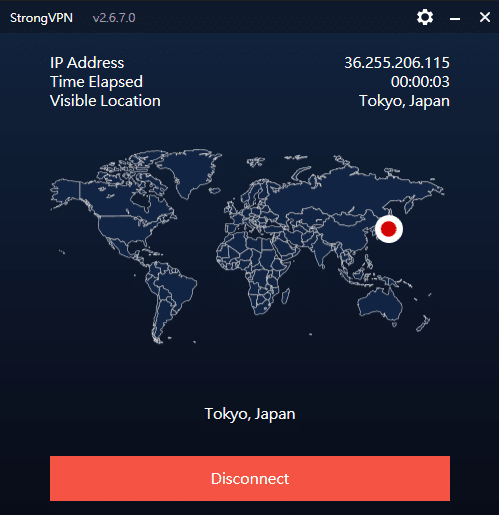
Key Features of StrongVPN:
- Wide platform support across computers, mobile devices, smart TVs, and routers
- Allows up to 12 simultaneous connections—ideal for families or multiple devices
- Unblocks major streaming platforms (Netflix, Amazon Prime Video, Disney+, Hulu, HBO)
- Includes 250 GB of SugarSync cloud storage with annual plans
- More than 950 P2P-friendly servers in 35+ countries
- Supports modern, secure protocols: WireGuard, OpenVPN, IKEv2, L2TP, SSTP
- 30-day money-back guarantee, no hassle
- 24/7 customer support via live chat and email
- Strict no-logs policy—your browsing data is never tracked or stored
- Highly competitive pricing, cheaper than ExpressVPN, Surfshark, and many EU/US providers
- Outperformed ExpressVPN in recent speed and server availability tests
- Strong connection stability, even over long distances
- Annual plan starts at USD $3.97/month (USD $47.69 for the first year)
Recommendation #2: ExpressVPN – Choose the annual ExpressVPN plan (confirm the current offer at checkout)
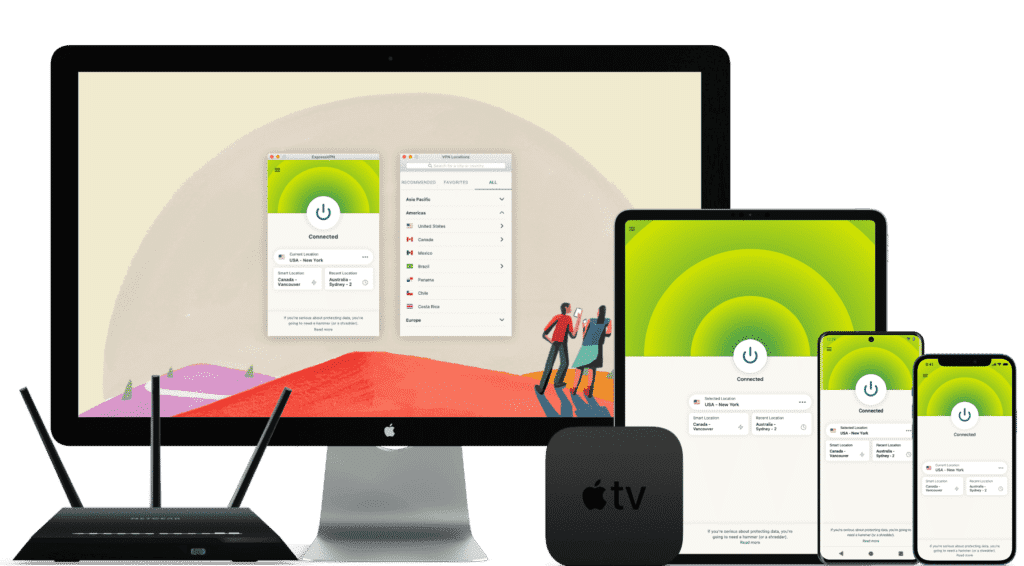
ExpressVPN is one of the world’s leading VPN services, known for its massive infrastructure, consistently high speeds, and rapid server updates. With over 3,000 servers in 94 countries and 160+ locations, it provides fast, secure, and highly reliable connections. It’s ideal for unblocking Netflix and other streaming platforms, and it fully supports torrenting with a strict no-logs policy.
Its interface is user-friendly, making it suitable for beginners and advanced users alike.
While ExpressVPN is more expensive than many competitors, the premium performance and global reliability justify the cost.
⚡Performance:
In speed tests conducted in August 2026, ExpressVPN ranked as one of the fastest and most stable VPNs available, offering consistently high performance across long-distance and local connections.
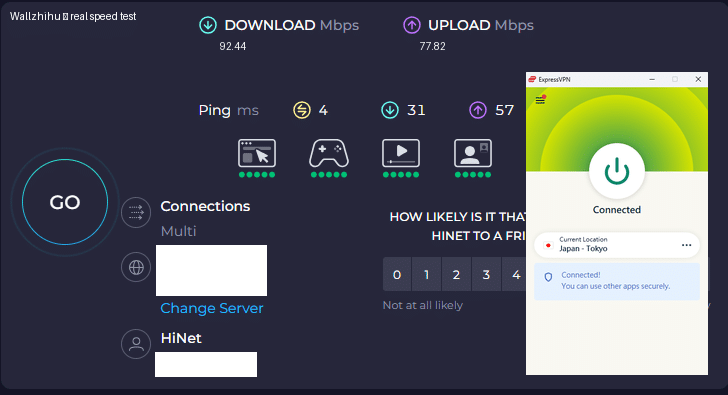
⭐ Key Features of ExpressVPN
- 3,000+ servers in 94 countries and 160+ global locations
- Massive worldwide user base and strong industry reputation
- Fast server recovery and updates when firewalls or blocks are detected
- 30-day money-back guarantee, no questions asked
- 24/7 customer support via live chat and email
- Apps for Windows, macOS, Android, iOS, Linux, and more
- Compatible with Apple TV, Fire TV, PlayStation, Chromebook, Kindle, etc.
- Supports various payment methods, including Bitcoin and other cryptocurrencies
- Enterprise-grade encryption for maximum security and privacy
- Constant optimization to bypass firewalls and maintain stable, unrestricted access
🔀 Detailed Explanation: VPN Split Tunneling (How It Works)
VPN split tunneling is a feature that lets you use your VPN connection and your regular local internet connection at the same time. This means you can control which traffic is protected through the VPN and which traffic goes directly through your local network.
With split tunneling, you can:
- Route sensitive apps (browser, streaming, downloads) through the VPN
- Keep local resources (printers, LAN devices, internal servers) outside the VPN for faster access
This provides greater flexibility, improved performance, and more efficient bandwidth usage.
⚙️ How Does It Work Technically?
Split tunneling is implemented by modifying your device’s routing tables, assigning specific traffic to the encrypted VPN tunnel and the rest to your local network.
This separation allows your device to maintain two simultaneous paths:
one encrypted (VPN) and one direct (local).
⚠️ Precautions
While split tunneling is useful, it also has security considerations:
- Traffic routed outside the VPN is not encrypted
- Sensitive data may be exposed if incorrectly configured
- Local network vulnerabilities can affect unprotected traffic
Therefore, it’s important to evaluate which apps truly need protection and ensure your VPN provider offers strong security protocols, leak protection, and robust privacy policies before enabling split tunneling.
Recommendation #3: Surfshark— Protect Unlimited Devices
Surfshark is one of the newer VPN providers on the market, but it has quickly become extremely popular thanks to its competitive pricing and one standout feature almost no other service offers: unlimited simultaneous connections.
This means you can protect every device you own — and even share your account with family members — without paying extra.
If you want to save money while still getting secure browsing, smooth streaming, and reliable performance, Surfshark is an excellent value.
⚡ Fast Speeds — Surfshark Review (Tested August 2026)
Below is a complete overview of Surfshark’s core features, based on our hands-on testing.

Key Features of Surfshark VPN
- 🔐Advanced Encryption: Uses AES-256 encryption and secure protocols such as OpenVPN, IKEv2/IPSec, and WireGuard to ensure top-tier data protection.
- 🌍 Large Server Network: Over 3,200 servers in 65 countries, ideal for faster connections and accessing global content.
- 🚀 Speed & Stability: Consistent high speeds for HD streaming, downloading, gaming, and everyday browsing.
- 🛡️ Strict No-Logs Policy: Does not store your browsing history, IP address, or online activity.
- 📱 Unlimited Device Connections: Protect as many devices as you want — no limits, no restrictions.
- 💻 Cross-Platform Compatibility: Apps for Windows, macOS, Linux, Android, iOS, plus browser extensions for Chrome and Firefox.
- 🧹 CleanWeb Feature: Blocks ads, trackers, malware, and phishing sites automatically.
- 👨💻 24/7 Customer Support: Live chat, email support, and a detailed knowledge base with guides and tutorials.
- 💰 30-Day Money-Back Guarantee: Try it risk-free for an entire month.
💵 Pricing & Plans
Surfshark’s best value is its 24-month plan, costing roughly $2.30 per month.
Payment methods include credit/debit cards, PayPal, cryptocurrencies, Amazon Pay, and Google Pay.
⭐ Final Verdict: Surfshark is a young but powerful VPN with excellent value for the price, advanced security features, and the rare advantage of unlimited device connections. It’s an ideal choice for anyone who wants strong privacy protection and unrestricted access to the internet across all their devices.
⭐ Recommendation #4: FlowVPN— Short trial option (confirm the current terms at checkout)
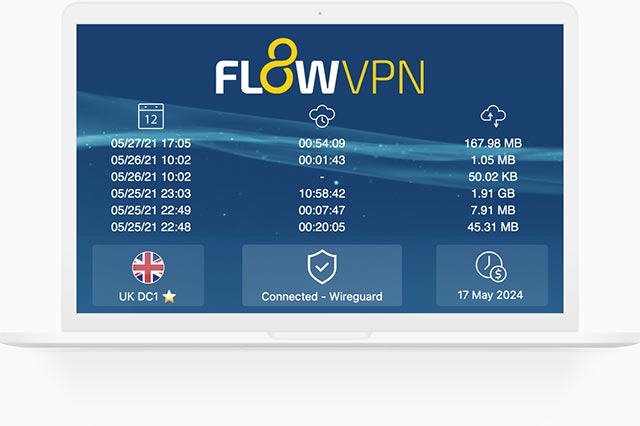
| Protocol / method | short trial (confirm terms at checkout) | 24/7 support | 5 devices | 30-Day Money-Back Guarantee |
|---|---|---|---|---|
| SSR | ✅ | ✅ | ✅ | ✅ |
FlowVPN has gained traction in recent years as a reliable and budget-friendly VPN solution, especially as many traditional VPN services struggle to keep up with evolving network blocks and filtering technologies. Based on our hands-on testing, FlowVPN delivers solid speed, stable performance, and dependable daily use.
FlowVPN allows up to five simultaneous device connections, supports a wide range of servers across multiple regions, and includes 24/7 customer support with multilingual assistance available. Its two-day free trial makes it easy to test the service without any commitment.
This provider has become popular among students and budget-conscious users thanks to its low-cost plans, ease of use, and functional performance, making it an excellent choice for everyday browsing, streaming, and privacy protection.
⭐ Key Features of FlowVPN
- short trial (confirm terms at checkout) with full access
- Unlimited server switching
- Supports up to 5 devices simultaneously
- 24/7 customer support, including Spanish-language assistance
- User-friendly interface, ideal for beginners
- Affordable plans, perfect for students and light users
- Stable speed and performance (tested August 2026)
- Money-back guarantee
- Wide compatibility with major platforms
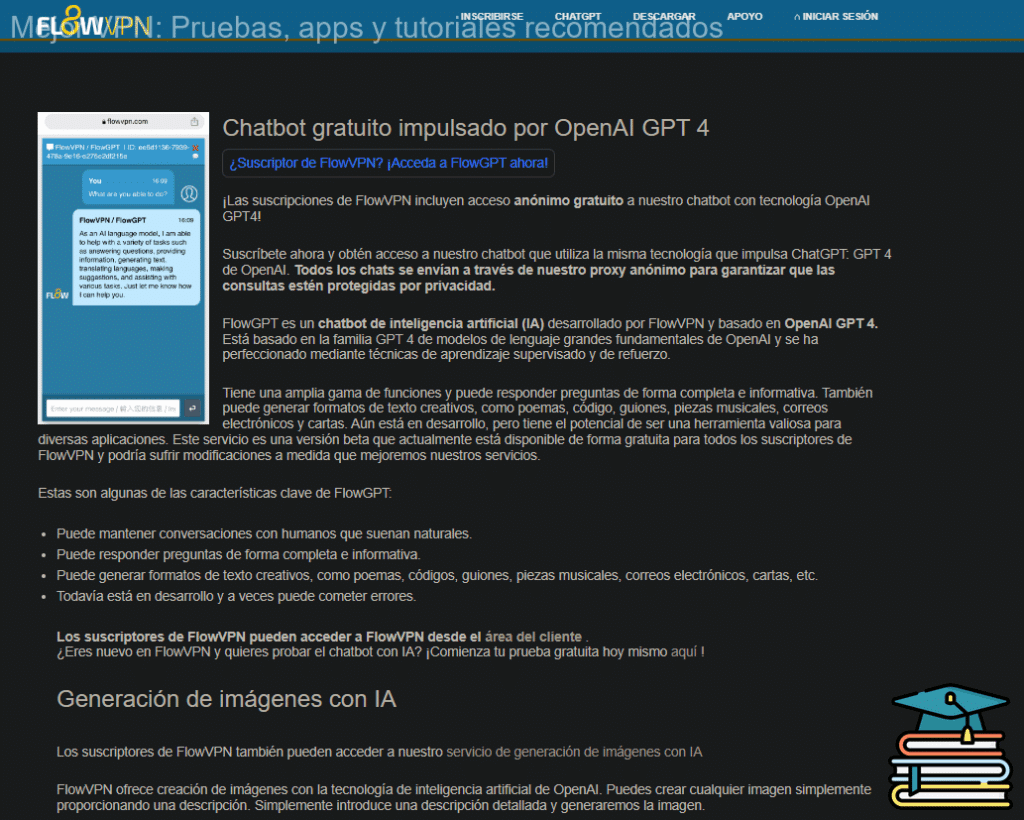
Flexible pricing and practical plans make FlowVPN a budget-friendly option, especially for students, short-term travelers, and users who want to test a VPN before committing to a longer subscription.
🎨 Bonus Feature: Built-In OpenAI Image Generation
FlowVPN offers a unique extra feature not found in most VPN services:
built-in access to AI image generation powered by OpenAI.
Simply enter a text description and generate original images instantly.
This is especially useful for:
- Content creators
- Students
- Designers
- Social media users
- Anyone experimenting with AI tools
💵 Pricing & Plans
FlowVPN offers flexible, low-cost plans designed to fit individual needs.
Its pricing is especially attractive for:
- Students
- Casual users
- Anyone looking for a budget-friendly VPN with reliable performance
FlowVPN remains one of the best low-cost options on the market.
📺 FlowVPN for Apple TV (tvOS 17 Support)
FlowVPN is the first VPN app specifically designed for Apple TV, taking full advantage of Apple’s new VPN support introduced in tvOS 17.
You can now enjoy secure, private streaming on Apple TV with access to servers in 60+ countries — perfect for watching international content or protecting your home network.
FlowVPN has released its first Apple TV version through Apple’s TestFlight beta program.
How to Install FlowVPN on Apple TV (TestFlight Beta)
- Open TestFlight on your Apple TV and install FlowVPN.
- If you don’t have a FlowVPN account yet, create one and start your free trial.
- Download TestFlight on your iPhone, iPad, or Mac.
- Join the FlowVPN Apple TV beta through the invitation link.
- Install TestFlight from the App Store on your Apple TV running tvOS 17 beta.
FlowVPN’s early support for Apple TV makes it one of the easiest and most flexible VPNs for streaming on large screens.
How to Watch YouTube, Netflix, and Disney+ Without Restrictions
If you’re looking for the best way to unblock YouTube, Netflix, and Disney+, a VPN is your most powerful tool. A VPN lets you bypass geo-restrictions and access these platforms from anywhere in the world. It also protects your online privacy by encrypting your data and hiding your IP address.
There are many VPN options on the market, but ExpressVPN is widely considered one of the top choices for streaming. It offers fast speeds, stable connections, and 24/7 customer support—everything you need to watch your favorite movies and shows without interruptions. If you want unlimited access to global entertainment, a VPN is essential.
Netflix remains one of the most popular streaming services worldwide, and a VPN expands your access even further. You can also unblock platforms like BBC iPlayer, Hulu, HBO, and Amazon Prime Video, enjoying high-definition content without censorship or regional limitations.
A useful tip for streaming fans:
By connecting to VPN servers in countries like Turkey or Argentina, you can subscribe to Netflix at significantly lower prices. With the same VPN, you can also unlock BBC iPlayer, Hulu, HBO, and more—giving you access to all your favorite shows without paying separately for each region’s content.
Streaming Services: Pros, Cons, and Pricing
| Service | Advantages | Disadvantages | Price (USD) |
|---|---|---|---|
| Hulu | Popular and exclusive content | Contains ads; No family account sharing | $6.99/mo |
| Amazon Prime Video | Included with Amazon Prime; No ads on most content | Limited original content; Some movies require extra payment | $8.99/mo |
| HBO | Large library of top-quality original content; Similar popular shows as Netflix | – | $9.99/mo |
| Apple TV+ | Affordable; No ads | No native apps for Android or Windows PC | $4.99/mo |
| Peacock | Free option available | Contains ads | Free |
Low-Ping VPN Comparison for Online Gaming

What Is Ping in Online Games?
In gaming, ping refers to the latency between your device and the game server—the time it takes for data to travel from your computer to the server and back. Every action you perform in a game (shooting, moving, jumping, interacting) must be sent to the server for processing. If your latency is high, responses become delayed, resulting in lag, stuttering, or even disconnections.
Ping is measured in milliseconds (ms).
- Lower ping = faster response time and smoother gameplay
- Higher ping = lag, delays, and poor performance
In fast-paced competitive games, having low ping is crucial for quick reactions and winning battles, which is why many players look for ways to reduce their latency.
How VPNs Affect Ping in Online Gaming
For international gamers, latency is one of the biggest performance factors.
Connecting directly to distant servers—such as U.S. servers from Europe or Latin America—often results in high ping because of the long physical distance.
Using a VPN can help if you connect to a server geographically close to your location, such as Spain, Mexico, or neighboring countries. A nearby VPN server can improve routing and reduce latency.
Typical examples:
- Direct connection to distant servers → Ping over 200 ms
- VPN with a nearby optimized server → Ping under 100 ms
This can make gameplay smoother, more responsive, and more stable overall.
Choosing a VPN for Gaming
Not all VPN providers offer gaming-optimized servers. To get the best results, look for a VPN with:
- Low-latency servers in your region
- High speed and modern protocols (like WireGuard)
- Reliable, stable connections
- Strong privacy and encryption to protect your account
Testing several server locations before choosing one is often the best way to find the lowest ping.
Game Boosters vs. VPNs: What’s the Difference?
Some regions (such as Mexico or Spain) offer game accelerators—tools designed specifically to optimize game traffic. They work by compressing data and improving routing paths to reduce latency. These can be useful if your only goal is to improve performance in a particular game.
However:
- Game accelerators only optimize gaming traffic
- VPNs optimize all internet traffic and provide:
- Encryption
- Privacy
- Geo-unblocking
- Protection for your entire device
If gaming performance is your only concern, an accelerator might be enough. But if you also care about online security, privacy, and accessing restricted content, a VPN is the more complete solution.
Using a VPN as a Gaming Accelerator
A VPN can also function as a gaming accelerator. By routing your connection through optimized servers and avoiding problematic network paths, a VPN can improve stability and sometimes even lower latency.
For example, if you're playing a game hosted in Europe or the U.S. from Latin America, the long distance often results in high ping.
A VPN with global low-latency servers can act as a bridge between you and the game server, providing:
- Faster, more stable routing
- Better in-game responsiveness
- Additional protection for your account and personal data
VPN Frequently Asked Questions (FAQ)
1. Why do many VPNs stop working or perform poorly?
VPN blocking methods are constantly evolving, and many low-quality VPNs can’t keep up.
Streaming platforms, firewalls, and network providers use advanced techniques—sometimes even machine learning and AI-based detection—to block VPN traffic.
That’s why some services suddenly stop working or fail to unblock websites.
If you want to avoid unreliable VPNs, check our list of VPN services you should not use based on real testing.
2. I turned on my VPN but still can’t access international websites. What should I do?
Here are the most common fixes:
- Contact customer support to confirm whether the server you're using is active. Sometimes nodes go down or get blocked.
- Check your firewall settings, especially Windows Defender—firewalls may block VPN tunnels.
- Don’t run multiple VPNs at the same time, as overlapping encryption can break the connection.
- Switch to another server location. If a region is blocked, choose a nearby country or ask support for a recommended node.
3. Which VPN servers are usually the fastest?
Speed generally depends on physical distance and server load. For most users, connecting to the closest available server offers the best performance.
Key factors that affect speed:
- Location: Nearby servers = lower latency.
- Server load: Avoid overcrowded nodes.
- Protocol: Modern protocols like WireGuard are faster than OpenVPN.
- Encryption level: Stronger encryption can reduce speed slightly.
- Data center quality: Better infrastructure = faster, more stable connections.
Overall, choose servers that are nearby, lightly loaded, using modern protocols, and hosted in reputable data centers.
4. Can I use my VPN subscription on multiple devices (phone, tablet, laptop)?
Yes. Most VPNs support Windows, macOS, iOS, Android, Linux, and more.
You can install the VPN app on multiple devices and use the same account on each of them.
However:
- The number of simultaneous connections depends on the provider (e.g., 5 devices, or unlimited in Surfshark’s case).
- Some VPNs support more platforms than others.
- Each device needs its own client setup for best performance.
Always review the provider’s device-limit policy before purchasing.
5. Can I use a VPN on my PC and mobile phone at the same time?
Yes. Most VPN providers allow multiple simultaneous connections.
Just install the app on both devices and sign in with the same account.
Different devices may require separate configuration, but running a VPN on both at the same time is perfectly fine.
Many providers support 5 devices at once, while services like Surfshark offer unlimited device connections.
6. Why does my Wi-Fi speed drop when I use a VPN?
Using a VPN can slow down your connection for several reasons:
- Encryption overhead: Encrypting and decrypting data requires processing power.
- Distance to the server: Farther servers = higher latency.
- Local bandwidth limits: Slow home internet will feel even slower when encrypted.
- ISP throttling: Some ISPs intentionally limit VPN traffic.
- Device limitations: Older devices may struggle with modern encryption.
While some speed loss is normal, a high-quality VPN and strong internet connection will minimize the impact.
If you notice severe slowdowns, try switching to a faster protocol like WireGuard, changing servers, or upgrading your provider.
Common Risks of Free VPNs
Many people turn to free VPNs because premium services typically require a subscription.
However, paid VPNs have become very affordable in recent years, with frequent discounts and long-term plans that cost only a few dollars per month.
Free VPNs, on the other hand, come with major risks—the same issues apply to many cracked or pirated versions.
Here are the most common dangers:
🔸 Data Leaks
Free VPNs often lack proper encryption and security protections, making your personal information vulnerable to leaks or interception.
🔸 Poor Connection Quality
Without investment in servers or engineering, free VPNs usually deliver slow speeds, unstable connections, and frequent timeouts.
🔸 Aggressive Advertising
Free VPNs rely heavily on ads to make money. Expect pop-ups, tracking scripts, and intrusive banners—because nothing is truly free.
🔸 Hidden Malware
Some free VPN apps include spyware, crypto-mining tools, or other malicious software designed to exploit your device.
In short, you should avoid free VPNs whenever possible.
They are typically overloaded with users, have very limited server networks, and prioritize ads or data collection over security.
Slow speeds, weak encryption, and privacy risks make them unsuitable for streaming, gaming, banking, or anything that requires real protection.
A trusted paid VPN like StrongVPN offers the complete opposite: fast servers, real security, unlimited bandwidth, and strict privacy policies—all essential for a safe online experience.
⭐ Why You Should Never Use Cracked or Pirated VPN Apps
Cracked VPN apps may seem like a shortcut to premium features, but they are extremely dangerous.
These versions bypass licensing protections, meaning you can’t trust anything inside the software.
🔸 Security Risks
Cracked VPNs lack funding, updates, and proper security measures. Your data becomes an easy target for hackers.
🔸 Data Logging & Tracking
Many cracked versions secretly collect your browsing history, IP address, timestamps, and other data—then sell it to third parties.
🔸 Viruses & Malware
Pirated VPNs frequently contain harmful code, including trojans, spyware, ransomware, or keyloggers that steal personal information.
🔸 Unstable Performance
These apps are often buggy, prone to crashes, or completely fail to establish encrypted connections.
🔸 Legal Issues
Using cracked software can violate local laws, exposing you to potential fines or legal penalties.
For all these reasons, it’s always safer to use a legitimate, reputable VPN provider.
Paid VPNs offer proper encryption, modern protocols, stable servers, customer support, and consistent updates—features that cracked versions will never provide.
If you value privacy, security, and reliable performance, a well-established service like StrongVPN is the smart, safe choice.
How to Evaluate the Security of a VPN
When choosing a VPN, security should be your top priority.
Here are the key factors to consider when determining whether a VPN is truly safe and trustworthy:
🔐 1. No-Logs Policy
A secure VPN should never store logs of your browsing history, traffic data, timestamps, or IP addresses.
Look for providers with:
- A strict, independently verified no-logs policy
- Clear privacy documentation
- Transparent security practices
Avoid VPNs that collect analytics or vague “diagnostic data” without explaining what is stored.
🔐 2. Encryption Standards
Your VPN should use strong, modern encryption to protect your data from interception.
Most reputable VPNs use:
- AES-256 encryption (industry standard)
- ChaCha20 with WireGuard (fast and secure)
These methods ensure your information remains private, even on public Wi-Fi.
🔐 3. VPN Protocols
Protocols determine how your encrypted connection is established.
The safest and most reliable protocols today are:
- WireGuard – fastest, most modern, highly secure
- OpenVPN – widely trusted, very secure
- IKEv2/IPSec – stable and fast for mobile devices
Older or weaker protocols (like PPTP) should be avoided.
🔐 4. Additional Security Layers
Strong VPNs include extra protections to safeguard your connection:
- Kill Switch: Cuts internet traffic if the VPN disconnects
- DNS Leak Protection: Prevents your real IP from leaking
- Split Tunneling: Lets you choose which apps use the VPN
- IPv6 leak protection: Prevents unencrypted IPv6 traffic
These features significantly increase your safety.
🔐 5. Jurisdiction & Privacy Laws
Where a VPN company is legally based matters.
Some countries require mandatory data retention or allow government access to user information.
Look for providers operating in privacy-friendly regions with strong data protection laws.
🔐 6. Reputation & User Feedback
A trustworthy VPN should have:
- Years of proven operation
- Positive user reviews
- Independent audits or security reports
- A transparent company background
Avoid services with unclear ownership or a history of privacy issues.
⭐ Summary
A secure VPN should provide:
- A strict no-logs policy
- Strong encryption
- Modern, secure protocols
- Advanced security features
- Privacy-friendly jurisdiction
- A solid industry reputation
Evaluating these factors will help you choose a VPN that truly protects your privacy—whether for streaming, gaming, traveling, or everyday browsing.
🔀 What Is Split Tunneling in a VPN?
Split tunneling is a VPN feature that lets you use your encrypted VPN connection and your regular local internet connection at the same time.
In simple terms, you can choose which apps or websites go through the VPN and which ones connect directly to the internet.
For example, you can:
- Send your browser, streaming apps, or torrent client through the VPN for privacy and geo-unblocking
- Keep local network traffic (like printers, smart home devices, or internal company servers) outside the VPN so they work normally and stay fast
This gives you more control, better speeds, and flexibility—especially if you don’t need every single app to use the VPN.
⚠️ Things to Keep in Mind
Split tunneling is powerful, but it must be used carefully:
- Any traffic not sent through the VPN is not protected by encryption
- Unprotected apps or websites may expose your real IP address or browsing activity
- You should only exclude traffic you’re sure doesn’t need extra privacy
That’s why it’s important to:
- Choose a VPN provider with strong security and clear split tunneling options
- Decide which apps truly need protection (banking, streaming, torrenting, etc.) and route those through the VPN
Used correctly, split tunneling lets you balance privacy, speed, and convenience without sacrificing security where it really matters.
🔐 Common VPN Protocols Explained
VPNs rely on different protocols to create secure, encrypted tunnels between your device and the internet. Each protocol has its own strengths, weaknesses, and ideal use cases. Here are the most widely used VPN protocols today:
1. PPTP (Point-to-Point Tunneling Protocol)
One of the oldest VPN protocols.
It encapsulates data using PPP and creates virtual tunnels through GRE.
- Pros: Easy to set up, compatible with older devices
- Cons: Weak security, outdated encryption, vulnerable to attacks
➡️ Not recommended for anything requiring strong protection.
2. L2TP (Layer 2 Tunneling Protocol)
L2TP combines the best parts of PPTP and Cisco’s L2F protocol.
It uses PPP to encapsulate data and typically pairs with IPSec for encryption.
- Pros: More secure than PPTP, widely supported
- Cons: Can be slower due to double encapsulation
➡️ Decent option but largely replaced by more modern protocols.
3. IPSec (Internet Protocol Security)
A highly secure protocol suite that provides encryption, authentication, and data integrity.
- Supports multiple ciphers and authentication methods
- Commonly used for site-to-site VPNs and secure remote access
➡️ A strong, reliable protocol suitable for business and personal use.
4. SSL/TLS (Secure Socket Layer / Transport Layer Security)
Originally designed to secure communication between web browsers and servers.
Today, SSL/TLS is also used in VPNs—particularly SSL VPNs—to encrypt user traffic.
- Pros: Strong encryption, ideal for securing online activity and transactions
- Cons: Usually browser-based, not full-device coverage
➡️ Best for protecting web sessions and secure logins.
5. OpenVPN
An open-source VPN protocol known for high security, excellent stability, and wide compatibility.
- Works on Windows, macOS, Linux, iOS, Android
- Supports both UDP (faster) and TCP (more reliable) modes
- Extremely configurable and trusted by both individuals and enterprises
➡️ One of the most secure and dependable VPN protocols available.
⭐ Summary
Each VPN protocol offers different levels of performance, security, and compatibility.
Choosing the right one depends on your needs:
Avoid: PPTP
Best overall security: OpenVPN or IPSec
Fast & modern: WireGuard (if supported — you can add this above if needed)
Older devices: L2TP
Frequently Asked Questions About Creating Your Own VPN
Some users consider building their own VPN to save money, especially since high-quality VPN services usually require a subscription. At the same time, using free VPNs from unknown sources can be risky.
This leads many people to ask: “Why not just create my own VPN?”
Below, we explain how a self-hosted VPN works, what it costs, and the most common questions about this approach.
🔧 How Can You Create Your Own VPN?
The biggest challenge in creating your own VPN is having access to a remote server located in another country. There are two main ways to set one up:
1. Build your own VPN server on a physical router
If you spend time abroad, you can purchase a compatible router and configure it as a VPN server yourself. This requires technical setup, maintenance, and a stable internet connection.
2. Rent a cloud server (the most common method)
Cloud platforms like Amazon AWS, DigitalOcean, Google Cloud, and others allow you to host a VPN server in almost any country.
For example, on Amazon AWS, the basic process looks like this:
- Log in to the EC2 dashboard
- Choose the region (country) where you want your server
- Select the operating system and server specs
- Review the configuration and launch the instance
- Generate a secure key pair for access
- Connect to the server remotely
- Install and configure the VPN software manually
While this works, it requires consistent updates, maintenance, and security patches.
💰 Costs of Running Your Own VPN
Hosting your own VPN on AWS or similar platforms is far more expensive than most people expect.
Costs vary by:
- Server type
- Usage level
- Bandwidth consumption
- Storage requirements
For heavy use—such as streaming video or transferring large amounts of data—your cloud server could cost around $0.70 per hour, which adds up to over $500 per month.
That is significantly more expensive than commercial VPN plans, which typically cost $3–$10 per month.
❓ Common Questions About Self-Hosted VPNs
1. Is it cheaper to create my own VPN?
Usually no.
Maintaining an overseas cloud server is expensive. High-bandwidth usage quickly increases your monthly bill.
2. Is a self-hosted VPN more secure?
Not automatically.
Professional VPNs use dedicated teams, audited protocols, multi-layer encryption, and leak protection.
A DIY VPN without proper configuration can expose your data or leave you vulnerable to attacks.
3. Is it worth the cost?
A high-quality, high-bandwidth node similar to what reputable VPN providers use can easily cost $500+ per month.
Meanwhile, a premium VPN subscription costs less than $15 per month for unlimited use.
4. Does a self-hosted VPN offer the same benefits as a commercial VPN?
Not really.
A personal VPN:
- Gives you one server location only
- Doesn’t help you unblock global streaming content
- Requires manual maintenance
- Lacks 24/7 support
- Provides no redundancy or optimized routing
A paid VPN offers dozens of server locations, optimized networks, and professional monitoring.
⭐ Conclusion
If your goal is simply to browse securely, protect your privacy, unblock content, or stream from overseas, the best and most cost-effective solution is a professional VPN provider.
Services like StrongVPN offer:
- Secure, pre-configured servers
- Modern protocols (WireGuard, OpenVPN, etc.)
- 24/7 customer support
- Global locations
- Unlimited bandwidth
- A fraction of the cost of hosting your own server
Building your own VPN can be an interesting technical project—but for everyday use, a reliable commercial VPN is safer, faster, and dramatically cheaper.
Websites You Can Access with a VPN
With a VPN, you can access a wide range of websites based on your interests—whether you’re streaming video, listening to music, browsing social media, or doing academic research. Here’s a quick overview organized by category:

| Category | Recommended Websites |
|---|---|
| Videos / Movies | Netflix, Amazon Prime Video, Hulu, HBO |
| Music | Spotify, Apple Music, Pandora |
| Research / Academic Papers | Arxiv, IEEE, Google Scholar |
| Search Engines | Google, Firefox, Bing |
| Comics / Manga | Marvel Unlimited, DC Universe, ComiXology, Amazon Prime Crunch |
| International News | CNN, BBC, The Wall Street Journal |
| Online Courses / Education | Udemy, Coursera, Khan Academy, MOOC |
| Social Media | Facebook, Instagram, Twitter |
Summary of VPN Protocols and Encryption Technologies
VPNs rely on several encryption methods and tunneling protocols to secure your connection. For a deeper technical breakdown, you can refer to our Complete Guide to VPN Technologies for 2026.
Main Encryption Technologies
VPNs typically use two categories of cryptographic systems:
Symmetric-Key Algorithms vs. Asymmetric Cryptography
| Feature | Symmetric Algorithms | Asymmetric Cryptography |
|---|---|---|
| Number of Keys | Few | Many |
| Speed | Fast | Slower |
| Security | Moderada | High |
Common Symmetric Algorithms:
AES, ChaCha20, 3DES, Salsa20, DES, Blowfish, IDEA, RC5, RC6, Camellia
Common Asymmetric Algorithms:
RSA, ECC (ideal for mobile devices), Diffie-Hellman, ElGamal, DSA (digital signatures)
Most Widely Used VPN Protocols
- OpenVPN
- IKEv2/IPSec
- WireGuard
- SSTP
- L2TP/IPSec
These protocols differ in speed, security, and compatibility. OpenVPN and WireGuard are generally the most recommended due to their strong encryption, high performance, and broad support across devices.
Conclusion
In today’s fast-paced digital world, your time and privacy are more valuable than ever. Paid VPN services provide a level of security, speed, and reliability that free VPNs simply can’t match. With a premium VPN, you can connect to servers around the world in just a few clicks, enjoy strong, modern encryption, and browse with confidence knowing your data is protected.
If a free VPN is unreliable, slow, or unclear about privacy, it is usually not worth the risk. A paid VPN lets you get started instantly, with stable performance and the peace of mind that your information stays private.
For streaming, travel, gaming, and sensitive logins, a trusted paid VPN is usually the more dependable choice.
Use the comparisons above to match the VPN to your actual use case: China access, streaming, gaming, travel Wi-Fi, price, or multi-device coverage.