
Last Updated on 2026年2月25日 by wallzhihu
In recent years, Netflix has grown into the world’s most influential streaming platform, offering an enormous library of movies, TV shows, documentaries, original productions, and global content that attracts millions of subscribers. From award-winning series like House of Cards, Stranger Things, and The Queen’s Gambit to popular international dramas and anime, Netflix delivers entertainment for every type of viewer.
However, Netflix libraries vary by country due to licensing restrictions. This means the shows available in one region may not be accessible in another. For travelers, expats, or anyone who wants to unlock the full global Netflix catalog, using a high-quality VPN has become the most reliable solution.
This guide will walk you through:
- What Netflix is & why its libraries differ by region
- How to access different Netflix libraries while traveling abroad
- The best VPNs for streaming Netflix in this year (speed-tested & verified)
- Step-by-step instructions for downloading and setting up Netflix + VPN
You’ll also find exclusive discounts on top-rated VPNs and detailed tutorials so you can start enjoying unrestricted streaming quickly and safely.
Discover the Ultimate Streaming Giant: Netflix
Netflix is the world's leading streaming entertainment service, revolutionizing how we watch TV shows, movies, anime, documentaries, and more. Founded in 1997 as a DVD rental-by-mail company in California, it pivoted to online streaming in 2007 and hasn't looked back. Today, with over 300 million paid subscribers across 190+ countries, Netflix lets you binge-watch unlimited content anytime, anywhere—on your phone, TV, laptop, or tablet—for one affordable monthly fee. No contracts, no hassle, just pure entertainment with new titles dropping every week.
From blockbuster originals like the epic finale of Stranger Things Season 5, the mind-bending Squid Game conclusion, and breakout hits like the animated sensation KPop Demon Hunters (which had everyone singing along to its viral soundtrack), to critically acclaimed series such as Adolescence, A Man on the Inside, and thrilling mysteries like Wake Up Dead Man: A Knives Out Mystery, Netflix dominates the charts. It's not just American blockbusters and dramas—dive into international gems too!
Love sweeping romances and fantasy epics? Check out addictive Chinese dramas available on the platform, like the timeless Eternal Love (Three Lives, Three Worlds, Ten Miles of Peach Blossoms), the heartfelt Ashes of Love, the bromance-filled Word of Honor, and fan-favorites such as The Untamed or Hidden Love. These xianxia and historical stories packed with immortal love, palace intrigue, and stunning costumes are perfect for your next marathon.
Anime fans, you're covered with an massive library featuring all-time classics and hot series: binge the full runs of Demon Slayer: Kimetsu no Yaiba (with its jaw-dropping animation and emotional battles), Attack on Titan (the ultimate story of survival and secrets), One Piece, Hunter x Hunter, and more. Whether you're catching up on intense action or discovering hidden gems, Netflix has episodes ready to stream instantly.
Ready to unlock endless hours of top-tier entertainment? Sign up today and start streaming—your next obsession is waiting!
(If you've got any killer recommendations that blew your mind on Netflix lately, drop them in the comments—I'd love to hear!)
Why Do You Need a VPN for Netflix?
Many people assume that Netflix offers the same content everywhere — but that’s far from the truth.
Because of licensing and regional restrictions, Netflix libraries vary significantly from country to country. A show that’s available in one region may be completely unavailable in another, even though it’s still on Netflix.
For example, some Asian dramas are accessible in the U.S. Netflix library but not in other regions, while the opposite is also common. You might see a message saying “This title is not available in your region”, even though you’re already a Netflix subscriber.
This is exactly where a VPN becomes essential.
A VPN allows you to change your virtual location, giving you access to Netflix libraries from different countries. Whether you’re traveling abroad, living in a region with limited content, or simply want a wider selection of shows and movies, using a VPN makes Netflix far more flexible and enjoyable.
Even if Netflix is accessible in your country without restrictions, a VPN still adds value — unlocking more titles, avoiding regional blocks, and improving your overall streaming experience.
Netflix VPN Speed & Value-for-Money Verdict
Not all VPNs work well with Netflix. Some are blocked, while others are simply too slow for HD or 4K streaming.
In this section, we compare Netflix-compatible VPNs based on:
- Streaming speed and stability
- Ability to bypass Netflix geo-blocks
- Server coverage across major regions
- Overall price-to-performance ratio
Below are our test results and recommendations for the best VPNs for Netflix.
VPN Value-for-Money Comparison – March 2026 (Updated)
When choosing a VPN, most users care about four things: security, connection stability, speed, and overall value for money.
There are many exaggerated claims online, but the recommendations here are based on real-world tests that I personally performed. My goal is to give you clear, practical information without unnecessary filler.
Why You Can Trust My Testing
- I evaluate every VPN using an objective and unbiased criteria.
- All tests are performed under real everyday usage, not theoretical lab conditions.
- Even though my home connection has limits, I ensure every VPN tested can handle
HD streaming, video calls, online gaming, and secure downloads without issues.
Value-for-Money Analysis
To make comparison easier, I prepared a chart where:
- The horizontal axis represents the plan duration.
- The vertical axis represents the monthly price (in USD).
Based on these metrics:
🔹 Annual Plan → StrongVPN is the most affordable
StrongVPN costs around $3 per month on its yearly plan, making it the best one-year value.
🔹 Two-Year Plan or Longer → Surfshark offers the best deal
Surfshark’s 24-month plan comes out to about $2 per month, giving it the best long-term value.
🔹 Monthly Plan → FlowVPN is the cheapest
FlowVPN offers the lowest monthly price at around $6 per month, ideal for casual or short-term use.
⭐ Personal Recommendation
- If you’re planning to subscribe for one year, StrongVPN offers the best balance of price, performance, and features.
- If you intend to subscribe for two years or more, Surfshark provides the strongest long-term value.
Over the long run, these two services deliver the best combination of affordability and reliable performance.
VPN Pricing Comparison – March

VPN Speed Comparison by Country – Updated march
This year, we performed extensive speed tests using StrongVPN, ExpressVPN, Surfshark, FlowVPN, and other leading providers.
Tests were conducted from multiple regions and across different international servers to provide real-world, data-driven results.
Our goal: help you choose the VPN that offers the best speed for your location and usage needs.
United States Server Tests (West Coast, California)
When connecting to U.S. West Coast servers, ExpressVPN delivered slightly faster speeds than StrongVPN.
This makes ExpressVPN a strong choice for:
- Streaming Netflix U.S.
- Gaming on American servers
- Low-latency, high-bandwidth activities
ExpressVPN’s broad U.S. infrastructure gives it a measurable edge in this region.
Europe Server Tests
Both StrongVPN and ExpressVPN performed well throughout Europe, but:
- ExpressVPN has more server locations across European countries
- This results in better stability, more routing options, and more consistent performance across peak hours
For users who travel frequently or access European content regularly, ExpressVPN has the advantage.
Asia & Latin America Server Tests
Asia (Japan, Hong Kong, Singapore)
StrongVPN performed exceptionally well on long-distance routes to Asia.
It delivered:
- Lower ping
- Faster download speeds
- More stable connections to Japan and Hong Kong
This makes StrongVPN ideal for gamers or users accessing Asian streaming libraries.
Latin America (Mexico, Brazil, Argentina)
Speed differences between the two weren’t as large.
However:
- ExpressVPN offers more server locations in the region
- This can lead to better stability depending on routing
Overall performance here is mixed but competitive.
⭐ Overall Conclusions
ExpressVPN
Best for:
- Fastest speeds to the United States
- More server options and stability in Europe
- Consistent global streaming performance
StrongVPN
Best for:
- Superior speeds to Asia (Japan, Hong Kong)
- Best price-to-performance ratio on annual plans
- Lower latency on long-distance connections
Regional Performance Summary
Additional Comparison Reports (Available Sections)
| Region | Winner |
|---|---|
| North America | ExpressVPN |
| Europe | ExpressVPN |
| Asia | StrongVPN |
| Latin America | Tie (ExpressVPN offers more locations) |
1 Global Speed Comparison : Includes results for North America, Europe, Asia, South America, Africa, Oceania, and Canada.

2 European & Latin American Speed Tests Includes Spain, Portugal, Argentina, Mexico, and Chile.

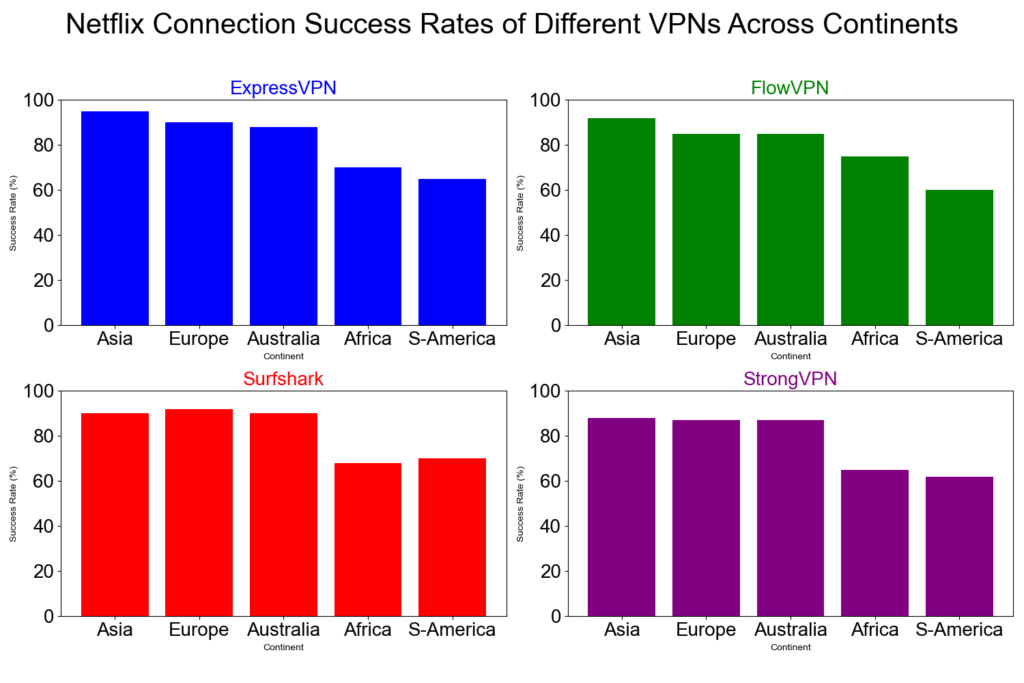
3 VPN Successful Connection Rates by Continent 。Each VPN tested 1,000 times with random nodes using a 95% confidence interval.

4 Netflix Connection Success Rate
A detailed comparison of how well ExpressVPN, FlowVPN, Surfshark, and StrongVPN unblock Netflix across different continents.
This chart shows:
- Horizontal axis: Continents (Europe, North America, South America, Asia, Oceania, Africa)
- Vertical axis: % Netflix connection success
- All four VPNs perform best in Europe, North America, and Oceania
- Lower success rates appear in some South American and African regions
These differences are influenced by:
- Regional network infrastructure
- Number of available VPN servers
- Specific local restrictions and censorship policies
Overall, this visual breakdown helps users choose the VPN that performs best in the region they care about most.
Detailed Recommendations for the Best VPNs
2026 VPN Recommendation – StrongVPN

| Free Trial | 24/7 Support | 5 devices | 30-Day Money-Back Guarantee |
|---|---|---|---|
| ✅ | ✅ | ✅ | ✅ |
Competitive pricing, excellent performance, and reliable security
StrongVPN is a rapidly growing VPN provider with infrastructure across the United States and Europe. Compared to market leaders like ExpressVPN, StrongVPN offers significantly more affordable plans, starting at just $3.50 per month on its annual subscription (about $43.99 total). ExpressVPN, by contrast, costs nearly $6 per month on similar terms.
Despite its lower price, StrongVPN maintains a dedicated technical team that continuously upgrades its servers to ensure fast, stable performance. Whether you're browsing, streaming Netflix or YouTube, gaming, or accessing social media securely, StrongVPN is a highly reliable choice.
The company promotes itself as “the best VPN for streaming media”, offering full compatibility with Netflix, Hulu, HBO, Amazon Prime Video, Disney+, and more.
StrongVPN also supports a wide range of devices, including:
- Windows
- macOS
- iOS
- Android
- Amazon Fire TV
- Chrome and Firefox extensions
- Manual setup guides for routers, Fire TV, and Kodi
The service currently operates over 950 P2P-friendly servers across 35+ countries and 46 cities.
StrongVPN supports multiple secure VPN protocols:
OpenVPN, IKEv2, L2TP, SSTP, and the modern WireGuard protocol.
Users benefit from 24/7 customer support (live chat + email) and a no-question 30-day money-back guarantee.
StrongVPN Test Results —March 2026
In addition to our own internal evaluations, we include real screenshots of speed test results—including tests on distant servers such as Japan—to provide transparent and verifiable data. This ensures our review avoids exaggerated or unfounded claims often found on other VPN comparison sites.

Key Features of StrongVPN:
- Wide platform support across computers, mobile devices, smart TVs, and routers
- Allows up to 12 simultaneous connections—ideal for families or multiple devices
- Unblocks major streaming platforms (Netflix, Amazon Prime Video, Disney+, Hulu, HBO)
- Includes 250 GB of SugarSync cloud storage with annual plans
- More than 950 P2P-friendly servers in 35+ countries
- Supports modern, secure protocols: WireGuard, OpenVPN, IKEv2, L2TP, SSTP
- 30-day money-back guarantee, no hassle
- 24/7 customer support via live chat and email
- Strict no-logs policy—your browsing data is never tracked or stored
- Highly competitive pricing, cheaper than ExpressVPN, Surfshark, and many EU/US providers
- Outperformed ExpressVPN in recent speed and server availability tests
- Strong connection stability, even over long distances
- Annual plan starts at just $4/month (around $48 for 12 months)

Recommendation #2: ExpressVPN – Get 12 Months + 3 Months Free
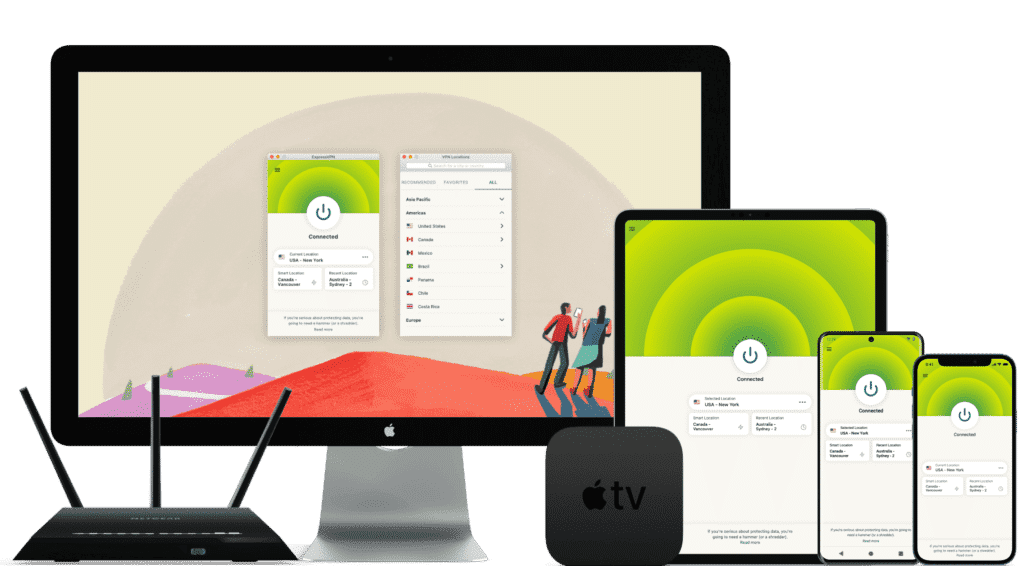
ExpressVPN is one of the world’s leading VPN services, known for its massive infrastructure, consistently high speeds, and rapid server updates. With over 3,000 servers in 94 countries and 160+ locations, it provides fast, secure, and highly reliable connections. It’s ideal for unblocking Netflix and other streaming platforms, and it fully supports torrenting with a strict no-logs policy.
Its interface is user-friendly, making it suitable for beginners and advanced users alike.
While ExpressVPN is more expensive than many competitors, the premium performance and global reliability justify the cost.
⚡Performance:
In speed tests conducted in December 2025, ExpressVPN ranked as one of the fastest and most stable VPNs available, offering consistently high performance across long-distance and local connections.

⭐ Key Features of ExpressVPN
- 3,000+ servers in 94 countries and 160+ global locations
- Massive worldwide user base and strong industry reputation
- Fast server recovery and updates when firewalls or blocks are detected
- 30-day money-back guarantee, no questions asked
- 24/7 customer support via live chat and email
- Apps for Windows, macOS, Android, iOS, Linux, and more
- Compatible with Apple TV, Fire TV, PlayStation, Chromebook, Kindle, etc.
- Supports various payment methods, including Bitcoin and other cryptocurrencies
- Enterprise-grade encryption for maximum security and privacy
- Constant optimization to bypass firewalls and maintain stable, unrestricted access
🔀 Detailed Explanation: VPN Split Tunneling (How It Works)
VPN split tunneling is a feature that lets you use your VPN connection and your regular local internet connection at the same time. This means you can control which traffic is protected through the VPN and which traffic goes directly through your local network.
With split tunneling, you can:
- Route sensitive apps (browser, streaming, downloads) through the VPN
- Keep local resources (printers, LAN devices, internal servers) outside the VPN for faster access
This provides greater flexibility, improved performance, and more efficient bandwidth usage.
⚙️ How Does It Work Technically?
Split tunneling is implemented by modifying your device’s routing tables, assigning specific traffic to the encrypted VPN tunnel and the rest to your local network.
This separation allows your device to maintain two simultaneous paths:
one encrypted (VPN) and one direct (local).
⚠️ Precautions
While split tunneling is useful, it also has security considerations:
- Traffic routed outside the VPN is not encrypted
- Sensitive data may be exposed if incorrectly configured
- Local network vulnerabilities can affect unprotected traffic
Therefore, it’s important to evaluate which apps truly need protection and ensure your VPN provider offers strong security protocols, leak protection, and robust privacy policies before enabling split tunneling.
Recommendation #3: Surfshark— Protect Unlimited Devices
Surfshark is one of the newer VPN providers on the market, but it has quickly become extremely popular thanks to its competitive pricing and one standout feature almost no other service offers: unlimited simultaneous connections.
This means you can protect every device you own — and even share your account with family members — without paying extra.
If you want to save money while still getting secure browsing, smooth streaming, and reliable performance, Surfshark is an excellent value.
⚡ Fast Speeds — Surfshark Review (Tested march 2026)
Below is a complete overview of Surfshark’s core features, based on our hands-on testing.

Key Features of Surfshark VPN
- 🔐Advanced Encryption: Uses AES-256 encryption and secure protocols such as OpenVPN, IKEv2/IPSec, and WireGuard to ensure top-tier data protection.
- 🌍 Large Server Network: Over 3,200 servers in 65 countries, ideal for faster connections and accessing global content.
- 🚀 Speed & Stability: Consistent high speeds for HD streaming, downloading, gaming, and everyday browsing.
- 🛡️ Strict No-Logs Policy: Does not store your browsing history, IP address, or online activity.
- 📱 Unlimited Device Connections: Protect as many devices as you want — no limits, no restrictions.
- 💻 Cross-Platform Compatibility: Apps for Windows, macOS, Linux, Android, iOS, plus browser extensions for Chrome and Firefox.
- 🧹 CleanWeb Feature: Blocks ads, trackers, malware, and phishing sites automatically.
- 👨💻 24/7 Customer Support: Live chat, email support, and a detailed knowledge base with guides and tutorials.
- 💰 30-Day Money-Back Guarantee: Try it risk-free for an entire month.
💵 Pricing & Plans
Surfshark’s best value is its 24-month plan, costing roughly $2.30 per month.
Payment methods include credit/debit cards, PayPal, cryptocurrencies, Amazon Pay, and Google Pay.
⭐ Final Verdict: Surfshark is a young but powerful VPN with excellent value for the price, advanced security features, and the rare advantage of unlimited device connections. It’s an ideal choice for anyone who wants strong privacy protection and unrestricted access to the internet across all their devices.
⭐ Recommendation #4: FlowVPN— 2-Day Free Trial + Bonus OpenAI Image Generator
| method | 2 days free trial | 24/7 Support | 5 devices | 30-Day Money-Back Guarantee |
|---|---|---|---|---|
| SSR | ✅ | ✅ | ✅ | ✅ |
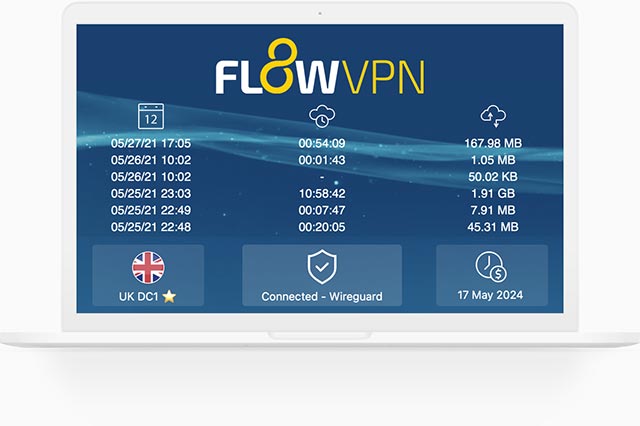
FlowVPN has gained traction in recent years as a reliable and budget-friendly VPN solution, especially as many traditional VPN services struggle to keep up with evolving network blocks and filtering technologies. Based on our hands-on testing, FlowVPN delivers solid speed, stable performance, and dependable daily use.
FlowVPN allows up to five simultaneous device connections, supports a wide range of servers across multiple regions, and includes 24/7 customer support with Spanish-language assistance available. Its two-day free trial makes it easy to test the service without any commitment.
This provider has become popular among students and budget-conscious users thanks to its low-cost plans, ease of use, and functional performance, making it an excellent choice for everyday browsing, streaming, and privacy protection.
⭐ Key Features of FlowVPN
- 2-day free trial with full access
- Unlimited server switching
- Supports up to 5 devices simultaneously
- 24/7 customer support, including Spanish-language assistance
- User-friendly interface, ideal for beginners
- Affordable plans, perfect for students and light users
- Stable speed and performance (tested October 2025)
- Money-back guarantee
- Wide compatibility with major platforms

Precio y planes ajustados a las necesidades individuales. Es una opción económica y práctica, recomendada especialmente para estudiantes y usuarios con presupuesto limitado.
🎨 Bonus Feature: Built-In OpenAI Image Generation
FlowVPN offers a unique extra feature not found in most VPN services:
built-in access to AI image generation powered by OpenAI.
Simply enter a text description and generate original images instantly.
This is especially useful for:
- Content creators
- Students
- Designers
- Social media users
- Anyone experimenting with AI tools
💵 Pricing & Plans
FlowVPN offers flexible, low-cost plans designed to fit individual needs.
Its pricing is especially attractive for:
- Students
- Casual users
- Anyone looking for a budget-friendly VPN with reliable performance
FlowVPN remains one of the best low-cost options on the market.
📺 FlowVPN for Apple TV (tvOS 17 Support)
FlowVPN is the first VPN app specifically designed for Apple TV, taking full advantage of Apple’s new VPN support introduced in tvOS 17.
You can now enjoy secure, private streaming on Apple TV with access to servers in 60+ countries — perfect for watching international content or protecting your home network.
FlowVPN has released its first Apple TV version through Apple’s TestFlight beta program.
How to Install FlowVPN on Apple TV (TestFlight Beta)
- Open TestFlight on your Apple TV and install FlowVPN.
- If you don’t have a FlowVPN account yet, create one and start your free trial.
- Download TestFlight on your iPhone, iPad, or Mac.
- Join the FlowVPN Apple TV beta through the invitation link.
- Install TestFlight from the App Store on your Apple TV running tvOS 17 beta.
FlowVPN’s early support for Apple TV makes it one of the easiest and most flexible VPNs for streaming on large screens.
Detailed Recommendations for the Best VPNs
2026 VPN Recommendation – StrongVPN
| Free Trial | 24/7 Support | 5 devices | 30-Day Money-Back Guarantee |
|---|---|---|---|
| ✅ | ✅ | ✅ | ✅ |
Competitive pricing, excellent performance, and reliable security
StrongVPN is a rapidly growing VPN provider with infrastructure across the United States and Europe. Compared to market leaders like ExpressVPN, StrongVPN offers significantly more affordable plans, starting at just $3.50 per month on its annual subscription (about $43.99 total). ExpressVPN, by contrast, costs nearly $6 per month on similar terms.
Despite its lower price, StrongVPN maintains a dedicated technical team that continuously upgrades its servers to ensure fast, stable performance. Whether you're browsing, streaming Netflix or YouTube, gaming, or accessing social media securely, StrongVPN is a highly reliable choice.
The company promotes itself as “the best VPN for streaming media”, offering full compatibility with Netflix, Hulu, HBO, Amazon Prime Video, Disney+, and more.
StrongVPN also supports a wide range of devices, including:
- Windows
- macOS
- iOS
- Android
- Amazon Fire TV
- Chrome and Firefox extensions
- Manual setup guides for routers, Fire TV, and Kodi
The service currently operates over 950 P2P-friendly servers across 35+ countries and 46 cities.
StrongVPN supports multiple secure VPN protocols:
OpenVPN, IKEv2, L2TP, SSTP, and the modern WireGuard protocol.
Users benefit from 24/7 customer support (live chat + email) and a no-question 30-day money-back guarantee.
StrongVPN Test Results —March 2026
In addition to our own internal evaluations, we include real screenshots of speed test results—including tests on distant servers such as Japan—to provide transparent and verifiable data. This ensures our review avoids exaggerated or unfounded claims often found on other VPN comparison sites.
Key Features of StrongVPN:
- Wide platform support across computers, mobile devices, smart TVs, and routers
- Allows up to 12 simultaneous connections—ideal for families or multiple devices
- Unblocks major streaming platforms (Netflix, Amazon Prime Video, Disney+, Hulu, HBO)
- Includes 250 GB of SugarSync cloud storage with annual plans
- More than 950 P2P-friendly servers in 35+ countries
- Supports modern, secure protocols: WireGuard, OpenVPN, IKEv2, L2TP, SSTP
- 30-day money-back guarantee, no hassle
- 24/7 customer support via live chat and email
- Strict no-logs policy—your browsing data is never tracked or stored
- Highly competitive pricing, cheaper than ExpressVPN, Surfshark, and many EU/US providers
- Outperformed ExpressVPN in recent speed and server availability tests
- Strong connection stability, even over long distances
- Annual plan starts at just $4/month (around $48 for 12 months)
Recommendation #2: ExpressVPN – Get 12 Months + 3 Months Free
ExpressVPN is one of the world’s leading VPN services, known for its massive infrastructure, consistently high speeds, and rapid server updates. With over 3,000 servers in 94 countries and 160+ locations, it provides fast, secure, and highly reliable connections. It’s ideal for unblocking Netflix and other streaming platforms, and it fully supports torrenting with a strict no-logs policy.
Its interface is user-friendly, making it suitable for beginners and advanced users alike.
While ExpressVPN is more expensive than many competitors, the premium performance and global reliability justify the cost.
⚡Performance:
In speed tests conducted in December 2025, ExpressVPN ranked as one of the fastest and most stable VPNs available, offering consistently high performance across long-distance and local connections.
⭐ Key Features of ExpressVPN
- 3,000+ servers in 94 countries and 160+ global locations
- Massive worldwide user base and strong industry reputation
- Fast server recovery and updates when firewalls or blocks are detected
- 30-day money-back guarantee, no questions asked
- 24/7 customer support via live chat and email
- Apps for Windows, macOS, Android, iOS, Linux, and more
- Compatible with Apple TV, Fire TV, PlayStation, Chromebook, Kindle, etc.
- Supports various payment methods, including Bitcoin and other cryptocurrencies
- Enterprise-grade encryption for maximum security and privacy
- Constant optimization to bypass firewalls and maintain stable, unrestricted access
🔀 Detailed Explanation: VPN Split Tunneling (How It Works)
VPN split tunneling is a feature that lets you use your VPN connection and your regular local internet connection at the same time. This means you can control which traffic is protected through the VPN and which traffic goes directly through your local network.
With split tunneling, you can:
- Route sensitive apps (browser, streaming, downloads) through the VPN
- Keep local resources (printers, LAN devices, internal servers) outside the VPN for faster access
This provides greater flexibility, improved performance, and more efficient bandwidth usage.
⚙️ How Does It Work Technically?
Split tunneling is implemented by modifying your device’s routing tables, assigning specific traffic to the encrypted VPN tunnel and the rest to your local network.
This separation allows your device to maintain two simultaneous paths:
one encrypted (VPN) and one direct (local).
⚠️ Precautions
While split tunneling is useful, it also has security considerations:
- Traffic routed outside the VPN is not encrypted
- Sensitive data may be exposed if incorrectly configured
- Local network vulnerabilities can affect unprotected traffic
Therefore, it’s important to evaluate which apps truly need protection and ensure your VPN provider offers strong security protocols, leak protection, and robust privacy policies before enabling split tunneling.
Recommendation #3: Surfshark— Protect Unlimited Devices
Surfshark is one of the newer VPN providers on the market, but it has quickly become extremely popular thanks to its competitive pricing and one standout feature almost no other service offers: unlimited simultaneous connections.
This means you can protect every device you own — and even share your account with family members — without paying extra.
If you want to save money while still getting secure browsing, smooth streaming, and reliable performance, Surfshark is an excellent value.
⚡ Fast Speeds — Surfshark Review (Tested march 2026)
Below is a complete overview of Surfshark’s core features, based on our hands-on testing.
Key Features of Surfshark VPN
- 🔐Advanced Encryption: Uses AES-256 encryption and secure protocols such as OpenVPN, IKEv2/IPSec, and WireGuard to ensure top-tier data protection.
- 🌍 Large Server Network: Over 3,200 servers in 65 countries, ideal for faster connections and accessing global content.
- 🚀 Speed & Stability: Consistent high speeds for HD streaming, downloading, gaming, and everyday browsing.
- 🛡️ Strict No-Logs Policy: Does not store your browsing history, IP address, or online activity.
- 📱 Unlimited Device Connections: Protect as many devices as you want — no limits, no restrictions.
- 💻 Cross-Platform Compatibility: Apps for Windows, macOS, Linux, Android, iOS, plus browser extensions for Chrome and Firefox.
- 🧹 CleanWeb Feature: Blocks ads, trackers, malware, and phishing sites automatically.
- 👨💻 24/7 Customer Support: Live chat, email support, and a detailed knowledge base with guides and tutorials.
- 💰 30-Day Money-Back Guarantee: Try it risk-free for an entire month.
💵 Pricing & Plans
Surfshark’s best value is its 24-month plan, costing roughly $2.30 per month.
Payment methods include credit/debit cards, PayPal, cryptocurrencies, Amazon Pay, and Google Pay.
⭐ Final Verdict: Surfshark is a young but powerful VPN with excellent value for the price, advanced security features, and the rare advantage of unlimited device connections. It’s an ideal choice for anyone who wants strong privacy protection and unrestricted access to the internet across all their devices.
⭐ Recommendation #4: FlowVPN— 2-Day Free Trial + Bonus OpenAI Image Generator
| method | 2 days free trial | 24/7 Support | 5 devices | 30-Day Money-Back Guarantee |
|---|---|---|---|---|
| SSR | ✅ | ✅ | ✅ | ✅ |
FlowVPN has gained traction in recent years as a reliable and budget-friendly VPN solution, especially as many traditional VPN services struggle to keep up with evolving network blocks and filtering technologies. Based on our hands-on testing, FlowVPN delivers solid speed, stable performance, and dependable daily use.
FlowVPN allows up to five simultaneous device connections, supports a wide range of servers across multiple regions, and includes 24/7 customer support with Spanish-language assistance available. Its two-day free trial makes it easy to test the service without any commitment.
This provider has become popular among students and budget-conscious users thanks to its low-cost plans, ease of use, and functional performance, making it an excellent choice for everyday browsing, streaming, and privacy protection.
⭐ Key Features of FlowVPN
- 2-day free trial with full access
- Unlimited server switching
- Supports up to 5 devices simultaneously
- 24/7 customer support, including Spanish-language assistance
- User-friendly interface, ideal for beginners
- Affordable plans, perfect for students and light users
- Stable speed and performance (tested October 2025)
- Money-back guarantee
- Wide compatibility with major platforms
Precio y planes ajustados a las necesidades individuales. Es una opción económica y práctica, recomendada especialmente para estudiantes y usuarios con presupuesto limitado.
🎨 Bonus Feature: Built-In OpenAI Image Generation
FlowVPN offers a unique extra feature not found in most VPN services:
built-in access to AI image generation powered by OpenAI.
Simply enter a text description and generate original images instantly.
This is especially useful for:
- Content creators
- Students
- Designers
- Social media users
- Anyone experimenting with AI tools
💵 Pricing & Plans
FlowVPN offers flexible, low-cost plans designed to fit individual needs.
Its pricing is especially attractive for:
- Students
- Casual users
- Anyone looking for a budget-friendly VPN with reliable performance
FlowVPN remains one of the best low-cost options on the market.
📺 FlowVPN for Apple TV (tvOS 17 Support)
FlowVPN is the first VPN app specifically designed for Apple TV, taking full advantage of Apple’s new VPN support introduced in tvOS 17.
You can now enjoy secure, private streaming on Apple TV with access to servers in 60+ countries — perfect for watching international content or protecting your home network.
FlowVPN has released its first Apple TV version through Apple’s TestFlight beta program.
How to Install FlowVPN on Apple TV (TestFlight Beta)
- Open TestFlight on your Apple TV and install FlowVPN.
- If you don’t have a FlowVPN account yet, create one and start your free trial.
- Download TestFlight on your iPhone, iPad, or Mac.
- Join the FlowVPN Apple TV beta through the invitation link.
- Install TestFlight from the App Store on your Apple TV running tvOS 17 beta.
FlowVPN’s early support for Apple TV makes it one of the easiest and most flexible VPNs for streaming on large screens.
How to Download & Watch Netflix with a VPN (Step-by-Step Guide)
Below is a simple, beginner-friendly guide showing you how to access Netflix smoothly using a VPN. Even if you’ve never used a VPN before, you can follow these steps without any technical background.
Step 1: Download and Activate ExpressVPN
Before continuing, make sure you’ve already downloaded ExpressVPN on your device.
Once installed, open the app and connect to a server.
If you’re setting this up on a mobile device, ExpressVPN works seamlessly on both iOS and Android, and the setup process only takes a few minutes.
After the VPN is connected, you’re ready to move on.
Step 2: Create or Log in to Your Netflix Account
With the VPN turned on, go to the official Netflix website and sign up using your email address, or log in if you already have an account.
Netflix offers different subscription plans. For most users, the Standard plan is more than sufficient, and you can always upgrade or downgrade later if needed. Prices may vary depending on region and current promotions.
Payment is typically made via Visa or MasterCard, and most international credit cards work without issues. Netflix may temporarily charge a small amount to verify your card, which is refunded shortly after confirmation.
If you’re unsure whether Netflix is right for you, you can simply try it for a month and decide later.
Important Notes About Using Netflix with a VPN
Netflix officially states that VPN usage is not supported, and in rare cases, accounts may temporarily lose access to certain content.
That said, premium VPNs like ExpressVPN are specifically optimized for streaming, using advanced technology to reduce detection and minimize interruptions. This is one of the main reasons we consistently recommend ExpressVPN over free or low-quality alternatives.
If you want to watch content from a specific country, simply connect to a VPN server in that region first, then open Netflix.
How to Use Netflix After Setup
Netflix itself is extremely easy to use. Once logged in, just search for the show or movie you want to watch and start streaming.
For official usage tips and supported features, you can always refer to Netflix’s own help center.
Warning: Avoid “Free Netflix Hacks” or Cracked Accounts
You may see claims online about “free Netflix,” “cracked Netflix accounts,” or “Netflix破解版.” Do not trust these.
No legitimate service gives away paid subscriptions for free. In most cases, these offers come with serious risks, such as stolen personal data, compromised credit card information, or malware infections.
If something sounds too good to be true, it usually is. Stick with official subscriptions and reputable VPN services to stay safe.
Watching Netflix on Different Devices
Netflix supports multiple devices, making it easy for families or shared households to stream at the same time.
Depending on your plan:
- Basic plan: 1 device at a time
- Standard plan: 2 devices simultaneously
- Premium plan: Up to 4 devices at once
Watching Netflix on Windows, macOS, or Linux
Simply open Netflix in Google Chrome or another modern browser. No additional setup is required.
Watching Netflix on Android or iOS
After connecting to the VPN, download the official Netflix app from the App Store or Google Play, log in, and start watching.
Watching Netflix on Game Consoles
Netflix is also available on gaming consoles such as PlayStation and Xbox. Setup instructions may vary slightly by device, so following Netflix’s official guide is recommended.
Watching Netflix on Different Devices: What You Should Know
Netflix is designed to work across a wide range of devices, making it easy for individuals and families to stream content wherever they are.
The most common devices fall into two main categories:
- Computers: Windows, macOS, and Linux
- Mobile devices: Android phones/tablets and iOS devices (iPhone, iPad)
In addition, Netflix also supports gaming consoles, which we’ll cover below.
How Many Devices Can You Use at the Same Time?
The number of devices that can stream simultaneously depends on your Netflix subscription plan:
- Basic plan – Stream on 1 device at a time
- Standard plan – Stream on 2 devices simultaneously
- Premium plan – Stream on up to 4 devices at the same time
This flexibility makes Netflix especially convenient for households that share a single account.
Watching Netflix on Windows, macOS, or Linux
On desktop or laptop computers, streaming Netflix is straightforward.
Simply open Google Chrome (or another modern browser), visit the Netflix website, and start watching. No additional setup is required, and playback is usually smooth and reliable.
Watching Netflix on Android and iOS Devices
On mobile devices, the process is just as simple.
After connecting to your VPN, download the official Netflix app from the App Store or Google Play, sign in, and start streaming. Netflix apps on Android and iOS are well optimized and easy to use.
Watching Netflix on Game Consoles
Netflix is also available on popular gaming consoles, including PlayStation and Xbox systems.
The setup process may vary slightly depending on the console, but in general, you can download the Netflix app directly from the console’s app store and follow the on-screen instructions provided by Netflix.
Netflix Prices by Region: Where Is Netflix the Cheapest?
Netflix pricing is not the same worldwide. Over the past few years, we’ve consistently analyzed differences in Netflix subscription prices and content libraries across regions—and the gaps can be surprisingly large.
Throughout 2024, Netflix raised prices in several countries, including the United States, Canada, the UK, Ireland, Turkey, and Denmark. At the same time, Netflix took the opposite approach in other markets. For example, India recently saw significant price cuts as Netflix competes more aggressively with platforms like Disney+ and Amazon Prime Video.
After compiling and comparing global pricing data, three regions stand out as the most affordable overall:
Pakistan, India, and Turkey.
Top 10 Best-Value Netflix Regions (Price vs Content)
Below is a summary of regions that offer the best value for money, based on monthly subscription price (converted to USD), estimated TV show library size, and overall cost efficiency.
| Country | Monthly Price (USD) | TV Shows (Approx.) | Cost per Title |
|---|---|---|---|
| Pakistan | $2.44 | ~2,000 | Very Low |
| India | $2.62 | ~2,000 | Very Low |
| Turkey | $2.58 | ~1,700 | Very Low |
| Argentina | $3.38 | ~1,900 | Low |
| Colombia | $4.48 | ~1,900 | Low |
| Ukraine | $5.43 | ~2,000 | Medium |
| Brazil | $5.51 | ~1,900 | Medium |
| Philippines | $7.15 | ~2,200 | Medium |
| South Africa | $6.74 | ~2,100 | Medium |
| Slovakia | $8.69 | ~2,000 | Higher |
Prices are approximate and may change over time.
Should You Build Your Own VPN to Watch Netflix?
Some users consider building their own VPN as a way to save money—especially when premium services like ExpressVPN require a paid subscription.
At the same time, using random “free VPNs” is risky. There have been multiple real-world cases where unsafe VPN services led to data leaks or legal trouble. As a result, many people start asking:
“Why not just build my own VPN?”
Before you go down that route, here’s what you need to know about self-hosted VPNs, including setup complexity, real costs, and common problems.
How Does a Self-Hosted VPN Work?
The hardest part of building your own VPN is having access to an overseas server. Without it, the VPN is useless for bypassing regional restrictions.
There are generally two ways to do this:
- Physical setup abroad
If you spend time living overseas, you could technically buy your own router and set up a VPN at that location. This requires networking knowledge and constant maintenance. - Renting a cloud server
This is the more common approach. You rent a virtual server from a cloud provider (such as Amazon AWS, Google Cloud, or similar platforms) and configure VPN software yourself.
In a typical cloud-based setup, the process involves:
- Choosing a server region (country)
- Selecting an operating system and instance size
- Creating login credentials and security keys
- Deploying and maintaining VPN software
- Managing updates, traffic, and security patches
This is not beginner-friendly, and mistakes can easily expose your data.
The Real Cost of Building Your Own VPN
Many people assume that self-hosting is cheaper—but in practice, it often isn’t.
If you rent a cloud server suitable for video streaming, bandwidth usage becomes expensive very quickly. For high data consumption (such as Netflix streaming), costs can reach around $0.70 per hour depending on traffic and server configuration.
Over a full month, that can exceed $500 USD—far more than any commercial VPN subscription.
Common Problems With Self-Hosted VPNs
Self-built VPNs come with several serious drawbacks:
- High ongoing costs (especially bandwidth)
- No professional encryption or obfuscation
- Higher risk of data leaks
- Poor ability to bypass streaming blocks
- No IP rotation or large server network
Most importantly, a basic self-hosted VPN is much more likely to be detected and blocked by streaming platforms like Netflix.
Self-Hosted VPN vs Premium VPN: Which Makes Sense?
To put things into perspective:
- Building a VPN node comparable to a premium service can cost hundreds of dollars per month
- A trusted VPN service costs under $15 per month
- Premium providers offer:
- Advanced encryption
- Streaming-optimized servers
- IP rotation
- Dedicated teams maintaining uptime and security
From a practical standpoint, self-hosting only makes sense for advanced technical users with very specific needs.
For most people who simply want to:
- Watch Netflix
- Bypass regional restrictions
- Protect their privacy
Using a reliable, well-established VPN provider is the safer, cheaper, and far more convenient option.
Common VPN Issues When Watching Netflix (FAQ)
1. I turned on my VPN but can’t access Netflix. What should I do?
This is a common issue and usually easy to fix.
First, contact your VPN’s customer support—they can quickly test whether the server you’re using is temporarily down or blocked.
Second, make sure your local firewall (such as Microsoft Defender Firewall) isn’t blocking the connection.
Third, check that you don’t have multiple VPNs running at the same time, as this can cause encryption conflicts and prevent internet access.
Finally, try switching to a different server location. If one region doesn’t work, connect to another and retry. If none work, customer support is your fastest solution.
2. Which VPN locations are the fastest for Netflix streaming?
In general, the closer the server is to your physical location, the faster the speed.
If you’re in Asia, nearby regions such as Hong Kong, Taiwan, Japan, or South Korea usually provide smoother streaming and lower latency than distant servers.
3. Can I use my paid VPN on other devices like phones or tablets?
Yes. All recommended premium VPNs support Android, iOS, Windows, macOS, and Linux. You can use the same subscription across different devices without any issues.
4. Can I use a VPN on my PC and phone at the same time?
Yes. Most paid VPN services allow up to five devices connected simultaneously, so using a computer and a mobile device at the same time is completely fine.
5. Why does my local Wi-Fi feel slower after turning on a VPN?
This is normal. When a VPN is active, your data is encrypted, sent through an overseas server, and then decrypted. This extra process adds latency, so speeds may decrease slightly.
If you’re not accessing Netflix or region-restricted content, simply turn off the VPN to restore normal speed.
Does Netflix Have a Free Version?
No. Netflix does not offer a free plan or free trial.
That said, Netflix is very flexible. There are no long-term contracts and no cancellation fees. You can sign up, use all features normally, and cancel anytime if you decide it’s not for you. If you’re unhappy, simply cancel online—no questions asked.
What About “Netflix Cookies”?
What Is a Netflix Cookie?
A Netflix cookie is a small piece of data stored in your browser that remembers your login session. Each cookie has an expiration date, and once you log out of Netflix, that cookie becomes invalid.
Some people claim that sharing Netflix cookies allows others to access an account without paying. In theory, this sounds possible—but in reality, it rarely works.
Is Using Netflix Cookies Reliable or Safe?
Not really.
- Cookie-based access is unstable and usually expires quickly
- Success rates are very low
- Sharing cookies can expose personal or account data
- Netflix actively blocks suspicious or reused sessions
If something promises “free Netflix” through cookies or similar tricks, it’s best to avoid it. These methods are unreliable at best and risky at worst.
Bottom Line
Netflix does not offer a free version, and shortcuts like shared cookies are not a safe or dependable solution. The safest approach is to subscribe officially and, if needed, use a VPN to access regional pricing or content—without risking your account or personal information.
Streaming Platforms Outside Netflix: The Best Alternatives
Netflix may be the most well-known streaming service worldwide, but it’s far from the only option—and it’s certainly not the cheapest. With frequent price increases, many users are now looking for Netflix alternatives that still offer strong content libraries, original shows, or better value.
Below are some of the best streaming platforms outside Netflix, each with its own strengths and trade-offs.
Hulu
Hulu is my personal top recommendation.
At roughly half the price of Netflix, Hulu offers a wide range of popular TV shows, movies, and original content for $6.99 per month.
The main downside is that the basic plan only supports one active stream at a time, making it less suitable for account sharing compared to Netflix.
Amazon Prime Video
If you’re already one of Amazon’s hundreds of millions of Prime subscribers, then you already have access to Amazon Prime Video.
For non-Prime users, the standalone price is $8.99 per month. The library is large, but many titles are niche, and some movies still require additional rental fees.
HBO
HBO is known for high-quality original series and access to recent blockbuster movies.
However, pricing is comparable to Netflix at around $9.99 per month, making it less attractive if you’re trying to cut costs.
Apple TV+
Apple TV+ focuses almost entirely on exclusive original content you won’t find anywhere else.
It’s also ad-free and relatively affordable at $4.99 per month.
That said, there are a few limitations:
- New episodes are released weekly
- No native app for Android or Windows PCs
Peacock
Peacock stands out because it offers a free, ad-supported plan.
It includes live TV channels and sports content, but streaming quality is limited and 4K is not supported.
Quick Comparison Overview
| Platform | Pros | Cons | Starting Price (USD) |
|---|---|---|---|
| Hulu | Popular shows, strong originals | Ads, limited sharing | $6.99 |
| Amazon Prime Video | Included with Prime, no ads | Fewer originals, rentals | $8.99 |
| HBO | Premium originals, new movies | Price similar to Netflix | $9.99 |
| Apple TV+ | Exclusive originals, no ads | Limited device support | $4.99 |
| Peacock | Free tier available | Ads, no 4K | Free |
Final Thoughts: Watching Netflix From China
If you’ve made it this far, the conclusion is simple.
The easiest and most reliable way to watch Netflix from China is still to use a paid, high-quality VPN. It saves time, avoids unnecessary risks, and works not only for Netflix, but also for Hulu, HBO, Amazon Prime Video, and more.
Set it up once, choose the region you want, and enjoy your shows without restrictions. Happy streaming 🍿