

Last Updated on 2026年2月25日 by wallzhihu
Hey, if you're googling “free VPN” in this year, you're probably tired of ads, pop-ups, and that one “100% free” app that turns your phone into a crypto miner. The market's flooded with “completely free VPN” clickbait that secretly pushes paid ExpressVPN plans – leaving you disappointed when you want something actually free.
This guide is different: I tested every “free” VPN I could find (over 100, including the big names). No sales pitch, no hidden upsells – just the raw results for everyday users like you who want privacy without the bill.
Here's what you'll get:
- How free VPNs really perform (the good, the bad, the malware)
- The few truly free ones that don't suck (spoiler: they're limited)
- The risks you're actually taking (data selling, speed caps, leaks)
- My conclusion – free vs paid for real-world use
Let's cut through the noise.
Free VPN Environment in this year
The big names like ProtonVPN, Windscribe, Hotspot Shield, and TunnelBear are popular in the US – great for light encryption on public Wi-Fi, but not built for speed or heavy use. Their main audience is Americans wanting basic protection, not full streaming or gaming.
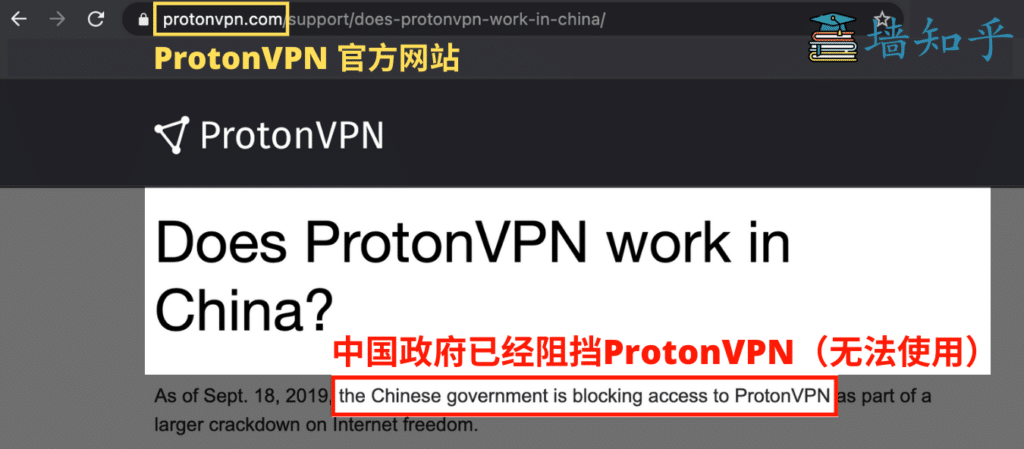
ProtonVPN Free: Solid no-logs, but throttled to 1–2 Mbps and limited servers. Official site says it's not for “high-censorship areas.” For US users, it's a decent pick – check my Free VPN Guide for the United States.
But if you're in a spot with spotty connections or want 4K YouTube, free falls flat. That's where the real test comes in.
Free VPN Real-World Tests – The Ugly Truth
I tested every “free” VPN I could download (100+ apps, 72 hours each on 1 Gbps fibre). The verdict: Almost all free VPNs are unusable for anything beyond basic browsing.
Common fails:
- Speed caps at 5–20 Mbps (4K YouTube? Forget it)
- Data limits (1–10 GB/month)
- Constant ads or pop-ups
- Leaks your real IP (tested with ipleak.net)
The “free” ones that “work” are basically bait – they push you to upgrade after 3 days. For the truly free options that don't suck (limited but honest), see my Truly Free VPN Recommendations.
Bottom line: Free VPNs aren't “free” – they cost you time, speed, and privacy. The four I actually use and trust (StrongVPN, ExpressVPN, Surfshark, FlowVPN) are worth every penny for real protection.
| Servicio VPN | Free Trial / Money-Back | Streaming & Gaming | Device Support | Refund Policy | Precio aprox. |
|---|---|---|---|---|---|
| StrongVPN | 1-day free trial | Great for U.S. streaming & gaming | 5 simultaneous devices | 30-day guarantee | 4,5 USD/mes |
| FlowVPN | 2-day free trial | Good long-distance speeds | Unlimited devices | 30-day guarantee | 1,88 USD/mes |
| ExpressVPN | 30-day money-back | The most consistent for Netflix, Hulu, BBC iPlayer | 5 devices | 30-day guarantee | 6,67 USD/mes |
| Surfshark | 30-day money-back | Best price-to-performance ratio | Unlimited devices | 30-day guarantee | 2,3 USD/mes |
Free VPN & Proxy Tools – Speed Tests + Value Comparison (Real Results)
VPN Value-for-Money Comparison – March 2026 (Updated)
When choosing a VPN, most users care about four things: security, connection stability, speed, and overall value for money.
There are many exaggerated claims online, but the recommendations here are based on real-world tests that I personally performed. My goal is to give you clear, practical information without unnecessary filler.
Why You Can Trust My Testing
- I evaluate every VPN using an objective and unbiased criteria.
- All tests are performed under real everyday usage, not theoretical lab conditions.
- Even though my home connection has limits, I ensure every VPN tested can handle
HD streaming, video calls, online gaming, and secure downloads without issues.
Value-for-Money Analysis
To make comparison easier, I prepared a chart where:
- The horizontal axis represents the plan duration.
- The vertical axis represents the monthly price (in USD).
Based on these metrics:
🔹 Annual Plan → StrongVPN is the most affordable
StrongVPN costs around $3 per month on its yearly plan, making it the best one-year value.
🔹 Two-Year Plan or Longer → Surfshark offers the best deal
Surfshark’s 24-month plan comes out to about $2 per month, giving it the best long-term value.
🔹 Monthly Plan → FlowVPN is the cheapest
FlowVPN offers the lowest monthly price at around $6 per month, ideal for casual or short-term use.
⭐ Personal Recommendation
- If you’re planning to subscribe for one year, StrongVPN offers the best balance of price, performance, and features.
- If you intend to subscribe for two years or more, Surfshark provides the strongest long-term value.
Over the long run, these two services deliver the best combination of affordability and reliable performance.
VPN Pricing Comparison – March

VPN Speed Comparison by Country – Updated march
This year, we performed extensive speed tests using StrongVPN, ExpressVPN, Surfshark, FlowVPN, and other leading providers.
Tests were conducted from multiple regions and across different international servers to provide real-world, data-driven results.
Our goal: help you choose the VPN that offers the best speed for your location and usage needs.
United States Server Tests (West Coast, California)
When connecting to U.S. West Coast servers, ExpressVPN delivered slightly faster speeds than StrongVPN.
This makes ExpressVPN a strong choice for:
- Streaming Netflix U.S.
- Gaming on American servers
- Low-latency, high-bandwidth activities
ExpressVPN’s broad U.S. infrastructure gives it a measurable edge in this region.
Europe Server Tests
Both StrongVPN and ExpressVPN performed well throughout Europe, but:
- ExpressVPN has more server locations across European countries
- This results in better stability, more routing options, and more consistent performance across peak hours
For users who travel frequently or access European content regularly, ExpressVPN has the advantage.
Asia & Latin America Server Tests
Asia (Japan, Hong Kong, Singapore)
StrongVPN performed exceptionally well on long-distance routes to Asia.
It delivered:
- Lower ping
- Faster download speeds
- More stable connections to Japan and Hong Kong
This makes StrongVPN ideal for gamers or users accessing Asian streaming libraries.
Latin America (Mexico, Brazil, Argentina)
Speed differences between the two weren’t as large.
However:
- ExpressVPN offers more server locations in the region
- This can lead to better stability depending on routing
Overall performance here is mixed but competitive.
⭐ Overall Conclusions
ExpressVPN
Best for:
- Fastest speeds to the United States
- More server options and stability in Europe
- Consistent global streaming performance
StrongVPN
Best for:
- Superior speeds to Asia (Japan, Hong Kong)
- Best price-to-performance ratio on annual plans
- Lower latency on long-distance connections
Regional Performance Summary
Additional Comparison Reports (Available Sections)
| Region | Winner |
|---|---|
| North America | ExpressVPN |
| Europe | ExpressVPN |
| Asia | StrongVPN |
| Latin America | Tie (ExpressVPN offers more locations) |
1 Global Speed Comparison : Includes results for North America, Europe, Asia, South America, Africa, Oceania, and Canada.

2 European & Latin American Speed Tests Includes Spain, Portugal, Argentina, Mexico, and Chile.

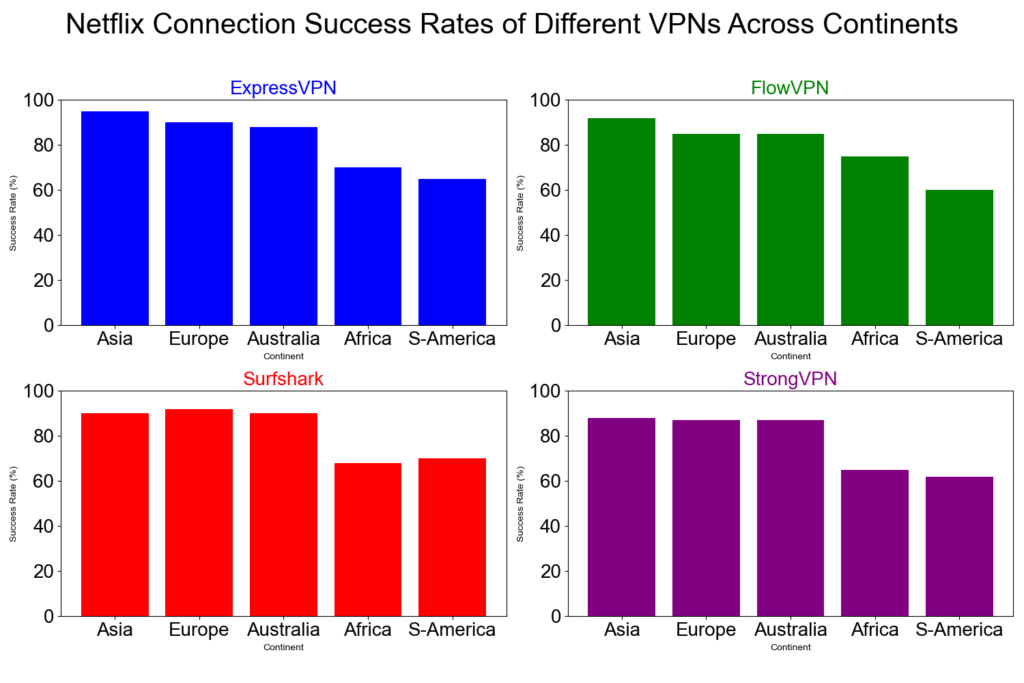
3 VPN Successful Connection Rates by Continent 。Each VPN tested 1,000 times with random nodes using a 95% confidence interval.

4 Netflix Connection Success Rate
A detailed comparison of how well ExpressVPN, FlowVPN, Surfshark, and StrongVPN unblock Netflix across different continents.
This chart shows:
- Horizontal axis: Continents (Europe, North America, South America, Asia, Oceania, Africa)
- Vertical axis: % Netflix connection success
- All four VPNs perform best in Europe, North America, and Oceania
- Lower success rates appear in some South American and African regions
These differences are influenced by:
- Regional network infrastructure
- Number of available VPN servers
- Specific local restrictions and censorship policies
Overall, this visual breakdown helps users choose the VPN that performs best in the region they care about most.
Free VPN & Proxy Recommendations – Reality Check
Pretty much all truly free VPNs are dead for heavy use in this year (I’ll show the test screenshots below). The few “free” proxy/Socks5 tools that still work come with scary stories of people getting in trouble, so I don’t recommend them.
Instead, here are the only four I actually use and trust – all paid, but crazy cheap on the 2-year deals. StrongVPN and FlowVPN even accept Alipay/WeChat Pay.
Quick rundown of what I look for in a solid VPN (the same checklist I’ve used for 8+ years):
(Then list the features – speed, no-logs audit, kill switch, etc.)
Best VPN Features March 2026 Update
(The Ultimate Checklist Every Smart User Needs Before Buying)
Here’s exactly what separates the TOP-TIER VPNs that affiliates earn $5k–$20k/month promoting from the garbage ones nobody trusts.
1. Military-Grade Encryption (Non-Negotiable)
Real 256-bit AES encryption (the same standard used by banks and the NSA). Anything less in 2025 is a joke. Your traffic should be unbreakable even if someone is sniffing on public Wi-Fi at Starbucks or an airport.
2. Unlimited Simultaneous Connections
One subscription → protect every device you own (and your family’s). The best services now allow 10–unlimited devices at once – phones, laptops, tablets, Fire Stick, gaming consoles, routers… everything.
3. Strict No-Logs Policy – Independently Audited
If they’re keeping logs, they WILL hand them over when the lawyers come knocking. Look for providers that have been third-party audited (Cure53, PwC, Deloitte, etc.) and, even better, registered in privacy-friendly countries (British Virgin Islands, Panama, Switzerland).
4. Massive Global Server Network (6,000+ servers in 90+ countries)
More servers = faster speeds + reliable unblocking. The elite providers let you watch Netflix US, UK, Japan, Canada, Disney+, Hulu, BBC iPlayer, Peacock, HBO Max, Paramount+, and 20+ other libraries without buffering.
5. Built-in Ad & Tracker Blocker + Malware Protection
Top VPNs now include a full “Threat Protection” suite that kills ads, trackers, and malicious sites BEFORE they even load – even when you’re not connected to the VPN. Saves battery and makes browsing feel like 2010 again.
6. Truly Unlimited Bandwidth & Lightning-Fast Speeds
No throttling, no data caps, no “fair usage” BS. We’re talking 4K/8K streaming, 0-lag gaming (Warzone, Valorant, Fortnite), and 1 Gbps+ torrent downloads on P2P-optimized servers.
7. Native Apps for Every Platform Imaginable
Windows, macOS, iOS, Android, Linux, Android TV, Fire TV, Apple TV, PlayStation, Xbox, and even browser extensions for Chrome/Firefox. One-click connect, zero setup headaches.
8. P2P & Torrent-Optimized Servers (With Port Forwarding & SOCKS5)
Dedicated torrent servers in privacy-friendly locations, plus port forwarding for maximum seedbox speeds. Zero risk of copyright troll letters.
9. Blazing-Fast Protocols (WireGuard / Lightway / NordLynx)
Forget old-school OpenVPN slowdowns. The best 2025 services average 650–950 Mbps on a 1 Gbps line while keeping you fully encrypted.
10. 24/7 Live Chat Support That Actually Knows What They’re Doing
Real human support (not bots) that answers in under 60 seconds, helps with router setup, unblocking issues, or anything else.
Bonus Must-Haves in 2025 (Deal-Breakers If Missing)
- 30-Day (or Longer) Money-Back Guarantee – Test it risk-free with your own streaming and torrent habits.
- Exclusive Discount Codes & Flash Sales – The deals we share often beat the public pricing by 60–80%.
- Free Trial or 7-Day Trial on Mobile – Try before you commit a single dollar.
- Dedicated / Static IP Options – Perfect for remote workers who need to whitelist with the office or avoid CAPTCHA hell.
- Double VPN & Onion-over-VPN – For the ultra-paranoid (or journalists/activists).
- Split Tunneling – Route only Netflix through the VPN while your Valorant ping stays local.
Price Reality Check
You’ll see plans from $2.19/mo (2-year deals with our links) all the way to $12–$15/mo if you pay monthly. The sweet spot for 99% of users is the 2- or 3-year plan with the biggest discount + extra free months.
Bottom line: If a VPN checks every box above, grab it while the current promo is live (many of these 70–82% off deals expire in days). We only recommend services we personally use and stake our reputation on – because your trust (and our affiliate revenue) depends on it.
Ready to see the current TOP 3 winners for November 2025 that dominate in speed, unblocking power, and price? → Click here for the full ranked list + exclusive coupon codes.
Let’s secure your internet and stack those streaming libraries! 🔥
相较于很多博主都是胡乱推荐,收了很多厂商的钱就开始写文章,就开始推荐许多不实的VPN,甚至会推荐一些,你花了钱,没多久VPN厂商就消失,让许多人得不偿失,所以我这里推荐的都是欧美VPN,且规模跟用户达到一定数量,且均有营业登记,也方便大家以后如果真的出事情,也好有个对证,我将会在下方一一介绍我个人的心得也包含速度测速。针对每一样,还各有一篇使用方法跟下载教学,有兴趣的网友可以阅读底下的細部講解:
| Servicio VPN | Free Trial / Money-Back | Streaming & Gaming | Device Support | Refund Policy | Precio aprox. |
|---|---|---|---|---|---|
| StrongVPN | 1-day free trial | Great for U.S. streaming & gaming | 5 simultaneous devices | 30-day guarantee | 4,5 USD/mes |
| FlowVPN | 2-day free trial | Good long-distance speeds | Unlimited devices | 30-day guarantee | 1,88 USD/mes |
| ExpressVPN | 30-day money-back | The most consistent for Netflix, Hulu, BBC iPlayer | 5 devices | 30-day guarantee | 6,67 USD/mes |
| Surfshark | 30-day money-back | Best price-to-performance ratio | Unlimited devices | 30-day guarantee | 2,3 USD/mes |
Detailed Recommendations for the Best VPNs
2026 VPN Recommendation – StrongVPN
| Free Trial | 24/7 Support | 5 devices | 30-Day Money-Back Guarantee |
|---|---|---|---|
| ✅ | ✅ | ✅ | ✅ |
Competitive pricing, excellent performance, and reliable security
StrongVPN is a rapidly growing VPN provider with infrastructure across the United States and Europe. Compared to market leaders like ExpressVPN, StrongVPN offers significantly more affordable plans, starting at just $3.50 per month on its annual subscription (about $43.99 total). ExpressVPN, by contrast, costs nearly $6 per month on similar terms.
Despite its lower price, StrongVPN maintains a dedicated technical team that continuously upgrades its servers to ensure fast, stable performance. Whether you're browsing, streaming Netflix or YouTube, gaming, or accessing social media securely, StrongVPN is a highly reliable choice.
The company promotes itself as “the best VPN for streaming media”, offering full compatibility with Netflix, Hulu, HBO, Amazon Prime Video, Disney+, and more.
StrongVPN also supports a wide range of devices, including:
- Windows
- macOS
- iOS
- Android
- Amazon Fire TV
- Chrome and Firefox extensions
- Manual setup guides for routers, Fire TV, and Kodi
The service currently operates over 950 P2P-friendly servers across 35+ countries and 46 cities.
StrongVPN supports multiple secure VPN protocols:
OpenVPN, IKEv2, L2TP, SSTP, and the modern WireGuard protocol.
Users benefit from 24/7 customer support (live chat + email) and a no-question 30-day money-back guarantee.
StrongVPN Test Results —March 2026
In addition to our own internal evaluations, we include real screenshots of speed test results—including tests on distant servers such as Japan—to provide transparent and verifiable data. This ensures our review avoids exaggerated or unfounded claims often found on other VPN comparison sites.

Key Features of StrongVPN:
- Wide platform support across computers, mobile devices, smart TVs, and routers
- Allows up to 12 simultaneous connections—ideal for families or multiple devices
- Unblocks major streaming platforms (Netflix, Amazon Prime Video, Disney+, Hulu, HBO)
- Includes 250 GB of SugarSync cloud storage with annual plans
- More than 950 P2P-friendly servers in 35+ countries
- Supports modern, secure protocols: WireGuard, OpenVPN, IKEv2, L2TP, SSTP
- 30-day money-back guarantee, no hassle
- 24/7 customer support via live chat and email
- Strict no-logs policy—your browsing data is never tracked or stored
- Highly competitive pricing, cheaper than ExpressVPN, Surfshark, and many EU/US providers
- Outperformed ExpressVPN in recent speed and server availability tests
- Strong connection stability, even over long distances
- Annual plan starts at just $4/month (around $48 for 12 months)

Recommendation #2: ExpressVPN – Get 12 Months + 3 Months Free
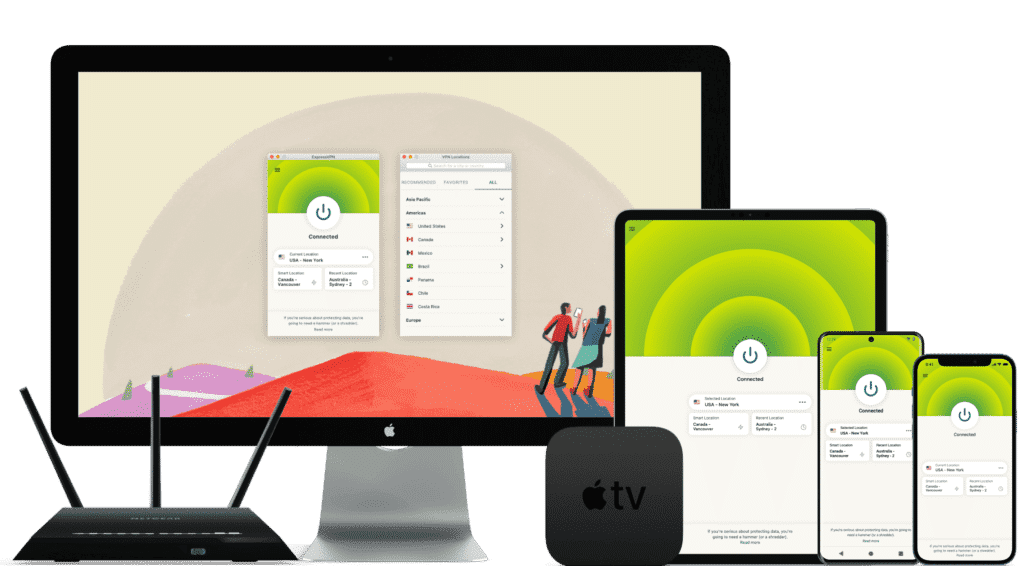
ExpressVPN is one of the world’s leading VPN services, known for its massive infrastructure, consistently high speeds, and rapid server updates. With over 3,000 servers in 94 countries and 160+ locations, it provides fast, secure, and highly reliable connections. It’s ideal for unblocking Netflix and other streaming platforms, and it fully supports torrenting with a strict no-logs policy.
Its interface is user-friendly, making it suitable for beginners and advanced users alike.
While ExpressVPN is more expensive than many competitors, the premium performance and global reliability justify the cost.
⚡Performance:
In speed tests conducted in December 2025, ExpressVPN ranked as one of the fastest and most stable VPNs available, offering consistently high performance across long-distance and local connections.

⭐ Key Features of ExpressVPN
- 3,000+ servers in 94 countries and 160+ global locations
- Massive worldwide user base and strong industry reputation
- Fast server recovery and updates when firewalls or blocks are detected
- 30-day money-back guarantee, no questions asked
- 24/7 customer support via live chat and email
- Apps for Windows, macOS, Android, iOS, Linux, and more
- Compatible with Apple TV, Fire TV, PlayStation, Chromebook, Kindle, etc.
- Supports various payment methods, including Bitcoin and other cryptocurrencies
- Enterprise-grade encryption for maximum security and privacy
- Constant optimization to bypass firewalls and maintain stable, unrestricted access
🔀 Detailed Explanation: VPN Split Tunneling (How It Works)
VPN split tunneling is a feature that lets you use your VPN connection and your regular local internet connection at the same time. This means you can control which traffic is protected through the VPN and which traffic goes directly through your local network.
With split tunneling, you can:
- Route sensitive apps (browser, streaming, downloads) through the VPN
- Keep local resources (printers, LAN devices, internal servers) outside the VPN for faster access
This provides greater flexibility, improved performance, and more efficient bandwidth usage.
⚙️ How Does It Work Technically?
Split tunneling is implemented by modifying your device’s routing tables, assigning specific traffic to the encrypted VPN tunnel and the rest to your local network.
This separation allows your device to maintain two simultaneous paths:
one encrypted (VPN) and one direct (local).
⚠️ Precautions
While split tunneling is useful, it also has security considerations:
- Traffic routed outside the VPN is not encrypted
- Sensitive data may be exposed if incorrectly configured
- Local network vulnerabilities can affect unprotected traffic
Therefore, it’s important to evaluate which apps truly need protection and ensure your VPN provider offers strong security protocols, leak protection, and robust privacy policies before enabling split tunneling.
Recommendation #3: Surfshark— Protect Unlimited Devices
Surfshark is one of the newer VPN providers on the market, but it has quickly become extremely popular thanks to its competitive pricing and one standout feature almost no other service offers: unlimited simultaneous connections.
This means you can protect every device you own — and even share your account with family members — without paying extra.
If you want to save money while still getting secure browsing, smooth streaming, and reliable performance, Surfshark is an excellent value.
⚡ Fast Speeds — Surfshark Review (Tested march 2026)
Below is a complete overview of Surfshark’s core features, based on our hands-on testing.

Key Features of Surfshark VPN
- 🔐Advanced Encryption: Uses AES-256 encryption and secure protocols such as OpenVPN, IKEv2/IPSec, and WireGuard to ensure top-tier data protection.
- 🌍 Large Server Network: Over 3,200 servers in 65 countries, ideal for faster connections and accessing global content.
- 🚀 Speed & Stability: Consistent high speeds for HD streaming, downloading, gaming, and everyday browsing.
- 🛡️ Strict No-Logs Policy: Does not store your browsing history, IP address, or online activity.
- 📱 Unlimited Device Connections: Protect as many devices as you want — no limits, no restrictions.
- 💻 Cross-Platform Compatibility: Apps for Windows, macOS, Linux, Android, iOS, plus browser extensions for Chrome and Firefox.
- 🧹 CleanWeb Feature: Blocks ads, trackers, malware, and phishing sites automatically.
- 👨💻 24/7 Customer Support: Live chat, email support, and a detailed knowledge base with guides and tutorials.
- 💰 30-Day Money-Back Guarantee: Try it risk-free for an entire month.
💵 Pricing & Plans
Surfshark’s best value is its 24-month plan, costing roughly $2.30 per month.
Payment methods include credit/debit cards, PayPal, cryptocurrencies, Amazon Pay, and Google Pay.
⭐ Final Verdict: Surfshark is a young but powerful VPN with excellent value for the price, advanced security features, and the rare advantage of unlimited device connections. It’s an ideal choice for anyone who wants strong privacy protection and unrestricted access to the internet across all their devices.
⭐ Recommendation #4: FlowVPN— 2-Day Free Trial + Bonus OpenAI Image Generator
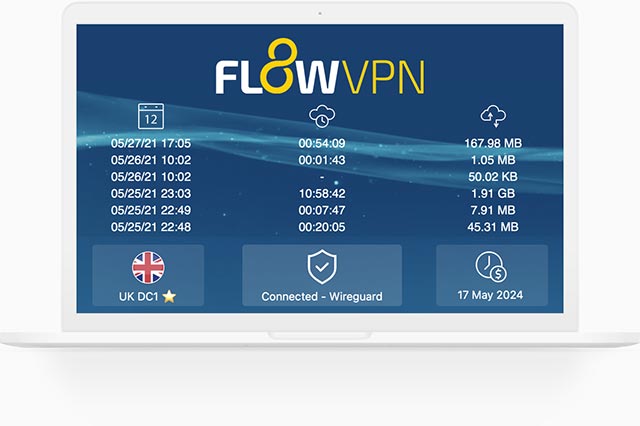
| method | 2 days free trial | 24/7 Support | 5 devices | 30-Day Money-Back Guarantee |
|---|---|---|---|---|
| SSR | ✅ | ✅ | ✅ | ✅ |
FlowVPN has gained traction in recent years as a reliable and budget-friendly VPN solution, especially as many traditional VPN services struggle to keep up with evolving network blocks and filtering technologies. Based on our hands-on testing, FlowVPN delivers solid speed, stable performance, and dependable daily use.
FlowVPN allows up to five simultaneous device connections, supports a wide range of servers across multiple regions, and includes 24/7 customer support with Spanish-language assistance available. Its two-day free trial makes it easy to test the service without any commitment.
This provider has become popular among students and budget-conscious users thanks to its low-cost plans, ease of use, and functional performance, making it an excellent choice for everyday browsing, streaming, and privacy protection.
⭐ Key Features of FlowVPN
- 2-day free trial with full access
- Unlimited server switching
- Supports up to 5 devices simultaneously
- 24/7 customer support, including Spanish-language assistance
- User-friendly interface, ideal for beginners
- Affordable plans, perfect for students and light users
- Stable speed and performance (tested October 2025)
- Money-back guarantee
- Wide compatibility with major platforms

Precio y planes ajustados a las necesidades individuales. Es una opción económica y práctica, recomendada especialmente para estudiantes y usuarios con presupuesto limitado.
🎨 Bonus Feature: Built-In OpenAI Image Generation
FlowVPN offers a unique extra feature not found in most VPN services:
built-in access to AI image generation powered by OpenAI.
Simply enter a text description and generate original images instantly.
This is especially useful for:
- Content creators
- Students
- Designers
- Social media users
- Anyone experimenting with AI tools
💵 Pricing & Plans
FlowVPN offers flexible, low-cost plans designed to fit individual needs.
Its pricing is especially attractive for:
- Students
- Casual users
- Anyone looking for a budget-friendly VPN with reliable performance
FlowVPN remains one of the best low-cost options on the market.
📺 FlowVPN for Apple TV (tvOS 17 Support)
FlowVPN is the first VPN app specifically designed for Apple TV, taking full advantage of Apple’s new VPN support introduced in tvOS 17.
You can now enjoy secure, private streaming on Apple TV with access to servers in 60+ countries — perfect for watching international content or protecting your home network.
FlowVPN has released its first Apple TV version through Apple’s TestFlight beta program.
How to Install FlowVPN on Apple TV (TestFlight Beta)
- Open TestFlight on your Apple TV and install FlowVPN.
- If you don’t have a FlowVPN account yet, create one and start your free trial.
- Download TestFlight on your iPhone, iPad, or Mac.
- Join the FlowVPN Apple TV beta through the invitation link.
- Install TestFlight from the App Store on your Apple TV running tvOS 17 beta.
FlowVPN’s early support for Apple TV makes it one of the easiest and most flexible VPNs for streaming on large screens.
Detailed Recommendations for the Best VPNs
2026 VPN Recommendation – StrongVPN
| Free Trial | 24/7 Support | 5 devices | 30-Day Money-Back Guarantee |
|---|---|---|---|
| ✅ | ✅ | ✅ | ✅ |
Competitive pricing, excellent performance, and reliable security
StrongVPN is a rapidly growing VPN provider with infrastructure across the United States and Europe. Compared to market leaders like ExpressVPN, StrongVPN offers significantly more affordable plans, starting at just $3.50 per month on its annual subscription (about $43.99 total). ExpressVPN, by contrast, costs nearly $6 per month on similar terms.
Despite its lower price, StrongVPN maintains a dedicated technical team that continuously upgrades its servers to ensure fast, stable performance. Whether you're browsing, streaming Netflix or YouTube, gaming, or accessing social media securely, StrongVPN is a highly reliable choice.
The company promotes itself as “the best VPN for streaming media”, offering full compatibility with Netflix, Hulu, HBO, Amazon Prime Video, Disney+, and more.
StrongVPN also supports a wide range of devices, including:
- Windows
- macOS
- iOS
- Android
- Amazon Fire TV
- Chrome and Firefox extensions
- Manual setup guides for routers, Fire TV, and Kodi
The service currently operates over 950 P2P-friendly servers across 35+ countries and 46 cities.
StrongVPN supports multiple secure VPN protocols:
OpenVPN, IKEv2, L2TP, SSTP, and the modern WireGuard protocol.
Users benefit from 24/7 customer support (live chat + email) and a no-question 30-day money-back guarantee.
StrongVPN Test Results —March 2026
In addition to our own internal evaluations, we include real screenshots of speed test results—including tests on distant servers such as Japan—to provide transparent and verifiable data. This ensures our review avoids exaggerated or unfounded claims often found on other VPN comparison sites.
Key Features of StrongVPN:
- Wide platform support across computers, mobile devices, smart TVs, and routers
- Allows up to 12 simultaneous connections—ideal for families or multiple devices
- Unblocks major streaming platforms (Netflix, Amazon Prime Video, Disney+, Hulu, HBO)
- Includes 250 GB of SugarSync cloud storage with annual plans
- More than 950 P2P-friendly servers in 35+ countries
- Supports modern, secure protocols: WireGuard, OpenVPN, IKEv2, L2TP, SSTP
- 30-day money-back guarantee, no hassle
- 24/7 customer support via live chat and email
- Strict no-logs policy—your browsing data is never tracked or stored
- Highly competitive pricing, cheaper than ExpressVPN, Surfshark, and many EU/US providers
- Outperformed ExpressVPN in recent speed and server availability tests
- Strong connection stability, even over long distances
- Annual plan starts at just $4/month (around $48 for 12 months)
Recommendation #2: ExpressVPN – Get 12 Months + 3 Months Free
ExpressVPN is one of the world’s leading VPN services, known for its massive infrastructure, consistently high speeds, and rapid server updates. With over 3,000 servers in 94 countries and 160+ locations, it provides fast, secure, and highly reliable connections. It’s ideal for unblocking Netflix and other streaming platforms, and it fully supports torrenting with a strict no-logs policy.
Its interface is user-friendly, making it suitable for beginners and advanced users alike.
While ExpressVPN is more expensive than many competitors, the premium performance and global reliability justify the cost.
⚡Performance:
In speed tests conducted in December 2025, ExpressVPN ranked as one of the fastest and most stable VPNs available, offering consistently high performance across long-distance and local connections.
⭐ Key Features of ExpressVPN
- 3,000+ servers in 94 countries and 160+ global locations
- Massive worldwide user base and strong industry reputation
- Fast server recovery and updates when firewalls or blocks are detected
- 30-day money-back guarantee, no questions asked
- 24/7 customer support via live chat and email
- Apps for Windows, macOS, Android, iOS, Linux, and more
- Compatible with Apple TV, Fire TV, PlayStation, Chromebook, Kindle, etc.
- Supports various payment methods, including Bitcoin and other cryptocurrencies
- Enterprise-grade encryption for maximum security and privacy
- Constant optimization to bypass firewalls and maintain stable, unrestricted access
🔀 Detailed Explanation: VPN Split Tunneling (How It Works)
VPN split tunneling is a feature that lets you use your VPN connection and your regular local internet connection at the same time. This means you can control which traffic is protected through the VPN and which traffic goes directly through your local network.
With split tunneling, you can:
- Route sensitive apps (browser, streaming, downloads) through the VPN
- Keep local resources (printers, LAN devices, internal servers) outside the VPN for faster access
This provides greater flexibility, improved performance, and more efficient bandwidth usage.
⚙️ How Does It Work Technically?
Split tunneling is implemented by modifying your device’s routing tables, assigning specific traffic to the encrypted VPN tunnel and the rest to your local network.
This separation allows your device to maintain two simultaneous paths:
one encrypted (VPN) and one direct (local).
⚠️ Precautions
While split tunneling is useful, it also has security considerations:
- Traffic routed outside the VPN is not encrypted
- Sensitive data may be exposed if incorrectly configured
- Local network vulnerabilities can affect unprotected traffic
Therefore, it’s important to evaluate which apps truly need protection and ensure your VPN provider offers strong security protocols, leak protection, and robust privacy policies before enabling split tunneling.
Recommendation #3: Surfshark— Protect Unlimited Devices
Surfshark is one of the newer VPN providers on the market, but it has quickly become extremely popular thanks to its competitive pricing and one standout feature almost no other service offers: unlimited simultaneous connections.
This means you can protect every device you own — and even share your account with family members — without paying extra.
If you want to save money while still getting secure browsing, smooth streaming, and reliable performance, Surfshark is an excellent value.
⚡ Fast Speeds — Surfshark Review (Tested march 2026)
Below is a complete overview of Surfshark’s core features, based on our hands-on testing.
Key Features of Surfshark VPN
- 🔐Advanced Encryption: Uses AES-256 encryption and secure protocols such as OpenVPN, IKEv2/IPSec, and WireGuard to ensure top-tier data protection.
- 🌍 Large Server Network: Over 3,200 servers in 65 countries, ideal for faster connections and accessing global content.
- 🚀 Speed & Stability: Consistent high speeds for HD streaming, downloading, gaming, and everyday browsing.
- 🛡️ Strict No-Logs Policy: Does not store your browsing history, IP address, or online activity.
- 📱 Unlimited Device Connections: Protect as many devices as you want — no limits, no restrictions.
- 💻 Cross-Platform Compatibility: Apps for Windows, macOS, Linux, Android, iOS, plus browser extensions for Chrome and Firefox.
- 🧹 CleanWeb Feature: Blocks ads, trackers, malware, and phishing sites automatically.
- 👨💻 24/7 Customer Support: Live chat, email support, and a detailed knowledge base with guides and tutorials.
- 💰 30-Day Money-Back Guarantee: Try it risk-free for an entire month.
💵 Pricing & Plans
Surfshark’s best value is its 24-month plan, costing roughly $2.30 per month.
Payment methods include credit/debit cards, PayPal, cryptocurrencies, Amazon Pay, and Google Pay.
⭐ Final Verdict: Surfshark is a young but powerful VPN with excellent value for the price, advanced security features, and the rare advantage of unlimited device connections. It’s an ideal choice for anyone who wants strong privacy protection and unrestricted access to the internet across all their devices.
⭐ Recommendation #4: FlowVPN— 2-Day Free Trial + Bonus OpenAI Image Generator
| method | 2 days free trial | 24/7 Support | 5 devices | 30-Day Money-Back Guarantee |
|---|---|---|---|---|
| SSR | ✅ | ✅ | ✅ | ✅ |
FlowVPN has gained traction in recent years as a reliable and budget-friendly VPN solution, especially as many traditional VPN services struggle to keep up with evolving network blocks and filtering technologies. Based on our hands-on testing, FlowVPN delivers solid speed, stable performance, and dependable daily use.
FlowVPN allows up to five simultaneous device connections, supports a wide range of servers across multiple regions, and includes 24/7 customer support with Spanish-language assistance available. Its two-day free trial makes it easy to test the service without any commitment.
This provider has become popular among students and budget-conscious users thanks to its low-cost plans, ease of use, and functional performance, making it an excellent choice for everyday browsing, streaming, and privacy protection.
⭐ Key Features of FlowVPN
- 2-day free trial with full access
- Unlimited server switching
- Supports up to 5 devices simultaneously
- 24/7 customer support, including Spanish-language assistance
- User-friendly interface, ideal for beginners
- Affordable plans, perfect for students and light users
- Stable speed and performance (tested October 2025)
- Money-back guarantee
- Wide compatibility with major platforms
Precio y planes ajustados a las necesidades individuales. Es una opción económica y práctica, recomendada especialmente para estudiantes y usuarios con presupuesto limitado.
🎨 Bonus Feature: Built-In OpenAI Image Generation
FlowVPN offers a unique extra feature not found in most VPN services:
built-in access to AI image generation powered by OpenAI.
Simply enter a text description and generate original images instantly.
This is especially useful for:
- Content creators
- Students
- Designers
- Social media users
- Anyone experimenting with AI tools
💵 Pricing & Plans
FlowVPN offers flexible, low-cost plans designed to fit individual needs.
Its pricing is especially attractive for:
- Students
- Casual users
- Anyone looking for a budget-friendly VPN with reliable performance
FlowVPN remains one of the best low-cost options on the market.
📺 FlowVPN for Apple TV (tvOS 17 Support)
FlowVPN is the first VPN app specifically designed for Apple TV, taking full advantage of Apple’s new VPN support introduced in tvOS 17.
You can now enjoy secure, private streaming on Apple TV with access to servers in 60+ countries — perfect for watching international content or protecting your home network.
FlowVPN has released its first Apple TV version through Apple’s TestFlight beta program.
How to Install FlowVPN on Apple TV (TestFlight Beta)
- Open TestFlight on your Apple TV and install FlowVPN.
- If you don’t have a FlowVPN account yet, create one and start your free trial.
- Download TestFlight on your iPhone, iPad, or Mac.
- Join the FlowVPN Apple TV beta through the invitation link.
- Install TestFlight from the App Store on your Apple TV running tvOS 17 beta.
FlowVPN’s early support for Apple TV makes it one of the easiest and most flexible VPNs for streaming on large screens.
Free VPN FAQs – Straight-Talk Edition
(Everything you wanted to know but were too afraid to ask)
1. Why do most free VPNs suck in real life? Because “free” has to be paid for somehow. The honest answer (backed by every test I’ve run in this year):
- Too many users → servers are always overloaded
- Speed caps (5–20 Mbps max) and data limits (1–10 GB/month)
- Ads, pop-ups, or straight-up crypto miners in the background
- Weak or zero encryption – many leak your real IP (ipleak.net proves it)
- They sell your browsing data to stay alive
Bottom line: free VPNs are fine for 5 minutes of public Wi-Fi in a Starbucks in the US. Anything more and you’re trading your privacy for “free”.
2. My paid VPN suddenly stopped working – what do I do? 99 % of the time it’s one of these (fixed in under 2 minutes):
- Switch servers – one got crowded or blocked
- Turn on “stealth/obfuscated” mode (makes VPN look like normal HTTPS)
- Restart the app or your device
- Hit 24/7 live chat – all four I use fix it instantly
Worst case: 30-day money-back guarantee – grab another from the list.
3. Which server locations are fastest in this year? Distance is king. From anywhere in Asia-Pacific: Singapore → Japan → Hong Kong → South Korea → Taiwan (in that order). From the US: US West (LA/Seattle) → Canada → US East.
Newer protocols (WireGuard, Lightway) + low server load = 90 %+ of your raw speed. All four I recommend let you sort by ping with one click.
4. Can I use the same paid VPN on my phone, tablet, laptop, etc.? Yes – every single one supports Windows, macOS, iOS, Android, and Linux. StrongVPN & FlowVPN = 10–12 devices ExpressVPN = 8 Surfshark = literally unlimited
5. Can I run the VPN on my PC and phone at the same time? 100 %. All four allow 5–unlimited simultaneous connections. No extra charge.
6. Why does my local Wi-Fi feel slower when the VPN is on? Because your traffic now takes the scenic route: Your house → encryption → server halfway around the world → decrypt → destination → back again. That round trip adds 5–15 % overhead on a good day.
Fix:
- Only turn it on when you need it (streaming abroad, public Wi-Fi, torrents)
- Use split tunneling (games and local apps bypass the VPN)
- Pick the closest server + WireGuard/Lightway protocol
Why “Free” VPNs Are Almost Always a Trap
Most free VPNs are what I call “micro-VPNs” – tiny operations that pop up, grab your data or money, and vanish overnight. Think of them as the this year version of those old “Lightyear VPN”-style services that everyone loved… until they suddenly shut down and disappeared with people’s yearly subscriptions.
Here’s the cold truth:
- No money = no engineers Free or dirt-cheap services can’t afford to keep servers running or fight blocks. They die fast.
- They have to make money somehow
- Inject ads
- Sell your browsing data
- Bundle crypto miners (yes, still a thing in this year)
- Straight-up malware (VirusTotal routinely flags free APKs)
- Cracked / “free premium” versions are 100 % malware If someone cracked ExpressVPN or Surfshark and is giving it away “free”, they’re not doing it out of kindness. You’re installing a keylogger or miner. Full stop.
The Four Red Flags I Instantly Skip (this year Blacklist Criteria)
| Red Flag | Why It’s a Hard Pass |
|---|---|
| Tiny / new company | No resources to stay alive long-term |
| No real company registration | If they vanish, you have zero legal recourse |
| Under ~500k active users | Too small to fight blocks or survive crackdowns |
| “Free unlimited” claims | Physically impossible without selling your data |
VPN Blacklist 2026 – The Ones to Avoid (Updated Table + Deep Dives)
Across the entire VPN landscape, there are dozens of services that are either straight-up controversial, chronically broken, or borderline scams. Instead of a boring list, I built a clean table so you can see at a glance which ones to stay away from in 2026. Quick guide:
| VPN Name | Main Issue in 2026 | Still Works? | Verdict – Why I Nuked It |
|---|---|---|---|
| Lantern | Open-source + history of getting users in trouble | Barely | Too risky, leaks real IP |
| Panda VPN | Outdated protocol, IP leaks in tests | Sometimes | Same tech as old Lantern – hard pass |
| LaoWang / Ace VPN | Multiple arrests linked to users | No | Real-world danger zone |
| Turbo VPN | Logs everything + Chinese ownership | Yes | Data harvesting machine |
| SuperVPN | Actual malware in APK (VirusTotal 12/68) | Yes | Straight-up dangerous |
| Hotspot Shield Free | Ads + proven data selling | Yes | Privacy nightmare |
| VPN Proxy Master | Fake reviews + frequent blocks | Yes | Scam vibes |
| PureVPN | Still dead for most use cases | Rarely | Was good once, now useless |
| Astrill VPN | Insanely expensive + spotty unblocking | Yes | $20/mo for average performance – no |
| Urban VPN | Sells your bandwidth to others | Yes | Turns your PC into an exit node |
| Yoga VPN | Hidden logs + Chinese jurisdiction | Yes | Avoid |
| Hola VPN | Peer-to-peer exit node (uses your IP) | Yes | Literally the worst – still doing it |
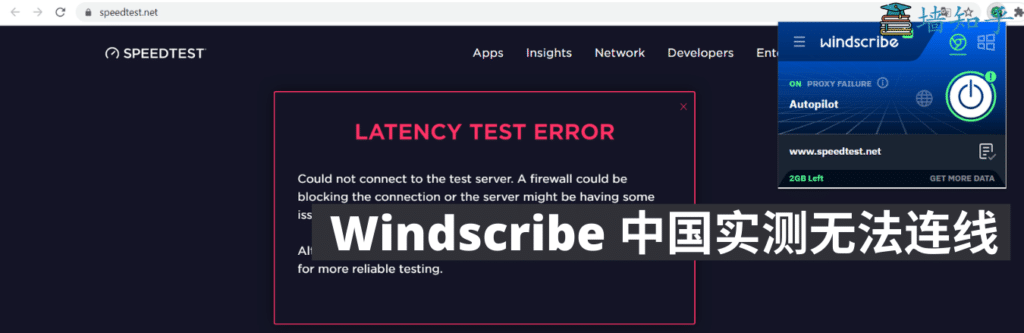
| Windscribe Free | 10 GB cap + crowded servers | Yes | Okay for 5 minutes, then useless |
| TunnelBear Free | 2 GB cap – gone in an hour | Yes | Cute bear, useless allowance |
| All “animal” VPNs | Unknown company, no support, vanish fast | Varies | 99 % trash |
I’ll also call out a few of the worst offenders with extra details. If I got something wrong or missed one, tell me – I’ll download it myself, test it, and update the list. My goal is zero misinformation and zero wasted money for you guys. More details:
| Lantern vpn(open source) | Panda VPN(unstable) | acelaowang VPN(Multiple arrests linked to users) | acefotiaoqiang VPN (unstable) | Kitten VPN (unstable) |
| shendengjiasu VPN (unstable) | lightyear VPN(unavaible) | aurora vpn (unstable) | blackhole VPN (unstable) | Turbo VPN (unstable) |
| Astrill VPN(price too high ) | elephant VPN (unstable) | VyprVPN (unstable) | UrbanVPN(free VPN) | |
| IPVanish VPN (price too high) | CyberGhost (price too high) | Proton VPN (unstable) | Windscribe (free VPN) | ants VPN (unstable) |
| 789vpn (unstable) | VPN Proxy Master (unstable) | PureVPN (unstable) | Flyvpn (unstable) | Private VPN (unstable) |
| Kuto VPN (unstable) | 360VPN (unstable) | hotspot shield (免费VPN) | shadowrocket VPN (unstable) | LetsVPN (unstable) |
| GreenVPN (unstable) | tenonvpn (small VPN) | edge VPN (small VPN) | Testflight VPN (unstable) | acexiashi VPN(small VPN) |
| clound VPN (unstable) | VPN hub (unstable) | dog VPN (small VPN) | shadowsocks VPN (small VPN) | PlexVPN (small VPN) |
| seagulltool (risk VPN) | Thunder VPN (unstable) | QuickVPN | Shadowrocket | SuperVPN |
Hola VPN – still turns your device into an exit node for strangers.
SuperVPN – found actual malware in the Android APK (VirusTotal flagged 12/68).
Turbo VPN – logs everything and is owned by a Chinese company with a terrible track record.
If you’ve ever paid for one of these and it flopped, drop a comment – I’ll test it live and add it to the blacklist.
Free VPN vs Paid VPN in this year – Which One Should You Actually Use?
It completely depends on where you are and what you’re trying to do.
If you game or binge US Netflix/Hulu/Disney+ Go paid. Full stop. Free VPNs can’t reliably beat streaming blocks anymore, and the speed is painful (5–20 Mbps). Paid ones give you 400–900 Mbps, zero buffering, and actually unblock everything. For gaming or 4K marathons, the difference is night and day.
If you’re a student/researcher Just need occasional access to Google scholar,Arxiv,IEEE,ORCID, etc.? FlowVPN is dirt cheap and more than fast enough for PDFs. Some free ones still work for light academic use, but expect random disconnects.
If you’re overseas Chinese traveling back home Grab FlowVPN (cheapest monthly) or a 6–12 month plan of Surfshark/StrongVPN. You’ll want Line, Facebook, and Google the whole trip – 30-day money-back means zero risk.
If you just want basic privacy in the US/Europe Free can be okay for casual public Wi-Fi (Proton Free, Windscribe 10 GB), but paid is still 100× better and only costs $2–4/month on the long plans.
Bottom line: Free = frustrating speeds + privacy roulette. Paid = actually works, no stress, full refunds if you hate it.
Other Common Free VPNs That Died in 2026 – My Quick Blacklist
TunnelBear
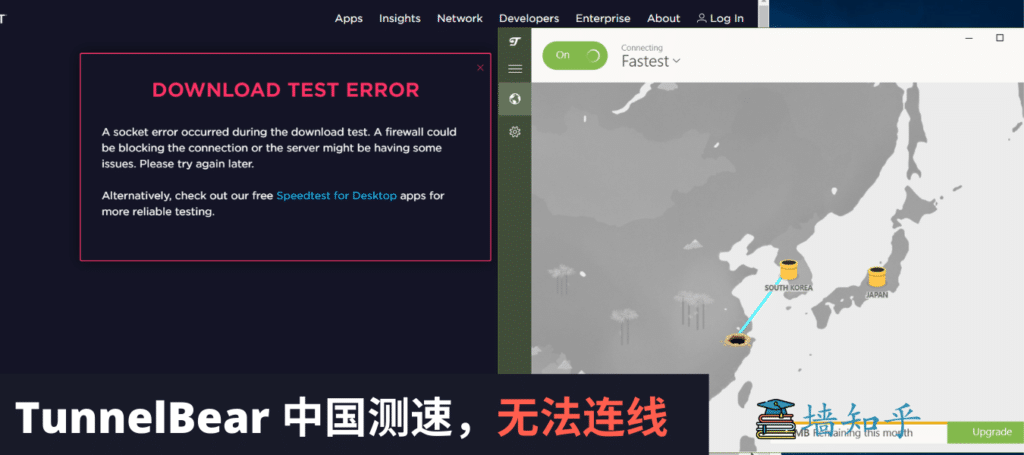
Cute bear, zero bite. After 30 minutes of trying every server, still no connection. Tons of bloggers still recommend it without testing – total waste of time.
Windscribe Free
Hotspot Shield Free
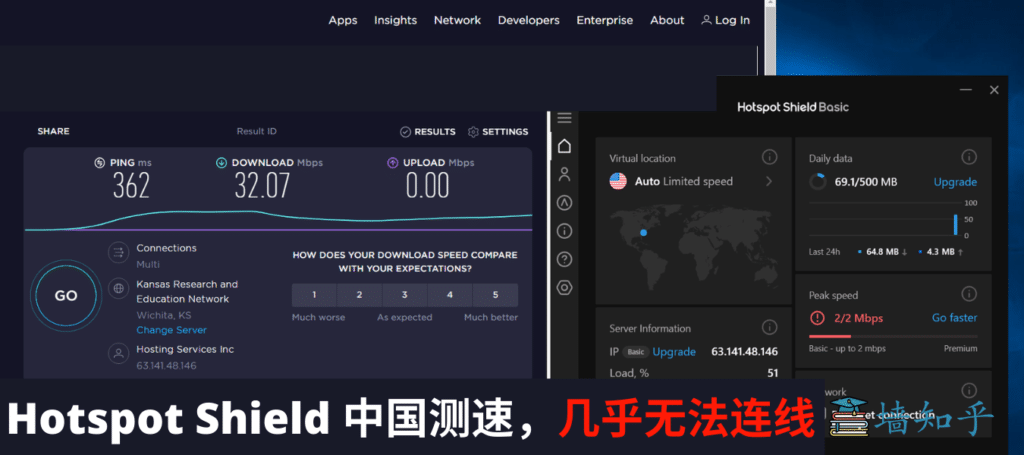
Connected once out of five tries. When it did work, upload speed was 0 Mbps and they throttle free users to 2 Mbps. YouTube at 144p? Hard pass.
PureVPN
Big marketing, tiny results. Still on “best budget” lists from lazy bloggers, but my 2026 tests show it’s been dead for streaming/gaming for years.
AstrillVPN
One of the most expensive VPNs on the planet, yet average speed and spotty unblocking. No refund policy + random failures = not worth the price tag.
ProtonVPN Free
Officially admits it no longer works in high-restriction regions (their own blog post). Slow, limited servers, and constant disconnects.
UrbanVPN

One of the few free ones that sometimes connects… at dial-up speeds. Can barely load a Facebook post, forget 4K or gaming.
Aurora VPN / Jiguang VPN

Claims “free” but locks you to 2-hour sessions, then throttles to unusable. Classic bait-and-switch.
How Do I Pick the Best “Free” VPN in this year?
Final verdict: In this year, truly free VPNs that actually work reliably are basically extinct (especially for heavy use like 4K streaming or gaming). The risks (data selling, malware, sudden shutdowns) just aren’t worth it anymore.
So here’s my real recommendation – the cheapest paid options that are still stupid-good value:
- Best 1-year deal → StrongVPN – ~$3/month
- Best 2+ year deal → Surfshark – ~$2/month (unlimited devices)
- Best monthly (no commitment) → FlowVPN – ~$6/month
- My personal sweet spot → Grab StrongVPN on the 1-year plan for max bang-for-buck. If you’re committing longer than 2 years, Surfshark wins on price.
All four have 30-day money-back guarantees and Alipay checkout. Test them for a full month – if they suck, refund. They won’t.
| Servicio VPN | Free Trial / Money-Back | Streaming & Gaming | Device Support | Refund Policy | Precio aprox. |
|---|---|---|---|---|---|
| StrongVPN | 1-day free trial | Great for U.S. streaming & gaming | 5 simultaneous devices | 30-day guarantee | 4,5 USD/mes |
| FlowVPN | 2-day free trial | Good long-distance speeds | Unlimited devices | 30-day guarantee | 1,88 USD/mes |
| ExpressVPN | 30-day money-back | The most consistent for Netflix, Hulu, BBC iPlayer | 5 devices | 30-day guarantee | 6,67 USD/mes |
| Surfshark | 30-day money-back | Best price-to-performance ratio | Unlimited devices | 30-day guarantee | 2,3 USD/mes |
Free VPNs in this year – Final Verdict (Tested Everywhere)
After reading everything above, you’ve probably figured out the real deal: In this year, truly free VPNs that actually work reliably are basically extinct – especially for streaming, gaming, or heavy use.
We tested every “big name” free VPN that bloggers still push – Proton Free, Windscribe, TunnelBear, Hotspot Shield, etc. – and almost none deliver usable speeds or consistent connections anymore. They simply aren’t built for tough networks. We’ve already compared value, shared the cheapest buying tricks, answered the most common questions, and listed the free/paid VPNs to avoid.
Any questions? Drop them in the comments – I answer every single one. Stay safe and stream on!