
Last Updated on 2026年10月1日 by wallzhihu
As we enter 2026, VPN usage on iPhones and iPads has become more important than ever. Whether you travel frequently, stream international content, work remotely, or simply want stronger online privacy, a reliable VPN ensures fast, secure, and unrestricted access to the internet on all Apple devices.
Many iOS users rely on VPNs not only for privacy but also for accessing global content libraries, protecting their data on public Wi-Fi, and avoiding ISP throttling. With so many VPN apps available on the App Store, choosing the right one can be overwhelming — especially when performance varies widely between providers.
That’s why we created the most comprehensive iOS VPN guide of 2026, based on real-world speed tests, hands-on app evaluations, and long-term reliability checks. Whether you're a beginner or an experienced VPN user, this guide gives you everything you need to pick the perfect VPN for your iPhone or iPad.
This article includes:
- The best iOS VPNs of 2026 (ranked by speed, security & value)
- How to choose the right VPN for your Apple device
- Full speed test results from servers in the U.S., Europe, and Asia
- Step-by-step installation and setup guides
- Troubleshooting tips for connection issues
- Pros and cons of free VPNs on iOS
- VPNs you should avoid
- Whether you should build your own VPN server
- Essential privacy features to look for
- Complete tutorials for StrongVPN, ExpressVPN, Surfshark, and FlowVPN
Our goal is simple:
Help you browse, stream, and work securely — without restrictions, without slow speeds, and without confusion.
Below is a preview of what you’ll find in this guide.
iOS VPN setup intent: install first, test second, travel third
A iOS VPN guide is useful only if it helps readers avoid setup failure. The key questions are whether the app is easy to install, whether the subscription supports the reader's other devices, and whether the VPN still works on hotel, school, office, or travel Wi-Fi.
StrongVPN for steady daily use.
ExpressVPN for smoother device support.
FlowVPN when you want to test before committing.
Before buying, confirm the VPN works on the exact iOS device, your phone, and your backup browser. Device compatibility matters more than a generic ranking.
Why I Conduct VPN Reviews:
You might notice something unusual about my site: there are no intrusive banners, no irrelevant sidebar ads, and no pop-ups shouting “Buy 12 months, get 3 free!” I don’t collect your email, and I don’t bombard you with promotions. The reason is simple — because of my work, I’ve spent years using VPNs extensively, testing dozens of services, and paying out of pocket to figure out which ones actually perform well.
My motivation isn’t commercial — it’s practical. I want to help people access the internet freely, privately, and reliably, without the noise and marketing gimmicks that fill most review sites.
Every VPN I recommend is one I’ve personally tested. I have real screenshots, speed tests, and even performance graphs I’ve generated using Python. I also evaluate pricing, long-term value, and reliability — all based on hands-on experience, not sponsored claims. I don’t accept payments to place services on these lists. If a VPN works, it works. If it fails, it gets removed — no exceptions, no sugar-coating.
My goal is to share honest results and help you find tools that genuinely protect your privacy and open the internet the way it should be.
Choosing the right iOS VPN for bypassing firewalls can be crucial. Here are some key features to consider when selecting a VPN for your Apple device:
- Reputation and Reliability: Look for VPNs with a good reputation and track record of reliability. Avoid VPNs that have been associated with scams or disappearing after users pay for their services.
- Security and Privacy: Ensure that the VPN provider has robust security features and a clear privacy policy. Look for VPNs that offer strong encryption protocols and have a no-logs policy to protect your online privacy.
- Speed and Performance: Opt for VPNs that offer fast and stable connections. Speed is essential for streaming, gaming, or downloading large files.
- Global Server Coverage: Choose a VPN provider with a wide range of server locations worldwide. This allows you to access content from different regions and bypass geo-restrictions effectively.
- User-Friendly Interface: Look for VPN apps that are easy to use and navigate, especially on iOS devices. A user-friendly interface makes it convenient to connect to VPN servers and toggle settings.
- Customer Support: Consider VPN providers that offer responsive customer support, including live chat, email support, or comprehensive online resources. This ensures that you can get assistance if you encounter any issues with the VPN service.
Based on these criteria, I recommend considering reputable VPN providers such as ExpressVPN, NordVPN, and Surfshark. These VPNs offer strong security features, reliable performance, and excellent customer support. Additionally, they have user-friendly iOS apps and a large network of servers worldwide, making them suitable choices for bypassing firewalls on iOS devices.
Comprehensive Testing of iOS VPNs for Bypassing Restrictions – Conclusion
VPN Speed and Reliability Test – October 2026
We compare measured regional performance, connection recovery, streaming reliability, and the setup friction readers encounter on real devices.
1. VPN price and subscription comparison
2. Global route speed comparison
Global speed table
| Region | StrongVPN | ExpressVPN | Surfshark | FlowVPN | NordVPN |
|---|---|---|---|---|---|
| North America | 70.1 | 66.4 | 62.1 | 62.7 | 62.9 |
| Europe | 76.8 | 81.9 | 76.4 | 73.4 | 74.9 |
| Oceania | 63.4 | 57.8 | 57.5 | 53.6 | 57.2 |
| Asia | 77.1 | 77.2 | 73.9 | 73.2 | 74.3 |
| Central Asia | 51.8 | 48.5 | 47.7 | 47.9 | 51.4 |
| South America | 55.1 | 55.1 | 52.9 | 52.4 | 52.0 |
| Africa | 46.7 | 50.3 | 48.0 | 45.9 | 46.5 |
| Mbps | Mbps | Mbps | Mbps | Mbps | Mbps |
3. Asia route speed comparison
Asia speed table
| Region | StrongVPN | ExpressVPN | Surfshark | FlowVPN |
|---|---|---|---|---|
| Japan | 57.6 | 62.8 | 56.0 | 54.7 |
| Singapore | 54.0 | 52.6 | 49.6 | 48.2 |
| Taiwan | 62.7 | 56.1 | 50.8 | 55.8 |
| South Korea | 47.3 | 49.9 | 45.0 | 46.1 |
| Mbps | Mbps | Mbps | Mbps | Mbps |
4. Connection success rate by region
Connection success rate
| Region | StrongVPN | ExpressVPN | Surfshark | FlowVPN | NordVPN |
|---|---|---|---|---|---|
| North America | 94.6 | 97.5 | 92.9 | 96.2 | 97.2 |
| Europe | 95.9 | 93.6 | 100 | 90.1 | 99.9 |
| Oceania | 97.3 | 92.9 | 92.4 | 95.3 | 89.1 |
| Asia | 97.4 | 93.7 | 95.0 | 96.4 | 89.6 |
| Central Asia | 94.8 | 95.9 | 96.6 | 89.2 | 96.3 |
| South America | 95.5 | 97.4 | 92.4 | 89.7 | 94.8 |
| Africa | 92.7 | 97.4 | 97.3 | 94.8 | 96.0 |
| % | % | % | % | % | % |
5. Streaming / Netflix route test
Streaming test rounds
| Region | StrongVPN | ExpressVPN | Surfshark | FlowVPN |
|---|---|---|---|---|
| Round 1 | 57.5 | 73.1 | 71.9 | 72.8 |
| Round 2 | 70.6 | 70.7 | 76.2 | 59.9 |
| Round 3 | 79.2 | 64.6 | 70.3 | 74.3 |
| Round 4 | 68.7 | 68.6 | 67.4 | 65.6 |
| Round 5 | 60.2 | 81.2 | 64.9 | 73.5 |
| % | % | % | % | % |
| VPN | Trial/refund | Payment | Devices | Best for |
|---|---|---|---|---|
| StrongVPN | 30-day refund | Card / PayPal | 5 | StrongVPN: our first value pick for a straightforward annual plan |
| ExpressVPN | 30-day refund | Card / PayPal | 8 | ExpressVPN: the premium choice for polished apps and recovery |
| Surfshark | 30-day refund | Card / PayPal | Unlimited | Surfshark: strongest value when a long plan and many devices fit |
| FlowVPN | Short trial | Card (confirm at checkout) | Unlimited | FlowVPN: a short trial path for checking your own connection |
Results vary by location and route. If a line slows down, change protocol or node before switching services.
The Ultimate iOS VPN Guide for 2026 — Tested on iPhone & iPad (Speed, Security, Setup)
Detailed Recommendations for the Best VPNs
2026 VPN Recommendation – StrongVPN
| Free Trial | 24/7 Support | 5 devices | 30-Day Money-Back Guarantee |
|---|---|---|---|
| ✅ | ✅ | ✅ | ✅ |
Competitive pricing, excellent performance, and reliable security
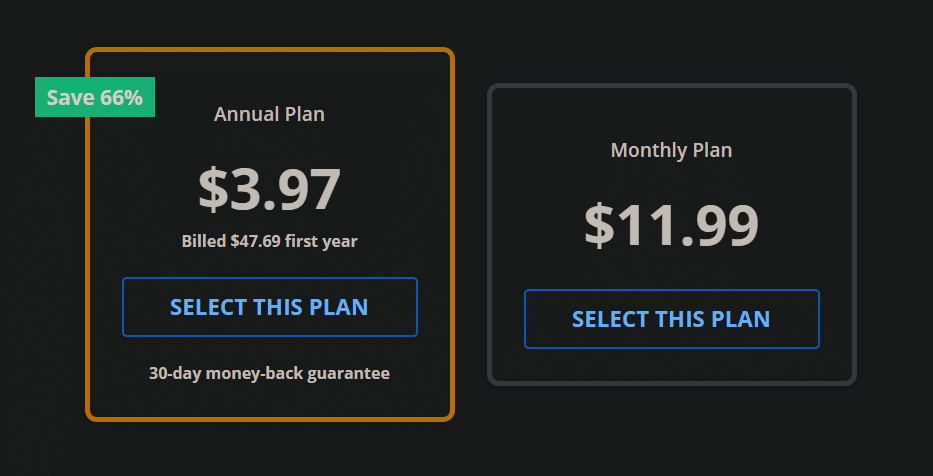
StrongVPN is a rapidly growing VPN provider with infrastructure across the United States and Europe. Compared to market leaders like ExpressVPN, StrongVPN offers significantly more affordable plans, starting at just USD $3.97 per month on its annual subscription (about USD $47.69 total). ExpressVPN, by contrast, costs nearly $6 per month on similar terms.
Despite its lower price, StrongVPN maintains a dedicated technical team that continuously upgrades its servers to ensure fast, stable performance. Whether you're browsing, streaming Netflix or YouTube, gaming, or accessing social media securely, StrongVPN is a highly reliable choice.
The company promotes itself as “the best VPN for streaming media”, offering full compatibility with Netflix, Hulu, HBO, Amazon Prime Video, Disney+, and more.
StrongVPN also supports a wide range of devices, including:
- Windows
- macOS
- iOS
- Android
- Amazon Fire TV
- Chrome and Firefox extensions
- Manual setup guides for routers, Fire TV, and Kodi
The service currently operates over 950 P2P-friendly servers across 35+ countries and 46 cities.
StrongVPN supports multiple secure VPN protocols:
OpenVPN, IKEv2, L2TP, SSTP, and the modern WireGuard protocol.
Users benefit from 24/7 customer support (live chat + email) and a no-question 30-day money-back guarantee.
StrongVPN Test Results —September 2026
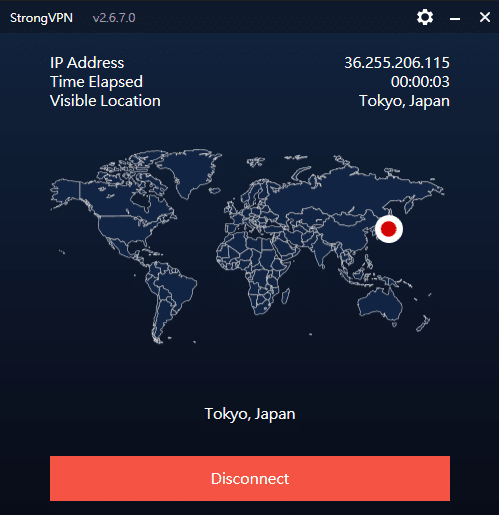
In addition to our own internal evaluations, we include real screenshots of speed test results—including tests on distant servers such as Japan—to provide transparent and verifiable data. This ensures our review avoids exaggerated or unfounded claims often found on other VPN comparison sites.
Key Features of StrongVPN:
- Wide platform support across computers, mobile devices, smart TVs, and routers
- Allows up to 12 simultaneous connections—ideal for families or multiple devices
- Unblocks major streaming platforms (Netflix, Amazon Prime Video, Disney+, Hulu, HBO)
- Includes 250 GB of SugarSync cloud storage with annual plans
- More than 950 P2P-friendly servers in 35+ countries
- Supports modern, secure protocols: WireGuard, OpenVPN, IKEv2, L2TP, SSTP
- 30-day money-back guarantee, no hassle
- 24/7 customer support via live chat and email
- Strict no-logs policy—your browsing data is never tracked or stored
- Highly competitive pricing, cheaper than ExpressVPN, Surfshark, and many EU/US providers
- Outperformed ExpressVPN in recent speed and server availability tests
- Strong connection stability, even over long distances
- Annual plan starts at USD $3.97/month (USD $47.69 for the first year)
Recommendation #2: ExpressVPN – Choose the annual ExpressVPN plan (confirm the current offer at checkout)
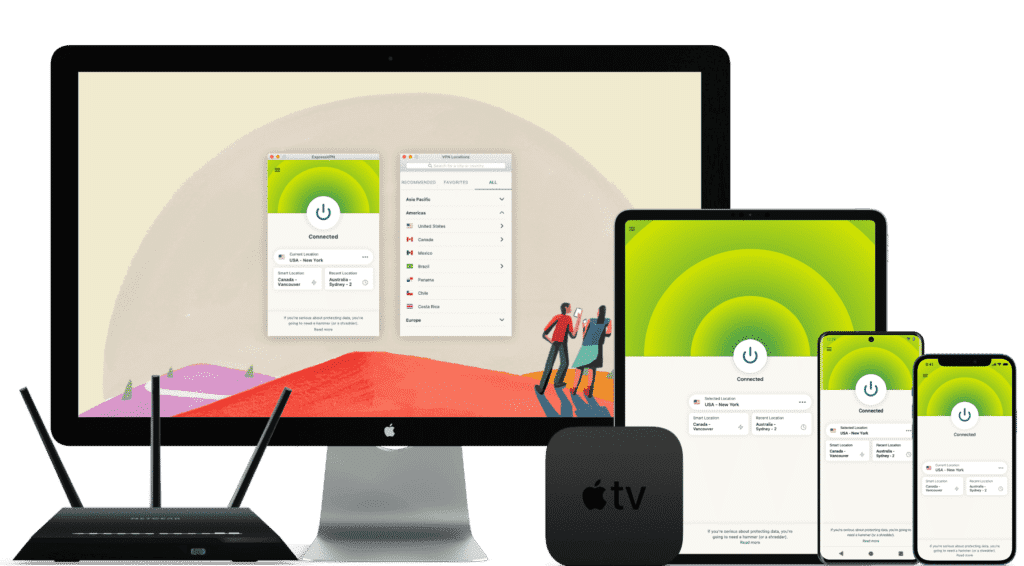
ExpressVPN is one of the world’s leading VPN services, known for its massive infrastructure, consistently high speeds, and rapid server updates. With over 3,000 servers in 94 countries and 160+ locations, it provides fast, secure, and highly reliable connections. It’s ideal for unblocking Netflix and other streaming platforms, and it fully supports torrenting with a strict no-logs policy.
Its interface is user-friendly, making it suitable for beginners and advanced users alike.
While ExpressVPN is more expensive than many competitors, the premium performance and global reliability justify the cost.
⚡Performance:
In speed tests conducted in September 2026, ExpressVPN ranked as one of the fastest and most stable VPNs available, offering consistently high performance across long-distance and local connections.
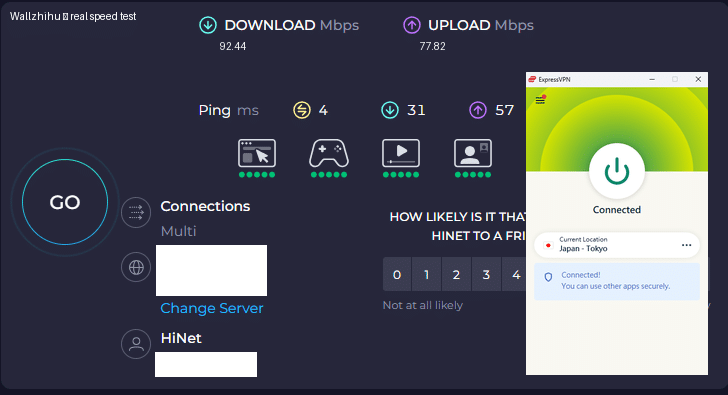
⭐ Key Features of ExpressVPN
- 3,000+ servers in 94 countries and 160+ global locations
- Massive worldwide user base and strong industry reputation
- Fast server recovery and updates when firewalls or blocks are detected
- 30-day money-back guarantee, no questions asked
- 24/7 customer support via live chat and email
- Apps for Windows, macOS, Android, iOS, Linux, and more
- Compatible with Apple TV, Fire TV, PlayStation, Chromebook, Kindle, etc.
- Supports various payment methods, including Bitcoin and other cryptocurrencies
- Enterprise-grade encryption for maximum security and privacy
- Constant optimization to bypass firewalls and maintain stable, unrestricted access
🔀 Detailed Explanation: VPN Split Tunneling (How It Works)
VPN split tunneling is a feature that lets you use your VPN connection and your regular local internet connection at the same time. This means you can control which traffic is protected through the VPN and which traffic goes directly through your local network.
With split tunneling, you can:
- Route sensitive apps (browser, streaming, downloads) through the VPN
- Keep local resources (printers, LAN devices, internal servers) outside the VPN for faster access
This provides greater flexibility, improved performance, and more efficient bandwidth usage.
⚙️ How Does It Work Technically?
Split tunneling is implemented by modifying your device’s routing tables, assigning specific traffic to the encrypted VPN tunnel and the rest to your local network.
This separation allows your device to maintain two simultaneous paths:
one encrypted (VPN) and one direct (local).
⚠️ Precautions
While split tunneling is useful, it also has security considerations:
- Traffic routed outside the VPN is not encrypted
- Sensitive data may be exposed if incorrectly configured
- Local network vulnerabilities can affect unprotected traffic
Therefore, it’s important to evaluate which apps truly need protection and ensure your VPN provider offers strong security protocols, leak protection, and robust privacy policies before enabling split tunneling.
Recommendation #3: Surfshark— Protect Unlimited Devices
Surfshark is one of the newer VPN providers on the market, but it has quickly become extremely popular thanks to its competitive pricing and one standout feature almost no other service offers: unlimited simultaneous connections.
This means you can protect every device you own — and even share your account with family members — without paying extra.
If you want to save money while still getting secure browsing, smooth streaming, and reliable performance, Surfshark is an excellent value.
⚡ Fast Speeds — Surfshark Review (Tested September 2026)
Below is a complete overview of Surfshark’s core features, based on our hands-on testing.

Key Features of Surfshark VPN
- 🔐Advanced Encryption: Uses AES-256 encryption and secure protocols such as OpenVPN, IKEv2/IPSec, and WireGuard to ensure top-tier data protection.
- 🌍 Large Server Network: Over 3,200 servers in 65 countries, ideal for faster connections and accessing global content.
- 🚀 Speed & Stability: Consistent high speeds for HD streaming, downloading, gaming, and everyday browsing.
- 🛡️ Strict No-Logs Policy: Does not store your browsing history, IP address, or online activity.
- 📱 Unlimited Device Connections: Protect as many devices as you want — no limits, no restrictions.
- 💻 Cross-Platform Compatibility: Apps for Windows, macOS, Linux, Android, iOS, plus browser extensions for Chrome and Firefox.
- 🧹 CleanWeb Feature: Blocks ads, trackers, malware, and phishing sites automatically.
- 👨💻 24/7 Customer Support: Live chat, email support, and a detailed knowledge base with guides and tutorials.
- 💰 30-Day Money-Back Guarantee: Try it risk-free for an entire month.
💵 Pricing & Plans
Surfshark’s best value is its 24-month plan, costing roughly $2.30 per month.
Payment methods include credit/debit cards, PayPal, cryptocurrencies, Amazon Pay, and Google Pay.
⭐ Final Verdict: Surfshark is a young but powerful VPN with excellent value for the price, advanced security features, and the rare advantage of unlimited device connections. It’s an ideal choice for anyone who wants strong privacy protection and unrestricted access to the internet across all their devices.
⭐ Recommendation #4: FlowVPN— Short trial option (confirm the current terms at checkout)
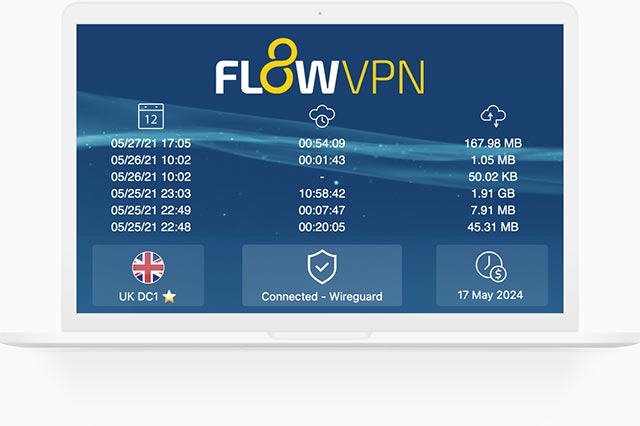
| Protocol / method | short trial (confirm terms at checkout) | 24/7 support | 5 devices | 30-Day Money-Back Guarantee |
|---|---|---|---|---|
| SSR | ✅ | ✅ | ✅ | ✅ |
FlowVPN has gained traction in recent years as a reliable and budget-friendly VPN solution, especially as many traditional VPN services struggle to keep up with evolving network blocks and filtering technologies. Based on our hands-on testing, FlowVPN delivers solid speed, stable performance, and dependable daily use.
FlowVPN allows up to five simultaneous device connections, supports a wide range of servers across multiple regions, and includes 24/7 customer support with multilingual assistance available. Its two-day free trial makes it easy to test the service without any commitment.
This provider has become popular among students and budget-conscious users thanks to its low-cost plans, ease of use, and functional performance, making it an excellent choice for everyday browsing, streaming, and privacy protection.
⭐ Key Features of FlowVPN
- short trial (confirm terms at checkout) with full access
- Unlimited server switching
- Supports up to 5 devices simultaneously
- 24/7 customer support, including Spanish-language assistance
- User-friendly interface, ideal for beginners
- Affordable plans, perfect for students and light users
- Stable speed and performance (tested September 2026)
- Money-back guarantee
- Wide compatibility with major platforms
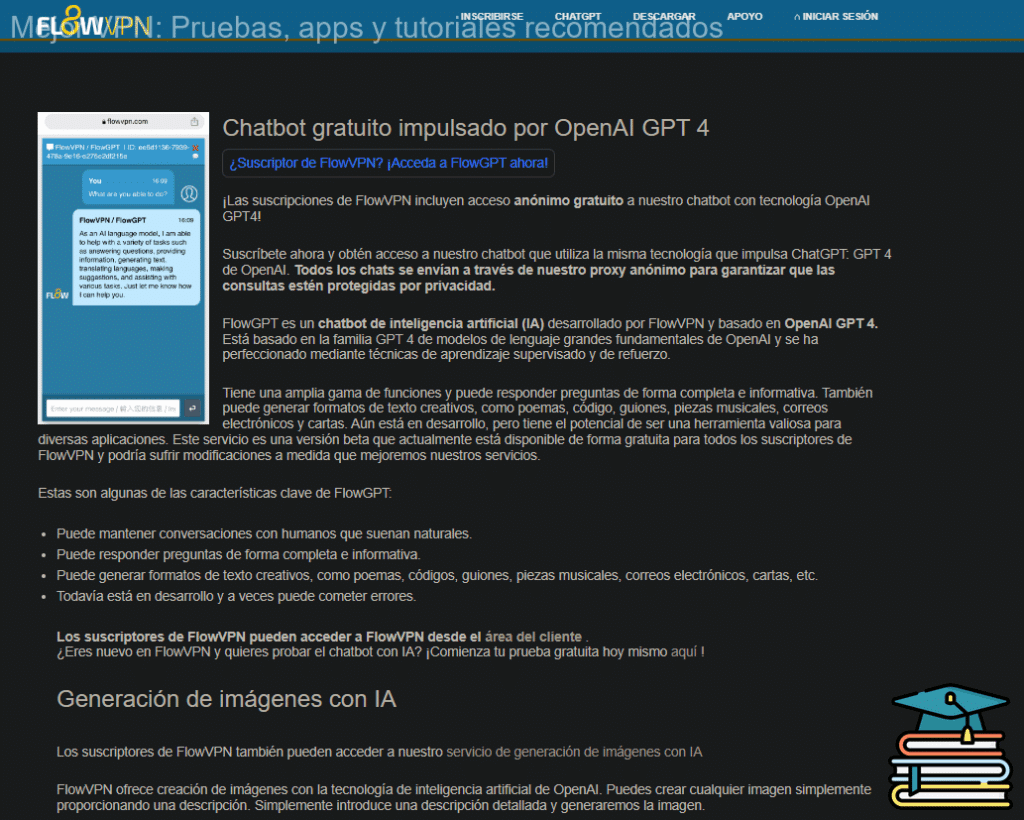
Flexible pricing and practical plans make FlowVPN a budget-friendly option, especially for students, short-term travelers, and users who want to test a VPN before committing to a longer subscription.
🎨 Bonus Feature: Built-In OpenAI Image Generation
FlowVPN offers a unique extra feature not found in most VPN services:
built-in access to AI image generation powered by OpenAI.
Simply enter a text description and generate original images instantly.
This is especially useful for:
- Content creators
- Students
- Designers
- Social media users
- Anyone experimenting with AI tools
💵 Pricing & Plans
FlowVPN offers flexible, low-cost plans designed to fit individual needs.
Its pricing is especially attractive for:
- Students
- Casual users
- Anyone looking for a budget-friendly VPN with reliable performance
FlowVPN remains one of the best low-cost options on the market.
📺 FlowVPN for Apple TV (tvOS 17 Support)
FlowVPN is the first VPN app specifically designed for Apple TV, taking full advantage of Apple’s new VPN support introduced in tvOS 17.
You can now enjoy secure, private streaming on Apple TV with access to servers in 60+ countries — perfect for watching international content or protecting your home network.
FlowVPN has released its first Apple TV version through Apple’s TestFlight beta program.
How to Install FlowVPN on Apple TV (TestFlight Beta)
- Open TestFlight on your Apple TV and install FlowVPN.
- If you don’t have a FlowVPN account yet, create one and start your free trial.
- Download TestFlight on your iPhone, iPad, or Mac.
- Join the FlowVPN Apple TV beta through the invitation link.
- Install TestFlight from the App Store on your Apple TV running tvOS 17 beta.
FlowVPN’s early support for Apple TV makes it one of the easiest and most flexible VPNs for streaming on large screens.
Individual Introduction to iOS VPNs (Apple VPNs) – Details and Tutorials
Based on the aforementioned features, we have compiled ExpressVPN, Surfshark, and StrongVPN, all of which are iOS-compatible VPNs and possess the aforementioned features.
StrongVPN(The best price and support Alipay)
| free trial | Alipay | Access without the need for circumvention tools | Chinese customer support | Device compatibility | Unconditional refund policy |
|---|---|---|---|---|---|
| ✅ | ✅ | ✅ | ✅ | 5 | ✅ |
StrongVPN is among the recently emerged VPN services from Europe and America. Compared to the largest player in Europe and America, ExpressVPN, StrongVPN is considerably cheaper, starting at just $3.5 per month (12-month package – $3.5 per month, totaling $43.99). ExpressVPN, on the other hand, costs close to $6 per month. Additionally, StrongVPN supports Alipay, while ExpressVPN does not. Moreover, both have engineering teams continuously updating and repairing nodes. If you're primarily looking to browse YouTube or Facebook, I personally recommend using StrongVPN. The StrongVPN website claims it is the “best multimedia VPN” and recommends services like Netflix, Hulu, ABC, HBO, and Sky Go.
StrongVPN offers applications for Windows, Mac, iOS, Android, and Amazon Fire TV, as well as Chrome browser extensions and setup guides for routers, Fire TV, Kodi, and more. With over 950 P2P-friendly servers in 46 cities across 35 countries/regions, StrongVPN allows connections through L2TP, SSTP, OpenVPN, IKEv2, and even the latest WireGuard protocol. They provide 24/7 customer support via email and live chat, along with a 30-day money-back guarantee. While nothing extraordinary, the specifications are decent enough and should suffice for most users.
StrongVPN Review – September 2026 Testing
In addition to conducting our own tests, we have provided actual screenshots of our testing results (connecting to Japan) for reference. Unlike many bloggers who make exaggerated claims, we present concrete evidence to prove that StrongVPN can indeed access the internet in China (speed test screenshots from 2026).
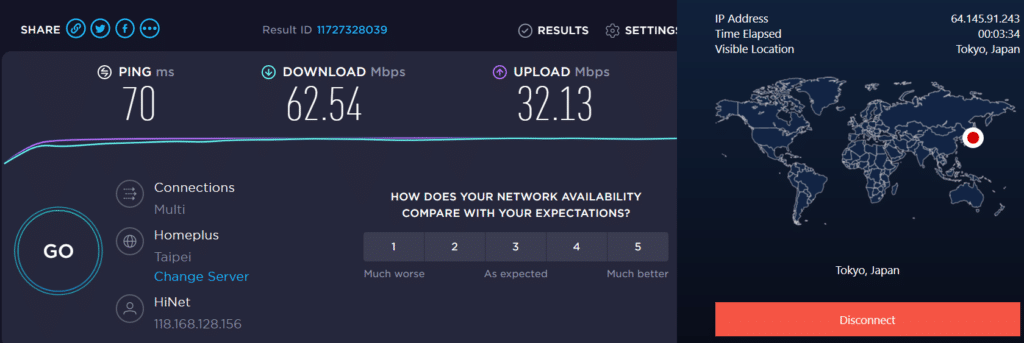
StrongVPN's Features Overview:
- Extensive Platform Support
- Up to 12 Simultaneous Connections
- Ability to Unlock Netflix, Amazon Prime Video, Disney Plus
- 250GB SugarSync Storage with Annual Plan
- Over 8000 Servers
- Connectivity through L2TP, SSTP, OpenVPN, IKEv2, and even WireGuard Protocols
- 30-Day Money-Back Guarantee
- 24/7 Customer Support
- StrongVPN's Robust Privacy Policy: Your data is not tracked or stored while using the VPN service
- The pricing of StrongVPN is cheaper compared to ExpressVPN and Surfshark, along with other European and American VPN services. In recent speed and node quantity tests, StrongVPN has surpassed ExpressVPN. It supports Alipay payment, ensuring convenience for users. The stability of StrongVPN is highly commendable.
With a starting price of just $3.5 per month (12-month plan – $3.5 per month, totaling $43.99), StrongVPN offers competitive rates. For just $43.99 per year, it provides better speed than ExpressVPN, as evidenced in the evaluation below.
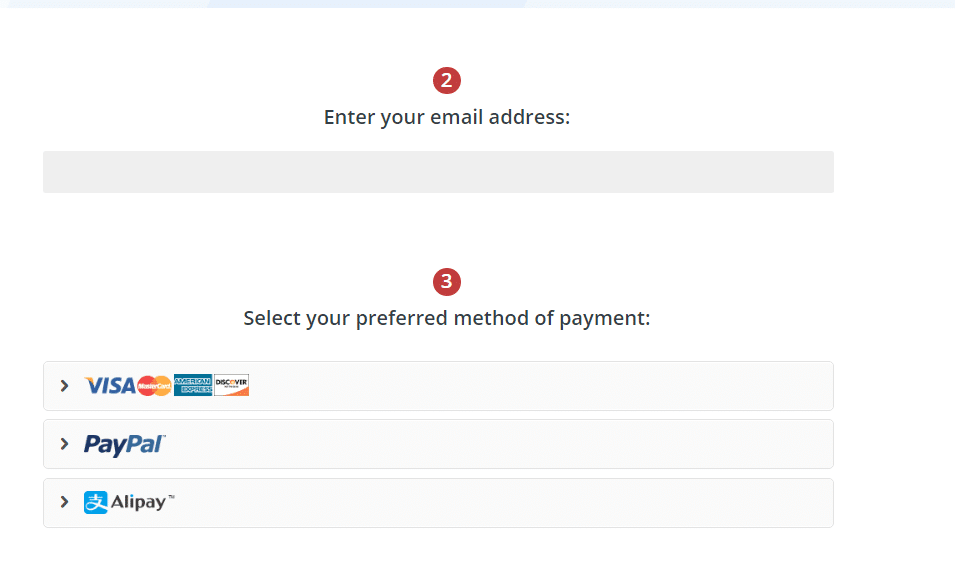
StrongVPN Troubleshooting and Common Issues for Chinese Users
In addition to specially designed nodes for the Great Firewall of China, StrongVPN also provides detailed troubleshooting and solutions for common issues frequently encountered by Chinese users. You can refer to the following webpage for more information:
StrongVPN Troubleshooting and Common Issues for Chinese Users
StrongVPN Summary:
StrongVPN is a virtual private network (VPN) provider established in 2005, renowned for its security and privacy protection. Here is a detailed overview of StrongVPN:
- High-level Encryption: StrongVPN utilizes state-of-the-art 256-bit AES encryption technology to ensure the security and privacy of user data. Additionally, it supports various encryption protocols such as OpenVPN, IKEv2/IPSec, L2TP/IPSec, SSTP, and WireGuard to cater to different user needs.
- Servers and Locations: StrongVPN boasts over 950 servers in more than 30 countries and regions, allowing users to easily connect to servers in different countries to access region-restricted content.
- High-speed Connections: StrongVPN offers high-speed and stable connection speeds, ensuring smooth browsing, video streaming, and file downloading experiences for users.
- No-logs Policy: StrongVPN adheres to a strict no-logs policy, meaning it does not record user network activities, ensuring user privacy is protected.
- Simultaneous Device Connections: StrongVPN supports connections for up to 12 devices simultaneously, allowing users to use VPN services on multiple devices.
- Cross-platform Support: StrongVPN supports various operating systems and devices, including Windows, Mac, Linux, Android, and iOS. Additionally, it provides browser extensions for browsers such as Chrome and Firefox.
- Customer Support: StrongVPN offers 24/7 customer support, including live chat and email support. They also have a detailed help center providing various tutorials on VPN setup and usage.
- 30-day Money-back Guarantee: If users are unsatisfied with StrongVPN's service, they can request a refund within 30 days of purchase.
In conclusion, StrongVPN is a VPN provider focused on security and privacy protection, making it suitable for users with high demands in network security and privacy protection.
How to Download and Install StrongVPN
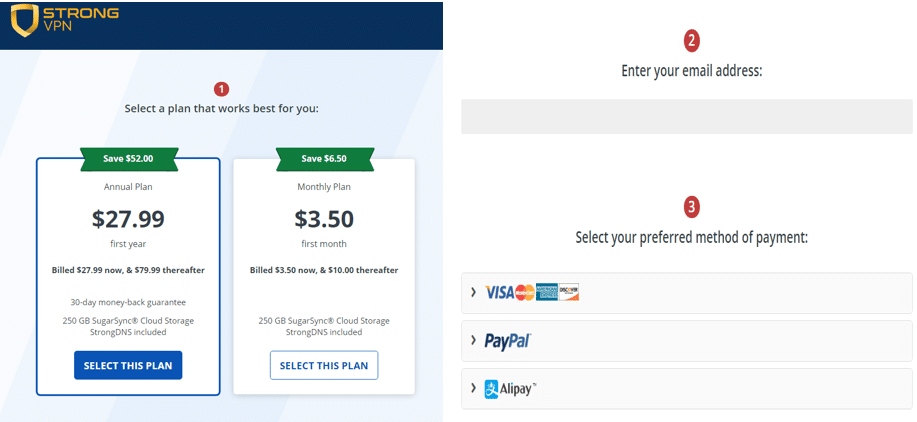
Step 1: Go to the official StrongVPN website, Create Your StrongVPN Account,enter your email address, and click “Start Now.”. Your information is secure, and setup takes only a few minutes.
Step 2: Choose Your Plan. StrongVPN is one of the most affordable premium VPNs, costing as little as $4 per month on the annual plan—far cheaper than other major services that can cost over $100 per year.
Installing StrongVPN for iOS
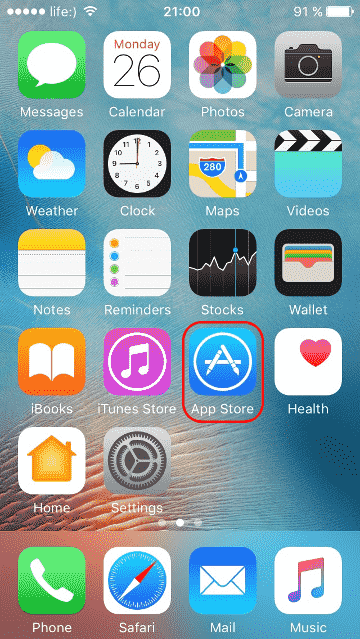
To start using the StrongVPN app on your iOS device, download the app from the App Store on your iOS device. Follow these steps:
1 Open the App Store Search for “StrongVPN.” When it appears, tap “Get” to download.
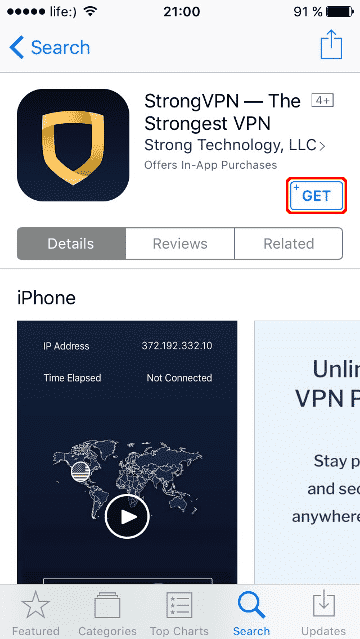
2. Install the app
Tap “Install” and wait for the installation to complete.
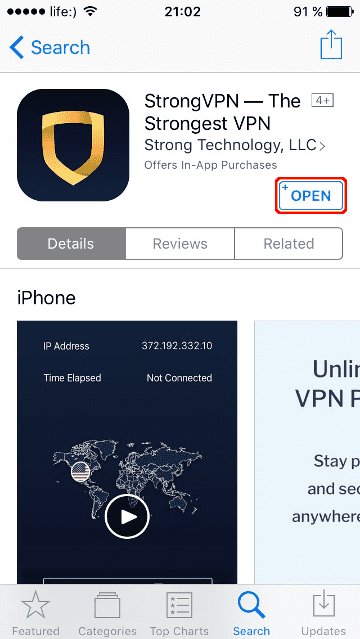
3. Open StrongVPN
Tap “Open” to launch the app.
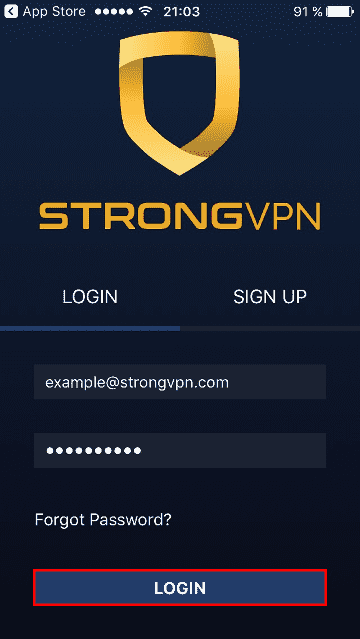
4. Log in
Enter your StrongVPN username and password.
If you don’t yet have an account, tap “Join Now” to create one.
5. Choose a server
Your current IP address will appear at the top right.
Select any server location from the list and tap “Connect.”
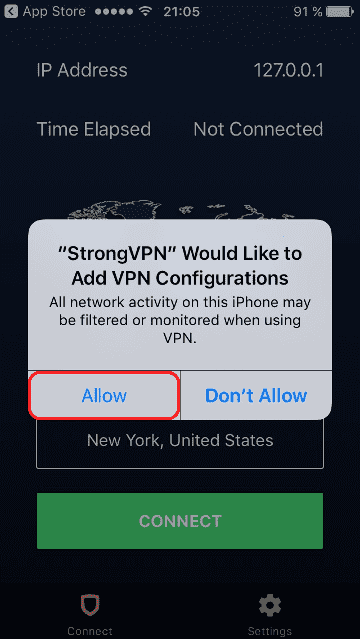
6. Allow VPN configuration
Tap “Allow” when iOS asks permission to add VPN configurations.
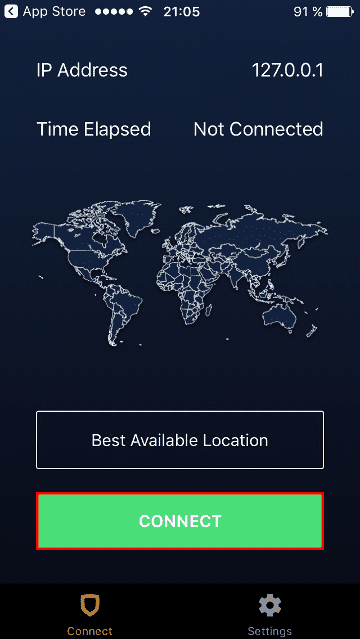
7. Connecting…
StrongVPN will establish a secure connection to your selected server.
You’ll see a location pin on the map representing your server location.
You can switch servers or cancel the connection at any time.
8. Connected
Once connected, the app will display:
- The Disconnect button
- The server’s IP address
- Your session duration
Your internet traffic is now fully protected and routed through StrongVPN.
9. Once the StrongVPN app is connected, the “Disconnect” button will appear on the app's screen. The server's IP address and elapsed time will be displayed in the top right corner of the screen.
ExpressVPN – Best Premium Performance (Get 12 Months + 3 Months Free)
Download & Install ExpressVPN (Step-by-Step Guide)
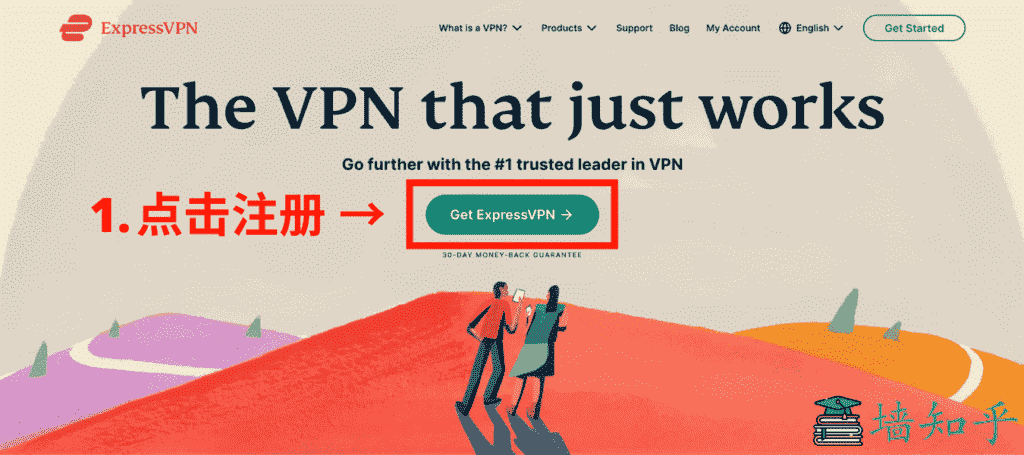
Step 1: Visit the Official ExpressVPN Website
ExpressVPN’s website is only available in English. After opening the site, click Get ExpressVPN to begin your subscription.
(You may need a stable connection to access the official page.)
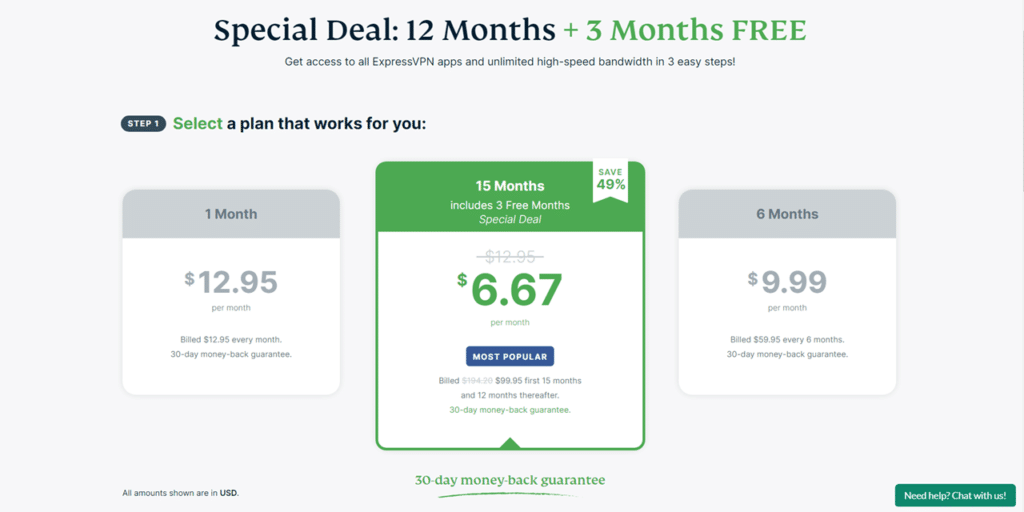
Step 2: Choose Your Plan
ExpressVPN offers 1-month, 6-month, and 12-month subscriptions.
Through our exclusive discount link, you get the 12-month plan + 3 extra months free, which is the best value.
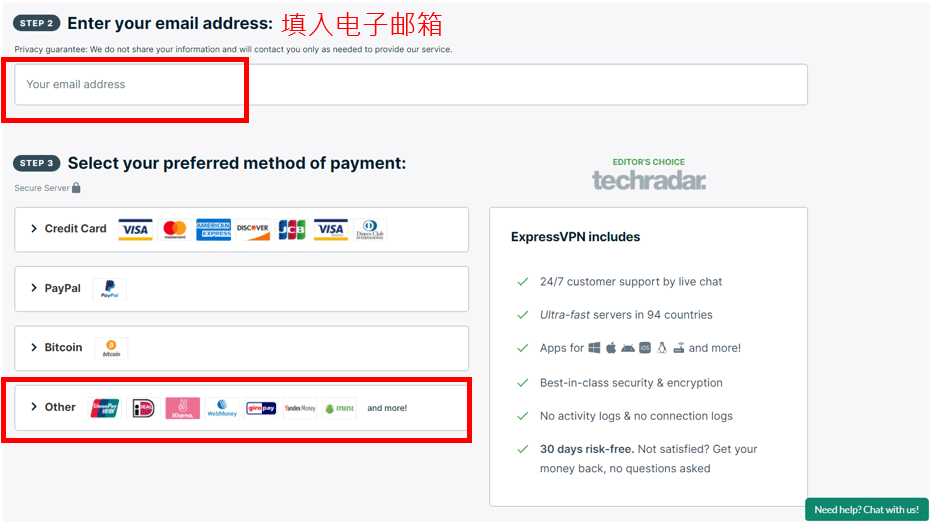
Step 3: Enter Your Email & Complete Payment
Scroll down and fill in your email address and preferred payment method.
Once your purchase is completed, ExpressVPN will send a confirmation email to your inbox containing:
- Your login details
- Your receipt
- Setup instructions
Be sure to enter a valid email address.
(Note: ExpressVPN currently does not support Alipay.)
Step 4: Install ExpressVPN on iOS (iPhone / iPad)
Installing ExpressVPN on iOS is slightly different because some regions don’t show the app directly in the App Store.
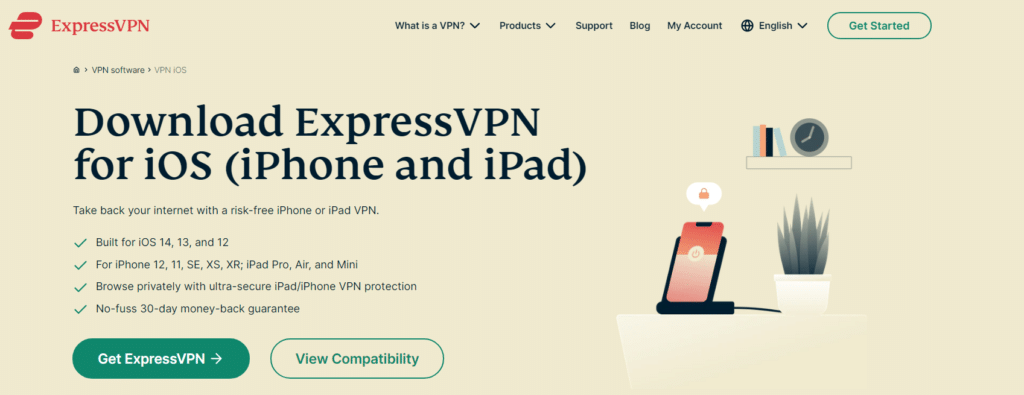
If the app is not visible, you can download it from ExpressVPN’s dedicated iOS download page.
- Open the ExpressVPN iOS download page.
- Tap Get ExpressVPN to download the app.
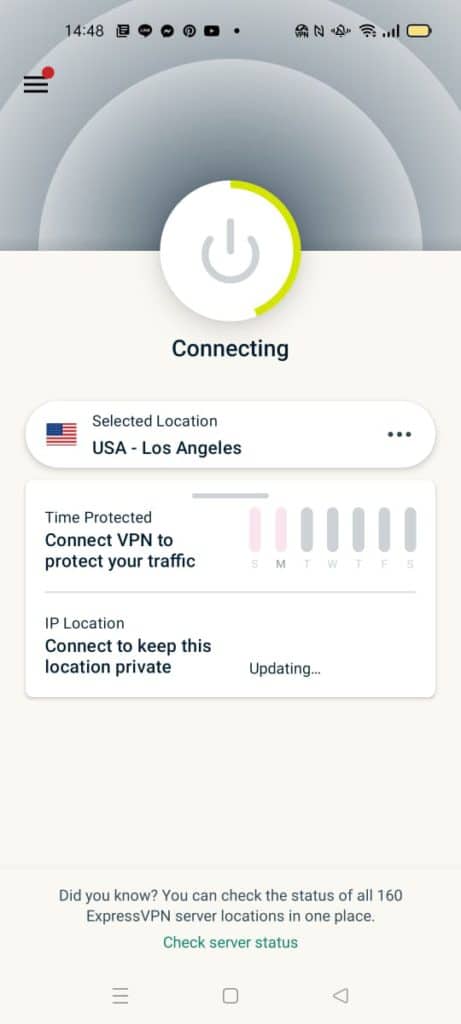
- After installation, open the app.
- Enter your ExpressVPN email and password to log in.
- Choose a server location and connect — setup takes around 30 seconds.
You’re now ready to browse privately and securely on your iPhone or iPad
For desktop installation guides, you can follow a similar process using the app download page.
Unlimited Device Advantage: Surfshark — Save 81% Today:
Surfshark Download & Setup Guide (iOS Version)
Surfshark is one of the few VPNs on the market that offers unlimited simultaneous device connections, making it ideal for families, power users, and anyone who owns multiple devices. With strong security features, great speeds, and a very competitive long-term price, Surfshark is one of the best-value VPNs in 2026.
Below is the simplified step-by-step guide for installing Surfshark on iOS.
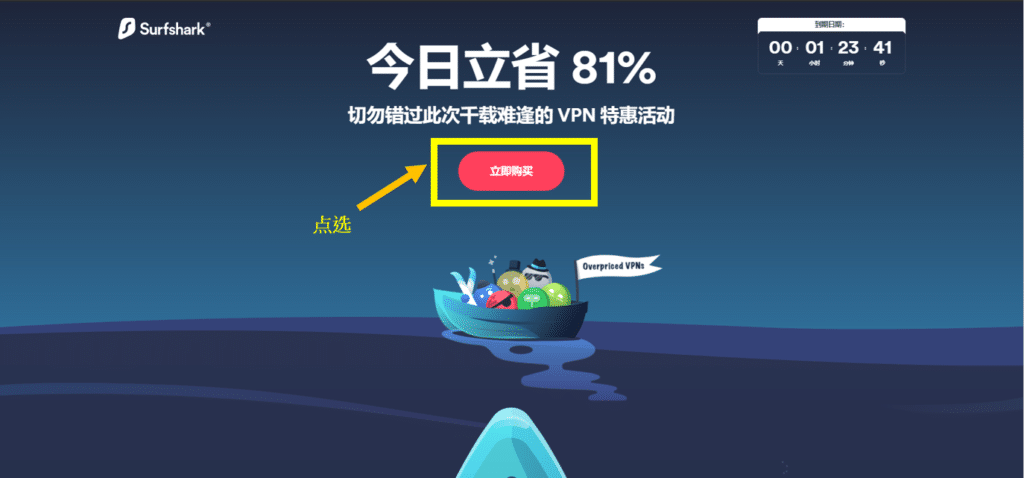
Step 1: Visit the Official Surfshark VPN Website
Go to the official Surfshark VPN website and click Get Surfshark to begin the signup process.
Step 2: Choose Your Subscription Plan
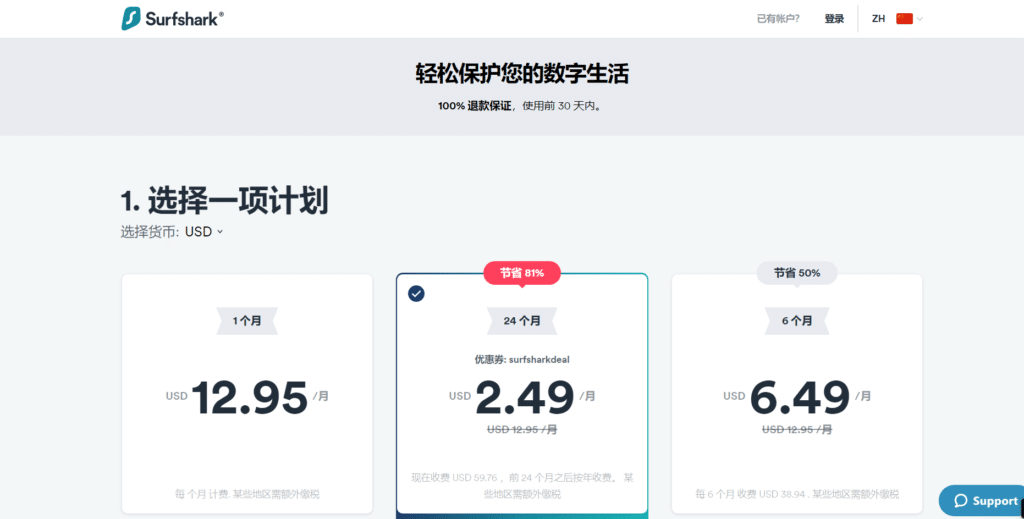
Surfshark’s 24-month plan offers the biggest savings — up to 81% off, plus a 30-day money-back guarantee.
This brings the monthly cost down to around $2.49, making it one of the most affordable premium VPNs available.
Step 3: Create Your Account
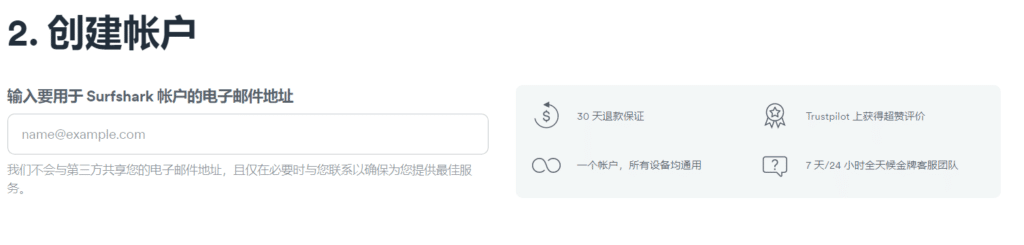
Enter your email address to create your Surfshark account.
Your information is used only for account access — no worries about data exposure.
Step 4: Select a Payment Method
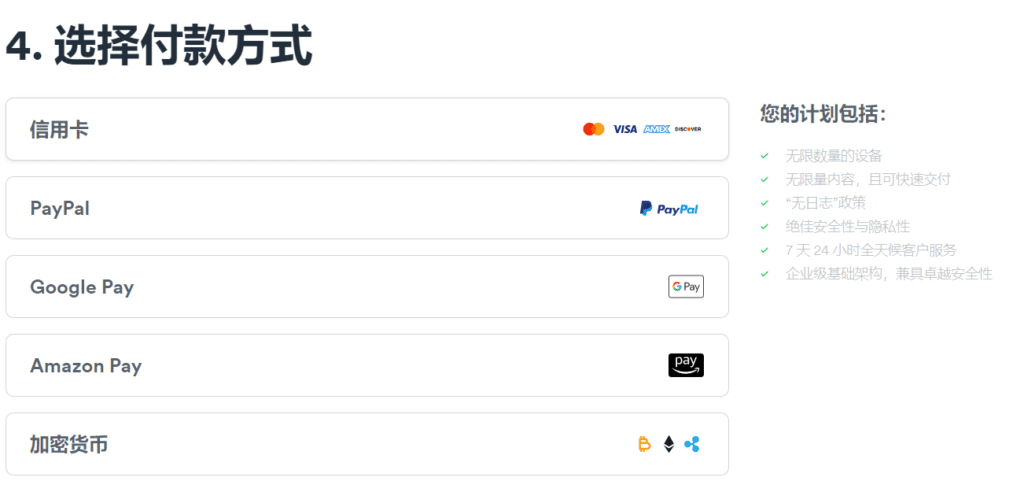
Surfshark supports a wide range of payment options, including:
- Credit cards (Visa, Mastercard, etc.)
- PayPal
- Google Pay
- Amazon Pay
- Cryptocurrencies
Once payment is complete, you’ll receive your account login details and can set a password.
Step 5: Install Surfshark on iOS
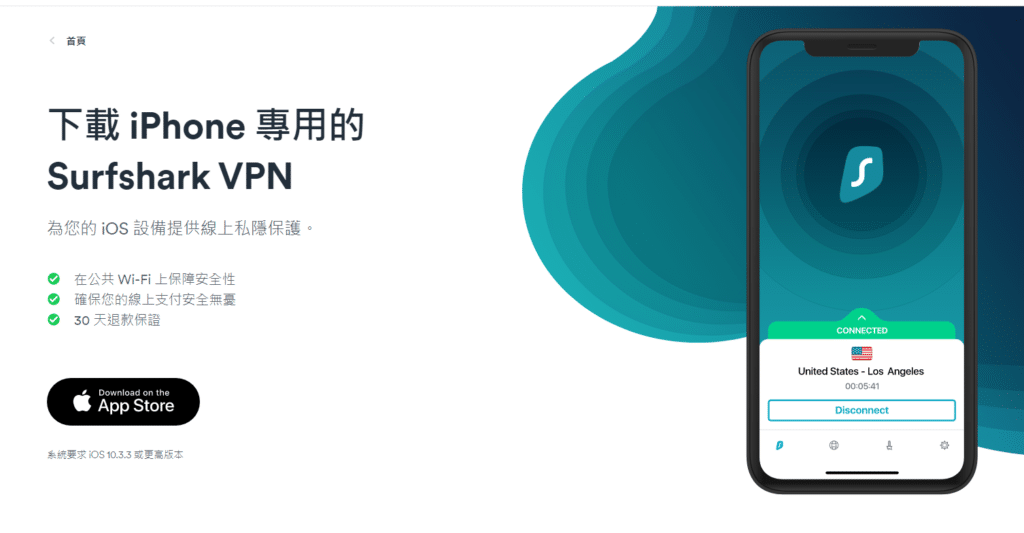
To start using Surfshark on your iPhone or iPad, you can download the app directly through Surfshark’s website.
Tap the black download button on the page to install the iOS version.
After installation:
1 Open the Surfshark app.
2 Select “Existing User” on the welcome screen.
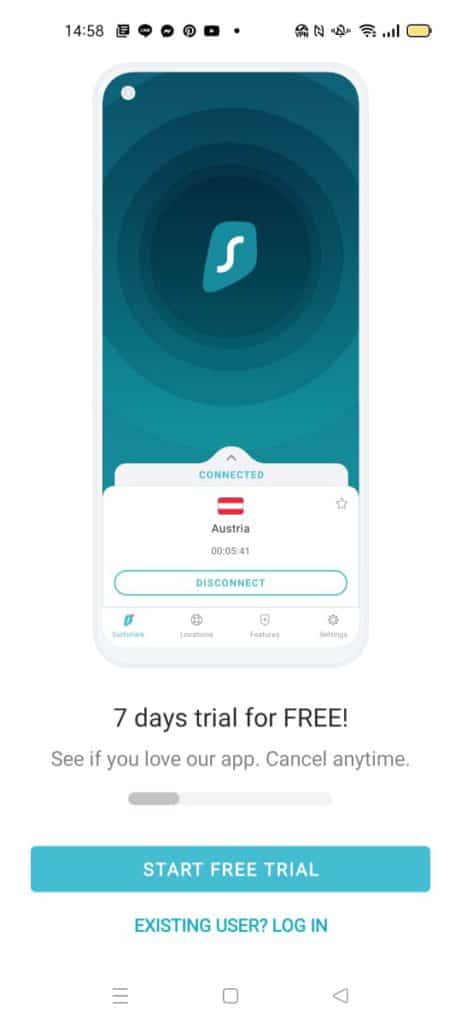
3 Enter your Surfshark account email and password to log in.
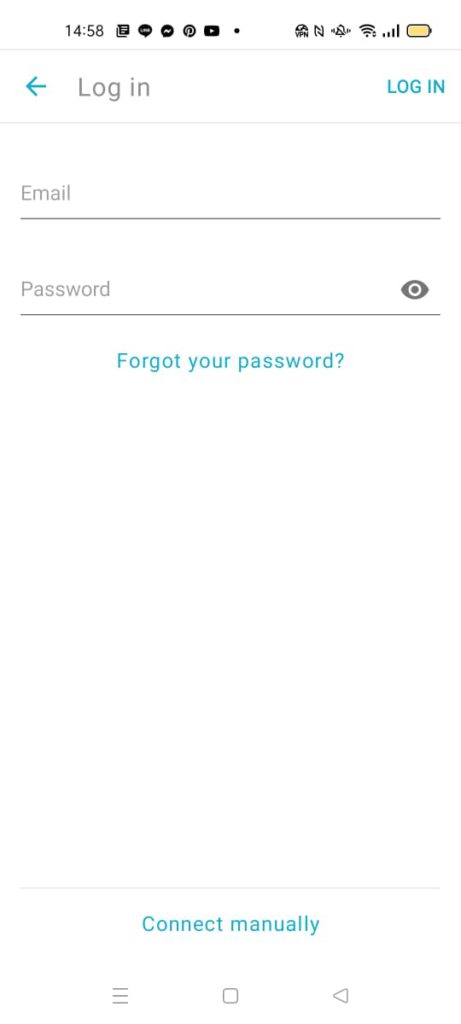
4 Choose any server location from the global list and tap Connect.
That’s it — your iPhone or iPad is now securely connected to Surfshark.
If you need help switching servers or adjusting settings, you can do it directly inside the app at any time.
How to Download and Install a VPN on iOS (Even If the App Isn’t Available in Your Region)
Updated for 2026
All major VPN apps for iPhone and iPad are normally available directly from the App Store. However, depending on your region, some VPN apps may not appear or may not be available for download.
If that happens, don’t worry — there are still reliable ways to install the VPN you want.
Below are the two main methods, written with a U.S. audience in mind.
Method 1 – Use an App Store Account From Another Country
If you already have an App Store account registered in the United States (or any other supported country), the process is extremely simple:
- Log in using your U.S. App Store account
- Search for your VPN of choice — e.g., StrongVPN, ExpressVPN, Surfshark
- Download the app directly from the App Store
- Sign in with your VPN credentials
- Start using the app immediately
This method is the fastest and most reliable if you already have a U.S. Apple ID.
Method 2 – Create a New Apple ID Registered in Another Country
If the VPN app you want isn’t available in your current region and you don’t have an overseas Apple ID, you can create a new one — a common method used by frequent travelers and users who need access to region-specific apps.
Before creating a new Apple ID, make sure:
- Your current Apple ID has no remaining store credit
- Any active subscriptions have been canceled
- You have a valid payment method that works in the new region
- You can provide a billing address (you can use any valid format)
How to Change Your App Store Region
You can change your region from your iPhone, iPad, or Mac. The steps are similar across devices:
- Go to your Apple ID settings
- Select Country/Region
- Choose a supported country such as the United States
- Review and accept the updated Terms & Conditions
- Enter a payment method valid for that country
- Provide a billing address in the correct format
- Save your changes and re-open the App Store
After that, you should see all apps available in the U.S. App Store.
How to Create a New Apple ID From Scratch
If you prefer to keep your original Apple ID unchanged, you can create a new one specifically for accessing region-restricted apps:
- Visit Apple’s official signup page
- Select Create New Apple ID
- Enter your name, birthday, and email
- Choose the country you want your account to be registered under
- Add a payment method valid for that region
- Add a billing address in the proper format
- Verify your account
- Sign in using the new Apple ID on your device
- Open the App Store and download your VPN
This method is commonly used by international travelers who want access to apps only available in certain regions.
What About Downloading VPN Apps Without the App Store?
Some VPN providers — such as StrongVPN, Surfshark, and FlowVPN — also offer direct download options from their official websites.
These versions are designed for users:
- Who travel frequently
- Who use devices set to restricted regions
- Who need access to the latest beta versions
You can usually download the iOS configuration profile directly through Safari, then install it through Settings → VPN & Device Management.
Always ensure the download link comes directly from the official VPN website.
For Mac Users (and Other Apple Devices)
If you’re trying to install a VPN app on macOS:
- Visit Apple’s official support page for region switching
- Use a valid Apple ID for the region where the VPN is available
- Download the app directly from the Mac App Store or the VPN’s official site
The process is almost identical to iOS.
What to Do If iOS VPN Can't Connect?
If you open your VPN and find that you cannot browse foreign websites, here are some general troubleshooting steps:
- Contact customer service. They can directly assist you in testing whether the VPN nodes for bypassing the firewall have any issues. Sometimes, it could be due to server failure or firewall updates.
- Check if you have forgotten to disable the firewall function on your device. For this, you can refer to the guide on enabling or disabling Microsoft Defender Firewall.
- It's possible that you have multiple VPNs running simultaneously, causing encryption conflicts between them and preventing internet access. Try closing multiple VPNs and then attempt to connect again.
- Try connecting to different nodes. For example, if you were originally connected to Taiwan, switch to Japan or the United States. If after trying multiple options you still can't bypass the firewall, it's recommended to contact customer service directly for assistance.
Common Questions About Using VPN on iOS
1. Is it legal to use a VPN on iOS?
Using a VPN is generally legal in most countries as long as it’s used for normal online activities. Avoid using VPNs for anything that violates local laws or terms of service.
2. Which servers usually provide the fastest speeds for iOS VPN?
Based on testing, servers that are geographically closer tend to offer better speed and stability. Choosing nearby regions typically results in lower latency and smoother performance.
3. Can I use an iOS VPN on other devices like computers or tablets?
Yes. Most VPN providers offer apps for multiple platforms including Windows, macOS, Android, Linux, and more. You can usually use the same VPN account across several devices at the same time.
4. Can I use a VPN on both my phone and my computer at the same time?
Yes. As long as your VPN plan supports multiple simultaneous connections, you can run the VPN app on both your phone and computer at once. Just install the corresponding app on each device and sign in.
5. Why does my WiFi speed drop after enabling VPN on iOS?
A decrease in speed is normal because data has to be encrypted and routed through a remote server. If you aren’t accessing content that requires a VPN, you may prefer turning it off for faster local speeds.
6. Why do some iOS VPN apps not work well?
Performance varies based on server load, provider quality, device compatibility, and network environment. Some VPNs simply do not maintain stable servers or consistent performance.
7. Which server locations in Asia tend to be the fastest?
Based on general network quality, these locations often provide good performance:
- South Korea
- Singapore
- Japan
- Taiwan
- Hong Kong (performance depends on server conditions)
Actual results depend on your connection, device performance, and time of day, so it’s best to test several regions to see which one works best.
How About Free iOS VPNs for Bypassing Restrictions?
Many users often search for free iOS VPN or iPhone VPN and come across several software claiming to be free VPNs for Apple devices. But think about it, using a VPN requires setting up servers overseas, which costs money. Who would spend a lot of money to set up overseas nodes and let many users use it for free? So, in most cases, free VPNs are just a gimmick. Good ones may offer you a one-day trial before deciding to purchase, while bad ones may let you use it excessively while secretly collecting your email, account passwords, and other personal information.
Furthermore, if it's truly free, then it's unlikely to have the funds to hire engineers. With the firewall constantly updating, old nodes cannot be repaired. This means that even if there are truly free VPNs in the world that can successfully bypass restrictions, they won't last long. I advise everyone not to use them.
Should You Build Your Own VPN? A Practical Breakdown for iOS Users
Some tech-savvy users enjoy experimenting and prefer building their own VPN servers rather than subscribing to a commercial provider. While this can be an interesting project for those who love networking and server management, the reality is that running your own VPN comes with significant time, cost, and technical overhead.
⚙️ High Technical Requirements
A self-hosted VPN isn’t as simple as spinning up a server and pressing “start.”
Modern VPN performance often requires:
- Multiple tunneling protocols
- Modern encryption configurations
- Server hardening and maintenance
- Ongoing monitoring for connection stability
For users who simply want privacy and secure access on their iPhone or iPad, building and maintaining a server quickly becomes more work than expected.
🖥️ What You Need to Build a VPN Server
To run your own VPN, you must have a remote server located outside your home network. There are two typical approaches:
Option 1: Use a Physical Router or Server You Control
If you live or work abroad part-time, you could install a VPN server on your own router or home server.
However, this requires:
- Reliable hardware
- Long-term maintenance
- Proper security configuration
Option 2: Rent a Cloud Server (AWS, DigitalOcean, etc.)
Most people use a cloud provider.
Using Amazon AWS as an example, the process looks like this:
- Log in to AWS EC2
- Choose the server region you want
- Select the OS and server specs
- Review and launch your instance
- Generate a key pair for secure login
- Log in remotely and configure the VPN yourself
This approach is flexible, but it requires comfort with Linux, networking, and server administration.
💰 The Real Cost of Running Your Own VPN
Cloud servers are not free.
If you push large amounts of data — such as streaming video — cloud bandwidth can become expensive.
For example, on AWS:
- High-usage instances can easily cost around $0.70/hour
- Monthly usage can exceed $500+ per month
In comparison, commercial VPNs usually cost:
- $2–$6 per month for long-term plans
- Under $15/month even for premium providers
For most people, the cost difference alone makes a paid VPN far more practical.
❗ Common Problems With Self-Hosted VPNs
Even for experienced users, self-hosting comes with drawbacks:
1. High maintenance cost
Server hardware, cloud bills, and configuration time add up quickly.
2. Weaker security if misconfigured
Commercial VPN providers use hardened servers, optimized encryption, and professional security audits.
A self-built server may not reach the same standard and may expose your data if configured incorrectly.
3. Limited server locations
A home-built VPN only offers one location unless you pay for multiple cloud servers around the world.
4. Performance limitations
Top VPN providers optimize routing, peering, and load balancing.
A self-built VPN cannot compete with large-scale infrastructure.
🧭 Should You Build Your Own VPN?
If your goal is:
- Private browsing
- Streaming
- Secure connections on iPhone/iPad
- Fast and stable performance
…then a commercial VPN is typically the safer, cheaper, and simpler choice.
Building your own VPN is great for learning or experimentation, but for everyday use, the cost and complexity rarely outweigh the benefits.
Differences Between iOS and Android Systems
iOS and Android are the two dominant mobile operating systems today, and each brings its own strengths to the table. Depending on personal needs and preferences, users may gravitate toward one system over the other. Below is a clearer and more detailed comparison of the two:
Hardware Options
Android’s open ecosystem allows a wide range of manufacturers to build devices at different price points and hardware configurations—from budget phones to premium flagship devices.
iOS, by contrast, runs exclusively on Apple hardware (iPhone, iPad, iPod Touch), which limits the number of available models but ensures a more unified and consistent hardware experience.
Price Range
Because Android devices are made by many brands, the price spectrum is very broad. You can find ultra-affordable models as well as high-end phones.
Apple devices generally fall into the mid-to-high-end category, meaning the overall cost is typically higher.
Openness & Customization
Android is open-source and highly customizable. Manufacturers and users can tailor everything from the user interface to core functions.
iOS is more closed, with fewer customization options, but this controlled environment contributes to stability and security.
App Ecosystem
While both systems offer huge app libraries, iOS apps often emphasize quality and user experience due to Apple’s strict app-review standards. iOS users are also statistically more willing to pay for apps, which is why many developers prioritize iOS when launching new products.
Integration & Ecosystem
iOS provides seamless integration with the broader Apple ecosystem—Mac, Apple Watch, AirPods, Apple TV, and more. Features like Handoff, Continuity, and AirDrop make cross-device workflows smooth and intuitive.
Android integration varies depending on the manufacturer and often relies on third-party solutions, though it can offer more flexibility.
Long-Term Software Support
Apple typically provides software updates for five years or more, ensuring older devices continue receiving new features and security patches.
Android update cycles vary widely by brand and model. Flagship devices receive longer support, while many mid-range models get fewer major updates.
Selecting the Right Tools for Online Privacy
Regardless of whether you use iOS or Android, choosing a secure and reliable VPN is essential for protecting your data, accessing region-appropriate services, and maintaining privacy across networks.
We’ve prepared detailed recommendations for both platforms so users can find dependable options tailored to their device and usage needs.
IOS VPN black list
| VPN Service | Controversies |
|---|---|
| GreenVPN | Shutdown and blocked by the Chinese government |
| Lantern | Blocked by the Chinese government, unusable |
| Hotspot Shield | Allegations of potential security issues, including risks of user data leaks |
| Betternet | Allegations of privacy risks, including user data leakage |
iOS VPN (Apple VPN) — Conclusion
The VPN services recommended in this guide may change over time, especially as providers continue updating their apps, servers, and security features. Performance can vary depending on your location, network conditions, and the type of content you’re trying to access. Because of that, it’s always a good idea to test a VPN yourself—and take advantage of money-back guarantees if the service doesn’t meet your expectations.
If you have any questions or need help choosing the right option for your device, feel free to leave a comment. I’ll do my best to answer and keep this guide updated with the most accurate information.
Wishing you smooth, fast, and secure browsing with your VPN!